Yes, you can create a real mobile app without writing code in 2026 and put it on the App Store and Google Play. The question is which tool, because two families look alike from the outside and produce very different things: some generate a genuine native application, others generate a website and wrap it in a shell when you ask for a mobile app.
Cadrant, Replit, Emergent and Newly turn a plain-language description into React Native and Expo code, the technology professional mobile teams use, that you test on your phone and publish from your own developer accounts. Rork does the same with a few differences of its own, and Thunkable builds native apps without ever showing you code. Lovable and Base44 build web applications; their mobile answer is a progressive web app or a wrapper.
This guide compares those tools on what you actually get, then covers the steps to the stores and the budget. It focuses on native mobile apps; for building with AI in general, web included, see how to create an app with AI.
The four ways to create a mobile app without coding
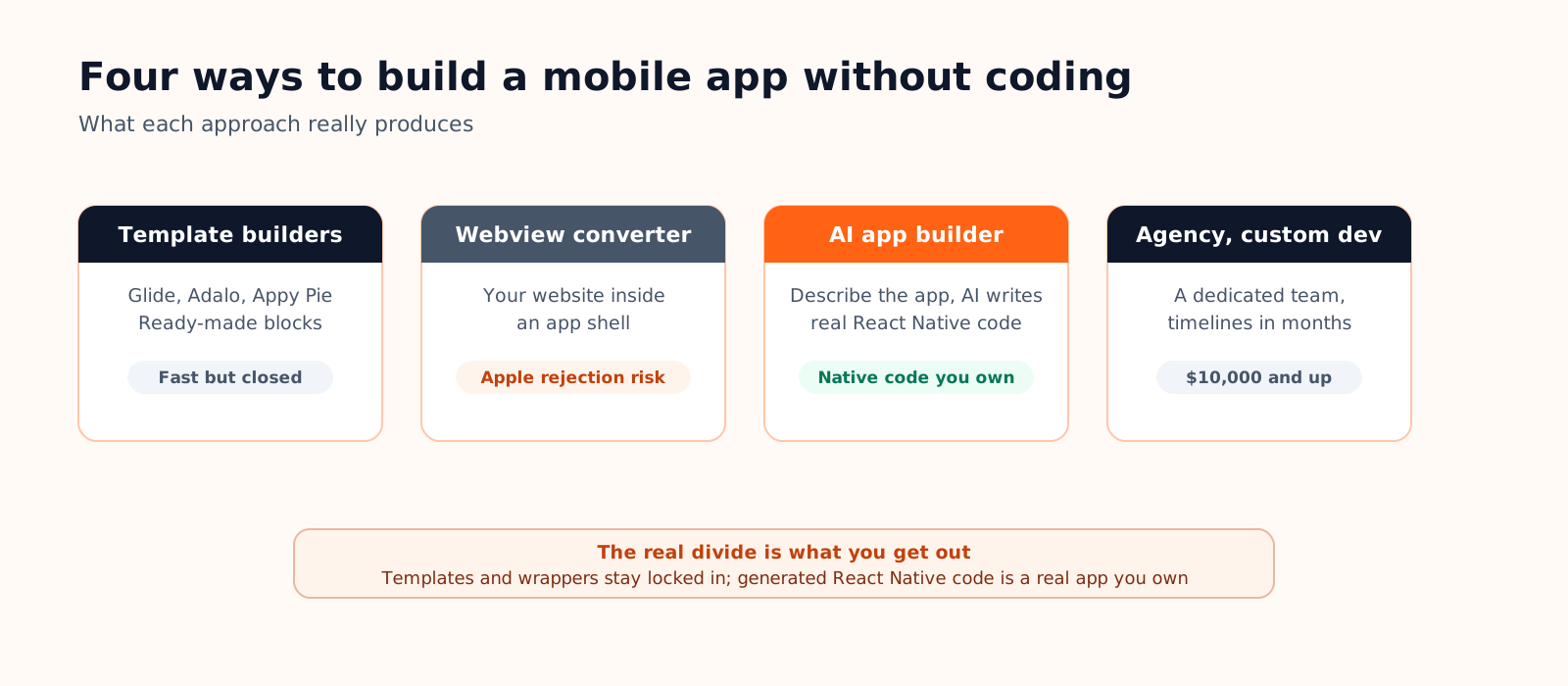
- No-code builders (Thunkable, Adalo, GoodBarber, Glide) assemble screens in a visual editor. Thunkable, Adalo and GoodBarber compile native iOS and Android apps for you; Glide produces a progressive web app that its own help center says cannot be published on the stores. In every case the app stays tied to the platform and its subscription, and you do not get the code.
- Web app builders plus a wrapper (Lovable, Base44, or any existing website) put your web application inside an app shell so it can be listed on a store. Fast and cheap, but it is a website with an icon: limited offline behavior and device access, and a real risk at Apple's review.
- AI app builders generating native code (Cadrant, Replit, Emergent, Newly, Rork) turn a description into a React Native and Expo project that you test on your phone with Expo Go and publish from your own developer accounts. The code is yours.
- Agencies and custom development remain the right answer for regulated products, heavy hardware integration or truly novel interfaces, at agency prices and agency timelines.
Which tools build a real native app, and which don't
The test is what runs on the phone once the app is installed: native components compiled for iOS and Android, or a browser view loading your web pages. Both can reach a store; only the first behaves like the apps people use daily and reliably passes review. Everything below comes from each tool's own documentation, as of September 2026.

| Tool | What you get on mobile | Preview and publishing | Cost model |
|---|---|---|---|
| Cadrant | Native React Native and Expo app, code you own | Expo Go on your phone; guided publishing to the App Store and Google Play from your own accounts | Free plan; flat plan at 20 dollars a month |
| Replit | Native React Native and Expo app, code you own | Expo Go on your phone; guided publishing to TestFlight and the App Store; Google Play manual for now | Subscription plus usage |
| Emergent | Native React Native and Expo app, code you own | Expo Go on your phone; App Store and Google Play through Expo's build service from your own accounts | Credits; Mobile Agent from the 20 dollar plan |
| Newly | Native React Native and Expo app, code you own | Expo Go on your phone; App Store and Google Play through Expo's build service from your own accounts | Free plan; paid plans |
| Rork | Native React Native and Expo app; SwiftUI, iOS only, on Rork Max | Expo Go on your phone; App Store from the editor, Google Play upload by hand | Free tier for public web projects only; 25 to 200 dollars and more a month |
| Thunkable | Native iOS and Android app built by the platform; no source code | Thunkable Live app on your phone; iOS sent to App Store Connect for you, Android delivered as an AAB you upload | Free plan; publishing from 37 dollars a month billed yearly |
| Lovable | Web application; no native binaries | Browser; stores only through a PWA or a wrapper you maintain | Credits |
| Base44 | Progressive web app | Browser; the platform packages the web app into store files | Credits |
What each native builder brings
Cadrant produces a native app, a web app or a website from the same kind of description, keeps the Supabase database in an account you own, and guides the path to both stores step by step with builds on your own Expo account. Pricing is a flat plan, not credits.
Replit added mobile apps to its agent in January 2026, on Expo: scan the QR code in Expo Go, then publish from the editor to TestFlight and the App Store. Its docs state that Google Play is not covered by a guided flow yet and is done manually.
Emergent reserves its Mobile Agent to paid plans, from 20 dollars a month, and generates a separate Expo app tested in Expo Go next to a Python backend. Its help center documents the store step as EAS commands run from the downloaded project, while its guides say it can build and submit through Expo's build service; either way it is Expo's tooling with your own developer accounts.
Newly is mobile only: Expo Go preview, then Expo's build service handles certificates, signing and submission to both stores from your accounts. You can download the React Native project or push it to GitHub.
Rork previews in Expo Go and publishes to the App Store from the editor, with the Play Console upload done by hand; code export through GitHub is on paid plans, and the free tier only covers public web projects. Rork Max, from 200 dollars a month, writes SwiftUI compiled on cloud Macs, for iOS only.
Thunkable is a visual editor with an AI builder rather than generated code: you preview in the Thunkable Live app, iOS builds are sent to App Store Connect on your behalf, and Android builds arrive as an AAB file you upload yourself. There is no source code export, and a published app needs an active subscription.
The web-only family
Lovable's own FAQ says it generates web applications and does not produce native iOS or Android binaries. The routes to a store are a PWA, a Capacitor project you maintain, or a wrapping service, so an App Store roadmap means rebuilding later. Our Lovable alternatives guide goes through the options.
Base44 apps are progressive web apps by design. The platform can generate the iOS and Android store files, with a check against store guidelines, but what ships is the web app in a container and guideline 4.2 applies in full. Good for an internal tool used in a browser; not a native app.
Which path for which project?
| Your situation | Best path | Why |
|---|---|---|
| Internal tool fed by a spreadsheet | No-code builder | Fastest to a usable result; lock-in matters less internally |
| An existing Lovable or Base44 web app that needs a store presence | Wrapper, carefully | Acceptable if the app adds real features; plan for guideline 4.2 |
| A product for clients or a startup MVP | AI builder generating native code | Native quality and code ownership without a dev team |
| Regulated domain, hardware, novel UX | Agency or developers | Custom problems need custom engineering |
Between the middle rows, the deciding factor is ownership: a no-code app cannot leave its platform, a wrapped website stays a website, generated React Native code can be exported and taken over by a developer later. For what native, webview and PWA mean concretely, see our guide to cross-platform mobile development.
Step by step, from idea to the stores
- Define the app in five screens or fewer. Who uses it, what is the one action that matters, what does each screen show? This half-hour of clarity improves everything downstream.
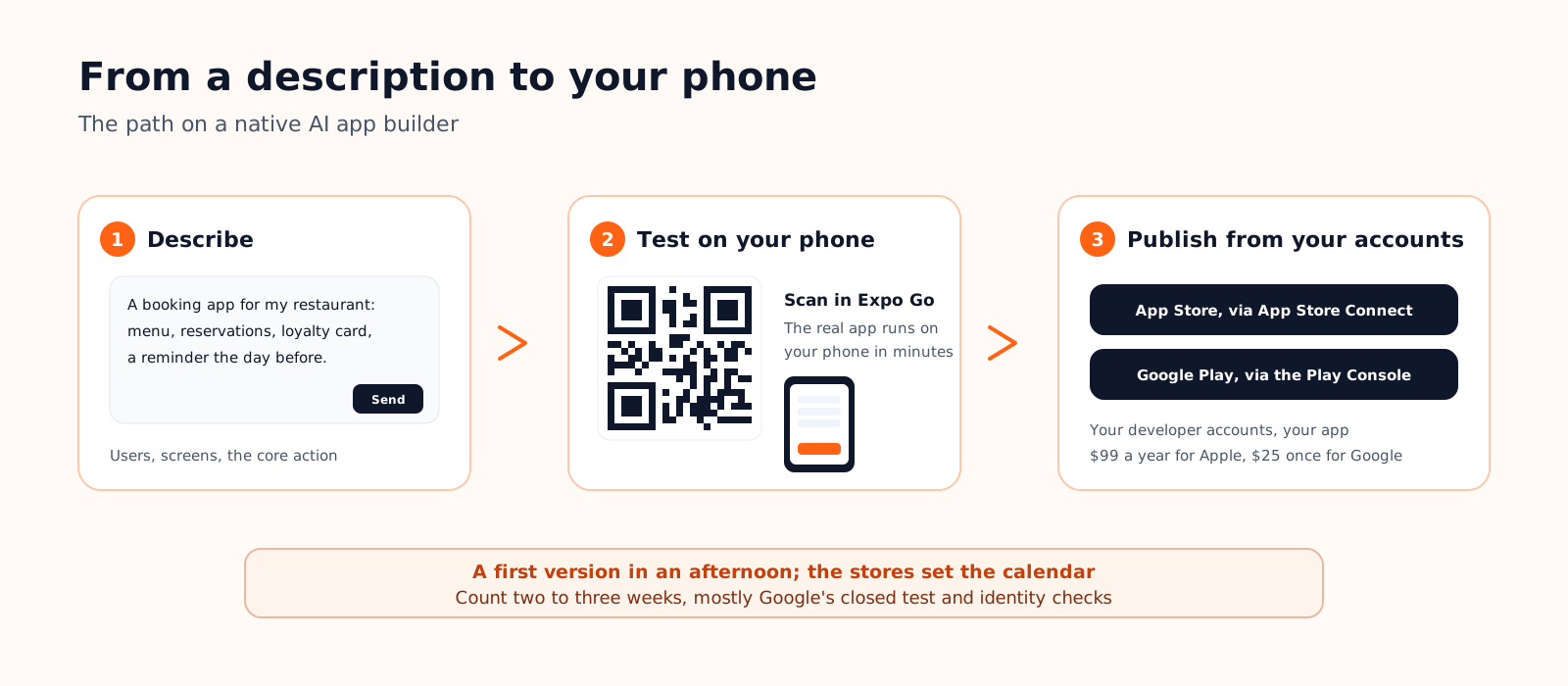
- Build the first version. On Cadrant, Replit, Emergent, Newly or Rork this is one detailed description: users, screens, the core action. Three screens that work beat fifteen that do not exist.
- Test on a real phone the same day. With Expo Go you scan a QR code and use the actual app on your phone within minutes. If a tool can only show you a browser tab, you have just learned which family it belongs to.
- Open the store accounts early. Apple's developer program costs $99 a year, Google's account $25 once. Both involve identity checks that take days, and Google's 12-tester rule for recent personal accounts adds two weeks of closed testing before production.
- Publish, then iterate. Submission has its own rules and testing tracks per store; our App Store and Google Play checklist covers it end to end.
What it costs
- No-code builders: GoodBarber lists 32 dollars a month for an Android app and 96 for iOS and Android together; Thunkable's publishing plans start at 37 dollars a month billed yearly. The subscription runs for as long as the app is live.
- Web app plus wrapper: the builder's credits, plus a wrapping service or the hours to maintain a Capacitor project. The hidden cost is a rejection at Apple's review and the rebuild that follows.
- AI builders generating native code: free plans exist everywhere but cover native mobile only at Cadrant and Newly; paid plans run 20 to 25 dollars a month. Builds often go through your own Expo account, free for 15 iOS and 15 Android builds a month.
- Agencies: from 10,000 dollars for a simple app to far beyond for a complex one, plus maintenance.
On every path you add the store fees, $99 a year for Apple and $25 once for Google, and optionally a domain and a Supabase plan. The full breakdown, agency quotes included, is in our guide to how much a mobile app costs.
Creating a mobile app without coding on Cadrant
Cadrant's mobile app builder sits in the native family: what you get is a genuine native app, not a wrapped website.

- Describe your app in plain language. The result is a React Native and Expo application with native screens and navigation.
- Test it on your phone immediately. Scan the QR code in Expo Go and every iteration is judged in the hand.
- Add real data when ready. The Supabase integration brings a database, accounts and roles, in an account you own.
- Publish guided, on your own accounts. The journey to the App Store and Google Play is step by step, builds run on your Expo account, and the signing keys are managed for the life of the app.
The short version
- Cadrant, Replit, Emergent, Newly and Rork generate a React Native and Expo app you own; Thunkable, Adalo and GoodBarber build a native app you rent; Lovable and Base44 build a web app and wrap it; Glide ships a PWA.
- The decisive criterion is what runs on the phone: native components, or a browser view showing your website. Apple's guideline 4.2 enforces the difference.
- Among native builders, the differences are in the last mile: Google Play still manual at Replit and Rork, a command line at Emergent, no code at Thunkable, credits versus a flat plan.
- Money-wise: 20 to 25 dollars a month on an AI builder plus $99 a year for Apple and $25 once for Google, versus 10,000 dollars and up at an agency.