Publishing an app on Google Play costs $25 once, with no annual subscription. Yet it is the journey that surprises people the most: since late 2023, a personal developer account can no longer push an app straight to production. It must first run the app in closed testing with 12 testers for 14 consecutive days, then apply for production access. Many first launches stall on this rule, not on the technology. Two companion guides go deeper: Google Play closed testing for that step, and what to do when Google Play rejects an app for the review.
The rest of the path is well tooled: the app bundle format, signing handled by Play App Signing, and progressive testing tracks that deliver a build to your testers in minutes, with no review. This guide follows the real order of operations, with the rules in force in 2026. If the app comes from a React Native app builder such as Cadrant, the build and the upload are guided, but every Google rule below still applies.
It covers Android only. iOS is a different path with its own dedicated guide: publish an app on the App Store. To compare both stores, our App Store and Google Play checklist puts the two journeys side by side.
The developer account and the 2026 rules
The account is created in Play Console, with a one-off $25 fee and an identity check that can take a few days. The choice between a personal and an organization account matters more than it looks:
| Personal account | Organization account | |
|---|---|---|
| Production access | After a closed test with 12 testers for 14 days (accounts created after 13 November 2023) | Direct, no tester requirement |
| Verification | Identity document | DUNS number and company checks |
| Publisher name shown | Your name | The company name |
How much does it cost to publish on Google Play?
Publishing on Google Play is close to free: the developer account costs $25 once, for life, and Google charges nothing per submission, per update or per app. A free app therefore costs $25 in total on Google's side, whatever the number of releases. The other items are optional or depend on your tooling.
| Item | Price | Note |
|---|---|---|
| Google Play developer account | $25 once | No renewal. An organization account needs a DUNS number, which is free but takes a few days. |
| Build and signing | $0 | Play App Signing manages the release key for free; a cloud build service such as EAS produces the app bundle on its free tier. |
| Testers for a personal account | $0 | The 12 testers over 14 days are people you invite, not a paid service. Budget time, not money. |
| Google commission | 0 to 30% | Only on digital goods sold through Google Play Billing: 15% on the first million dollars of yearly revenue, 30% beyond. |
| App Store, for comparison | $99 a year | Apple bills a yearly membership; see our guide on publishing on the App Store. |
Testing tracks and production access
Google Play is built around four tracks, from the most private to the most public. Each release climbs from one track to the next, and Google's review only happens at the production step.
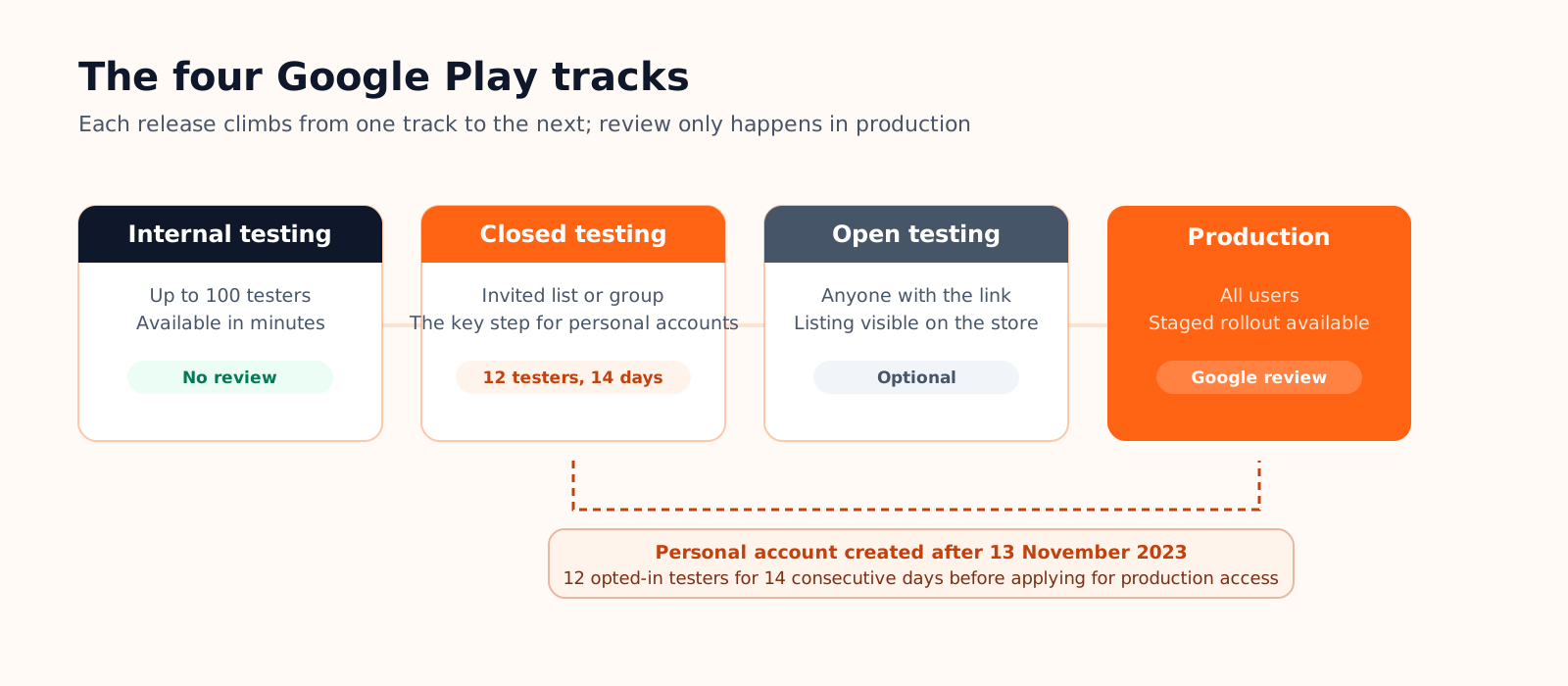
- Internal testing: up to 100 testers by email list, release available in minutes, no review. This is the everyday working track.
- Closed testing: a larger invited group, with a real install journey from the store. This is where the 12-tester requirement plays out.
- Open testing: anyone with the link can join and the listing becomes visible. Optional, useful for a public beta.
- Production: all users, with Google's review on the way in and staged rollout available.
The 12-tester gate
For a personal account created after 13 November 2023, Google requires a closed test with at least 12 opted-in testers for 14 consecutive days before opening production access. Opted-in means the tester accepted the invitation and installed the app under the matching Google account: an invitation without an install does not count. The threshold started at 20 testers and was lowered to 12 on 11 December 2024. The exact conditions are described in the official Google Play documentation.
Once the 14 days have passed, you fill in a short application about your app and your testing, and Google usually answers within 7 days. Recruit early: family, colleagues, developer communities that exchange testing slots. The clock only runs while 12 installs are active at the same time.
Step by step, from build to production
- Create the developer account. $25 once, identity verification, then access to Play Console to manage apps, testers and releases.
- Produce a signed app bundle. The expected format is the AAB, signed with an upload key. With Play App Signing, Google holds the final signing key: if your upload key is lost, it can be reset without losing the app.
- Create the app in Play Console. Display name and package name. The package name is permanent: it identifies your app forever.
- Publish a release to internal testing. Add your testers by email, roll out, and iterate: each new bundle carries a higher version code.
- Complete the listing obligations. Store listing, screenshots, privacy policy, the Data safety form, content rating and target audience. All of it is required before any public release.
- Promote to production. Closed testing first if your account is subject to it, then production. Google's review usually takes a few days, and staged rollout lets you limit the first wave to a percentage of users.
Your launch kit: checklist, ready-to-copy texts and calendar
The steps above tell you what to do. This section gives you what to tick and what to paste. Keep it open next to Play Console: every line matches a field Google checks before a release can leave review.
The pre-submission checklist
Each missing item blocks the release. Sizes and limits come from Google's store listing asset specifications and the Play Console help pages, checked in October 2026.
| Item | What Google expects | Where |
|---|---|---|
| ☐ App name | 30 characters max, no "best" or "#1" | Main store listing |
| ☐ Short description | 80 characters max | Main store listing |
| ☐ Full description | 4,000 characters max, no keyword lists | Main store listing |
| ☐ App icon | 512 × 512 px, 32-bit PNG, 1 MB max | Main store listing |
| ☐ Feature graphic | 1024 × 500 px, JPEG or 24-bit PNG without transparency | Main store listing |
| ☐ Phone screenshots | 2 to 8; 4 recommended at 1080 × 1920 px; long side at most twice the short side | Main store listing |
| ☐ Privacy policy | Public URL, required even if the app collects nothing | App content |
| ☐ Data safety form | Data collected and shared, SDKs included, plus the data deletion questions | App content |
| ☐ Content rating | IARC questionnaire, the rating is issued right away | App content |
| ☐ Target audience | Age groups; including under-13s brings in the Families policy | App content |
| ☐ Ads and app access | Declare ads; give test credentials if part of the app sits behind a login | App content |
| ☐ Account deletion | If users can create an account: an in-app path and a web link to delete it | App content |
| ☐ Target API level | API 36 (Android 16) for new apps and updates since 31 August 2026 | Your build |
| ☐ 12 testers, 14 days | Personal accounts created after 13 November 2023 only | Closed testing |
Ready-to-copy texts
Replace the brackets, keep the structure. The short description shows up under your name in search results: it carries the main benefit, not the app's name.
Day-by-day timeline
A realistic calendar when nothing is rejected. The gap between the two columns is the 12-tester rule.
| Day | Personal account | Organization account |
|---|---|---|
| Day 0 | Create the account, pay $25, start identity verification | Same, with the DUNS number already in hand |
| Days 1 to 3 | Build the AAB, create the app, ship to internal testing | Same |
| Days 3 to 5 | Store listing and App content; open closed testing, send the invitations | Store listing and App content, then submit to production |
| Day 5 | 12 testers opted in: the 14-day clock starts | Google review, usually a few days |
| Days 7 to 10 | Testing continues, fix what testers report | App live |
| Day 19 | Apply for production access | - |
| Days 19 to 26 | Google's answer, usually within 7 days | - |
| Days 26 to 30 | Production release, review, app live | - |
Each rejection adds a review cycle. If it happens, our guide on a Google Play rejection covers the reasons and the appeal.
Publishing to Google Play from Cadrant
If your app was built with Cadrant's mobile app builder, the build and delivery are guided, and both accounts stay yours: the build runs on your Expo account (15 Android builds a month on the free plan; how EAS Build quotas and prices work), and the app bundle lands in your Play Console. Since Google has no API to create an app, two actions remain on your side once in Play Console:
- Create the app with the provided package name: Cadrant gives you the package name to paste as is at creation time.
- Invite the service account: you add it under Users and permissions with the right to release to testing tracks, then Cadrant verifies the access without uploading anything.
- The upload key is managed for you: Cadrant generates the keystore that signs your builds and keeps it for the life of the app; Play App Signing keeps the final key on Google's side.
- Every publish lands in internal testing: the release arrives as a draft on the internal track, you roll it out to your testers and promote it when ready.
The short version
- $25 once, a signed app bundle, and a review that only happens at the production step.
- Recent personal account: start recruiting the 12 testers on day one, that is the real critical path.
- Data safety, content rating and the privacy policy can be filled in early: nothing forces you to wait for the end of development.