Mobile app prompt examples: 10 prompts to copy, by type of app
Ten complete prompts for a mobile app, one paragraph each, ready to paste into an AI app builder. Each names the tabs, what works offline, what triggers a notification and the format (native, PWA or WebView), with the follow-up prompts to send next.
Here are 10 mobile app prompt examples to copy into an AI app builder: four personal apps, three booking and marketplace apps, three apps for teams in the field. Each is one paragraph, ready to send as a first message. Replace the parts in [brackets] and keep the rest.
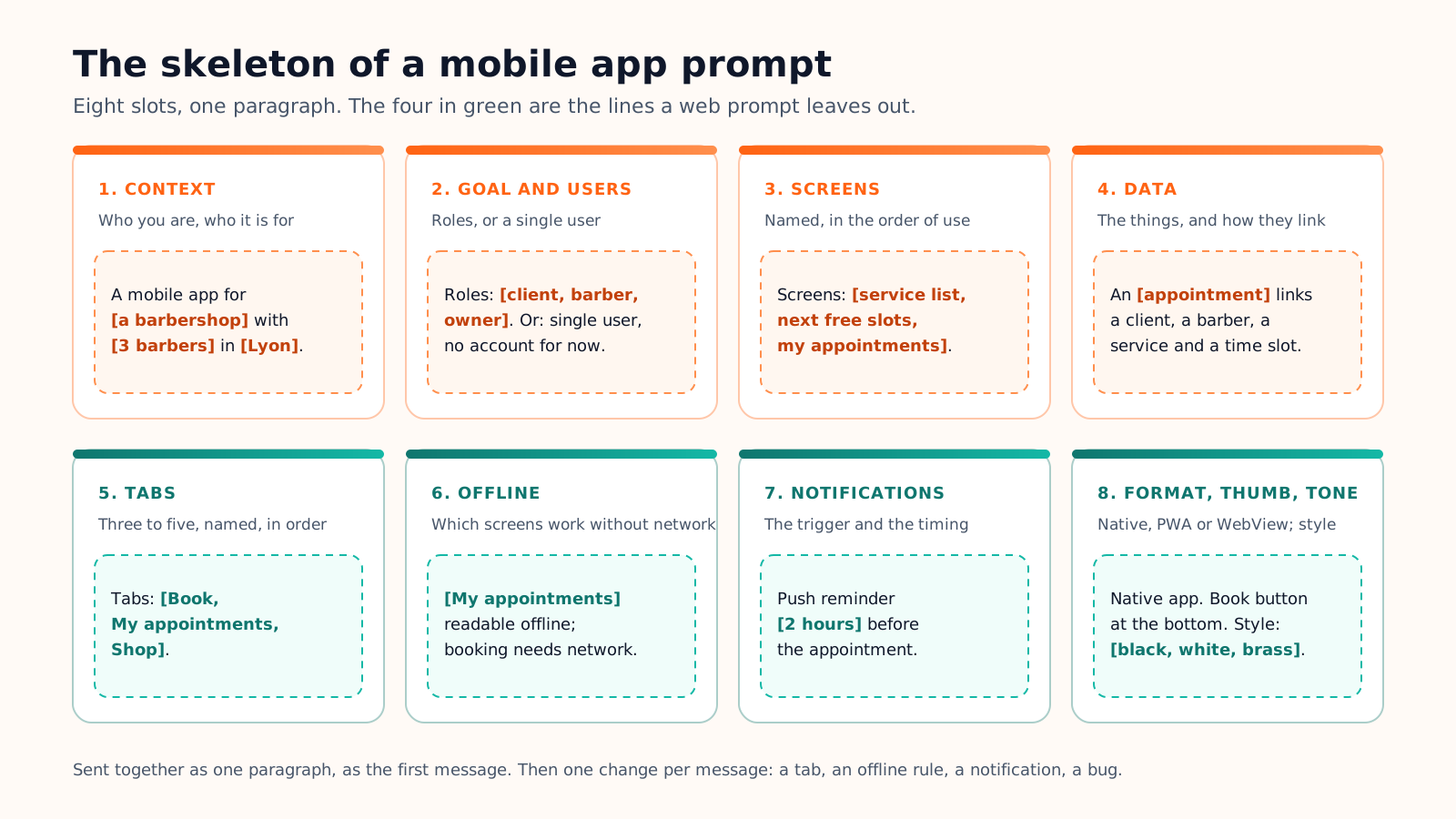
They follow the seven blocks (context, goal, users, screens, data, constraints, tone) of our app prompt examples, and add the four lines a phone needs: the tabs, what works offline, what triggers a notification, and where the main button sits. If you are building a website or a web app, that first library is the one to use; this page is for apps that live on a phone.
What a mobile prompt must say that a web prompt does not
A web app is a set of pages with roles and data. A mobile app is the same thing squeezed into a tab bar, used with one thumb, often without network, and allowed to interrupt its user. Four lines cover the difference:
Line
What to write
Why it matters
Tabs
Three to five, named, in order: "Tabs: Today, History, Settings"
Apple's guidelines and Material Design both stop at five destinations; a prompt without tabs gets a hamburger menu
Offline
Which screens work without network, and what syncs later
Basements, planes and the back of a shop; the AI otherwise assumes a permanent connection
Notifications
The trigger and the timing: "push reminder 2 hours before"
A notification without a rule becomes a notification for everything
Thumb zone
Where the main button sits: "pinned at the bottom of the screen"
The top corners of a phone are the hardest place to reach with one hand
On the number of tabs, the two platform guides agree. Apple's Human Interface Guidelines ask for the minimum number of tabs and cap an iPhone tab bar at five; Google's Material Design guidance gives a navigation bar three to five destinations. Write the names and the AI will build the screens behind them.
Eight slots, one paragraph. The last four are the ones a web prompt leaves out.
Native, PWA or WebView: say which one
The format decides what the AI generates, so it belongs in the first sentence. Three cases cover most projects:
Your case
Format to ask for
The sentence for the prompt
Camera, push notifications, offline use, a store listing
Native app (Expo / React Native)
"Native app for iOS and Android."
A link to share, no store, works on any phone
Installable PWA
"Installable PWA, no store listing."
A web app that already exists and must reach the stores
WebView shell
"WebView app wrapping [the web app] for the App Store and Google Play."
Personal app prompts
A personal app has one user and no roles, so the prompt spends its words on the daily entry, the overview screen and the reminder. Say whether an account exists at all: "single user, no account" is a legitimate first version.
Workout log
Fitness · Native
Create a native mobile app for iOS and Android for [people who lift weights three times a week]. Single user, no account for now. Tabs: Today, History, Exercises, Settings. Screens: today's session (pick a routine, log each set with weight and reps in two taps, rest timer), history as a calendar, exercise detail with a chart of the best set per week, routine editor. Data: a routine has many exercises; a session has many sets, each with an exercise, a weight and reps. Constraints: works fully offline, large plus and minus buttons at the bottom of the screen within thumb reach, optional reminder on training days, weights in [kg]. Energetic but plain style: dark background, lime accent, big numbers.
Meal planner with a grocery list
Food · Native
Create a mobile app for [a family of four] that plans the week's dinners and builds the grocery list. One household account shared by [two adults]. Tabs: Week, Recipes, Groceries. Screens: weekly plan (one dinner per day, drag to swap), recipe detail with servings scaling, add a recipe (photo, ingredients, steps), grocery list grouped by aisle with check-off. Data: a recipe has many ingredients with a quantity and a unit; a plan has seven slots; the list is generated from the plan and can be edited by hand. Constraints: the list works offline in the store, an item checked by one person disappears for the other, a notification on [Saturday at 10 am] to plan next week. Appetising style: cream, tomato red, rounded photos.
Language flashcards
Education · Native
Create a mobile app to learn [Spanish vocabulary] with flashcards. Single user with an account, to sync between phone and tablet. Tabs: Review, Decks, Stats. Screens: review session (card front, tap to flip, four buttons: again, hard, good, easy), deck list with the cards due today, card editor (word, translation, example sentence), stats with the daily streak and retention. Data: a deck has many cards; a card has review records with a date and a result; the next review date follows a spaced repetition schedule. Constraints: review works offline and syncs later, a daily reminder at the time the user chooses, the four answer buttons fixed at the bottom of the screen. Focused style: white, deep blue, one serif typeface for the words.
Plant identifier and care reminders
AI tool · Native
Create a mobile app for [apartment gardeners] that identifies a plant from a photo and schedules its care. Single user, optional account. Tabs: My plants, Identify, Calendar. Screens: camera or gallery capture, AI result (species, confidence, care sheet) that the user confirms or corrects, plant detail with watering and feeding schedule, calendar of upcoming tasks. AI step: the photo goes to a plant identification model; the app shows the top three matches and never saves a plant without the user's confirmation. Data: a plant has a species, a spot in the home and many care tasks with a due date and a done date. Constraints: a notification the morning a task is due, camera permission asked only when the Identify tab opens, calendar readable offline. Fresh style: white, leaf green, soft shadows.
Booking and marketplace prompts
Two sides, a request with a status, and a notification for each change of status: that is the whole model. Name the roles and the statuses, and say which side gets which tabs.
Barbershop booking
Booking · Local services
Create a native mobile app for [a barbershop with three barbers] in [Lyon]. Roles: client, barber, owner. Tabs for clients: Book, My appointments, Shop. Screens: service list with duration and price, barber choice with the next free slots, confirmation, my appointments with cancel, the barber's day view, the owner's schedule editor. Data: a service has a duration; a barber has working hours and many appointments; an appointment links a client, a barber, a service and a time slot, with a status (booked, done, no-show, cancelled). Constraints: push reminder [2 hours] before, free cancellation until [the day before], the Book button pinned at the bottom of the screen, no online payment yet. Sharp style: black, white, one brass accent.
Tool-lending marketplace
Marketplace · Community
Create a mobile app where [neighbours in one district] lend tools to each other. Roles: member, moderator. Tabs: Browse, Lend, Requests, Messages, Profile. Screens: tool search as a list and a map, tool detail with photos, deposit and availability, borrow request with dates, request inbox for the lender (accept, decline), chat, my tools. Data: a tool belongs to a member and has many availability periods; a loan links a borrower, a tool and dates, with a status (requested, accepted, picked up, returned). Constraints: identity checked by a moderator before a first loan, location asked only when the map opens, push notification for every request and reply, photos compressed before upload. Friendly style: off-white, forest green, hand-drawn icons.
Tickets for a local venue
Ticketing · Events
Create a mobile app for [a 300-seat music venue] that sells tickets and scans them at the door. Roles: customer, door staff, manager. Tabs for customers: Events, My tickets, Account. Screens: upcoming events, event detail with ticket types, checkout, ticket with a QR code, door scanner (camera, green or red result, count of people admitted), the manager's sales dashboard. Data: an event has ticket types with a price and a quantity; an order has many tickets; a ticket has a unique code and a scanned-at time. Constraints: tickets readable offline, the scanner works without network and syncs later, a reminder notification the morning of the event, payment through [Stripe] in a web checkout. Night-time style: near-black, white, electric violet.
Prompts for teams and field work
An app for a team is an internal tool in a pocket: the office plans, the field executes, and the two must agree without network. The data sentence and the offline line do most of the work here.
Restaurant shifts
Internal tool · Hospitality
Create a mobile app for [a 25-person restaurant team] to manage shifts. Roles: manager, employee. Tabs: My week, Team, Requests, Profile. Screens: my shifts by day, open shifts to claim, swap request (pick a shift, pick a colleague), the manager's weekly planner as a drag-and-drop grid, time-off requests. Data: an employee has a position (kitchen, floor, bar) and many shifts; a shift has a date, hours and a position; a swap links two shifts and has a status. Constraints: push notification when a shift is published, changed or swapped, the week readable offline, confirm buttons at the bottom of the screen, manager actions hidden from employees. Clean style: white, slate, one amber accent.
Delivery driver route
Logistics · Field
Create a mobile app for the [12 drivers of a bakery delivery service]; the office plans the routes. Roles: driver, dispatcher. Tabs for drivers: Route, Deliveries, Profile. Screens: today's stops in order with one-tap navigation to Maps, stop detail (customer, items, notes), proof of delivery (photo, signature, or the reason for a failure), end-of-day summary. Data: a route belongs to a driver and a date and has many stops; a stop has a customer, items and a status (pending, delivered, failed). Constraints: works offline between stops and syncs when back online, GPS used only while a route is active, push notification when the dispatcher changes a stop, big buttons usable with one hand in a van. Practical style: white, navy, high contrast.
Parent and teacher app for a school
Community · Education
Create a mobile app for [a primary school with 12 classes] to connect teachers and parents. Roles: teacher, parent, school admin. Tabs for parents: Feed, Messages, Calendar, My child. Screens: class feed with photos and short posts, direct message with the teacher, calendar of events and homework, absence form, the admin's broadcast to all classes. Data: a class has one teacher and many pupils; a pupil has one or two parents; a post belongs to a class; a message belongs to a thread between a parent and a teacher. Constraints: sign-up by invitation code only, push notification for messages and urgent broadcasts only, posts readable offline, no comments on posts. Reassuring style: white, soft blue, round avatars.
Follow-up prompts for a mobile app
The first prompt builds the skeleton and you test it on your phone. Every later message should change one thing: a tab, an offline rule, a notification, a bug. Say what to build, where it goes, and what must stay untouched.
When
Follow-up prompt to adapt
Add a tab
Add a [Stats] tab as the third tab, showing [weekly totals]. Keep the other tabs and their order.
Make a screen work offline
Make [today's stops] readable and editable without network; queue the changes and sync when back online. Do not change the layout.
Change a notification rule
Send the [shift published] notification only between 8 am and 8 pm, and never more than one per hour. Other notifications unchanged.
Fix a bug
On [the review screen], the Easy button does not move the card to a later date. Expected: next review in [4 days]. Fix only this.
On Cadrant's mobile app builder, the format line in your prompt is a real choice: a native Expo and React Native app, an installable PWA, or a WebView shell around a web app. You open the result on your own phone with Expo Go, iterate in conversation, then publish from your own developer accounts; our guide on how to publish an app on Google Play covers that last step. The prompt is the same whatever the tool: eight slots, one paragraph, and the brackets filled with your project.
Mobile App Prompt Examples: 10 Prompts to Build an App | Cadrant