Cross-platform mobile development means writing one codebase that runs on iOS and Android, and often on the web as well, instead of one app in Swift for iPhone and another in Kotlin for Android. In 2026 it is no longer a compromise reserved for prototypes: the two most used frameworks, Flutter and React Native, power apps from Google, Meta, Microsoft and Shopify, and a third approach, Kotlin Multiplatform, is now stable enough that Google recommends it to Android teams.
The real question has moved. It is no longer "cross-platform or native?" but "which kind of cross-platform, for which team?". The four families draw the screen in four different ways, and that single fact decides the look, the performance, the hiring pool and the maintenance you sign up for. This guide lays them out, with numbers where numbers exist, then gives you a decision path.
What cross-platform means in 2026
The most reliable adoption data comes from the Stack Overflow Developer Survey, which asks about 45,000 developers which frameworks they used in the past year. Mobile frameworks are a small slice of all developers, but the ranking inside that slice is stable.
| Framework | Share of all respondents | Language | Backed by |
|---|---|---|---|
| Flutter | 9.4% | Dart | |
| React Native | 8.4% | JavaScript / TypeScript | Meta, with Expo as the recommended framework |
| .NET MAUI | 3.1% | C# | Microsoft |
| Ionic | 2.5% | Web technologies | Ionic (OutSystems) |
| Capacitor | 1.8% | Web technologies | Ionic (OutSystems) |
Kotlin Multiplatform is not in that list, because the survey did not offer it as an option. It matters anyway: JetBrains shipped Compose Multiplatform 1.8 in May 2025, which made its shared UI for iOS stable, and Google has endorsed the approach for sharing business logic between Android and iOS.
Three things have changed since the last time you may have looked. React Native removed its old asynchronous bridge with the New Architecture, which became the default for the whole ecosystem with version 0.85 in April 2026. Flutter replaced its rendering engine with Impeller. And the wrapped-web approach split in two: progressive web apps that skip the stores entirely, and shells like Capacitor that put a web app in a store listing. If your shortlist is already down to the two leaders, our React Native vs Flutter head-to-head goes deeper on that specific choice.
To remember
Cross-platform no longer means giving up on look and feel. It means choosing where the sharing stops: the whole UI, the business logic only, or a web page in a native shell. Every framework is a point on that line.
Four families, four ways to draw a pixel
The names hide the important difference, which is what your code becomes on the device.
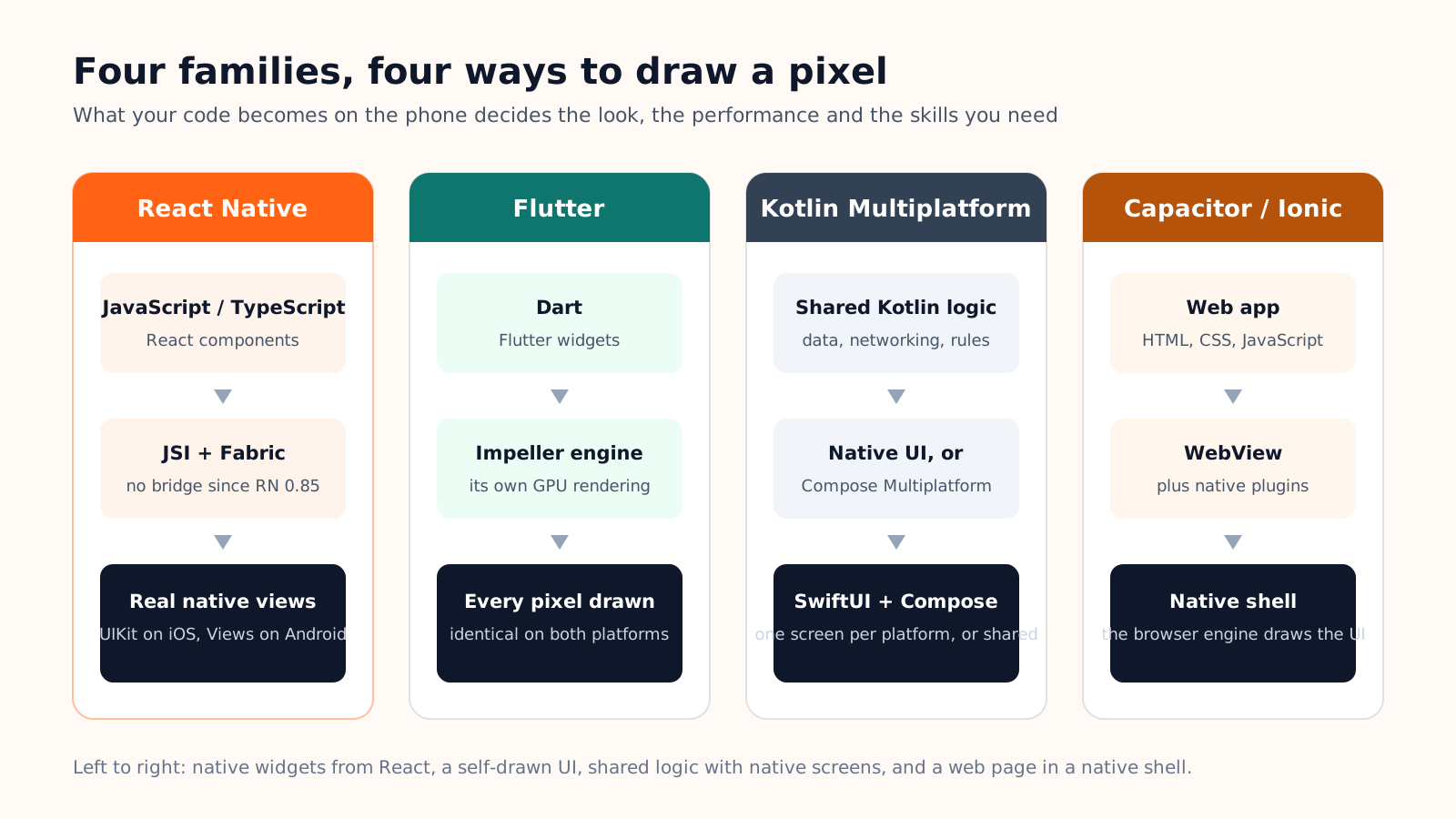
React Native, with Expo
Your React components become real native views: a UIKit control on iOS, an Android View on Android. The app looks and behaves like the platform because it is using the platform. The talent pool is the largest of the four, since any JavaScript or TypeScript developer can contribute, and the React Native team itself now recommends starting with the Expo framework, which adds navigation, a standard library of device APIs and cloud builds. We explain that layer in What is Expo?.
Flutter
Flutter takes the opposite bet. It does not use native widgets at all: its Impeller engine draws every pixel itself, so the app looks identical on both platforms and a custom design is cheap to build. The price is Dart, a language your team probably has to learn, and a UI that follows platform conventions only as far as Flutter's widget library imitates them. Google reported more than one million apps shipped with Flutter as early as 2023.
Kotlin Multiplatform
KMP shares the parts users never see: networking, data models, business rules, written once in Kotlin and compiled for both platforms. The screens stay native (SwiftUI on iOS, Jetpack Compose on Android), or they can be shared too with Compose Multiplatform, stable on iOS since Compose Multiplatform 1.8. It is the natural path for a company that already has Android developers and wants an iOS app without a second logic layer.
Capacitor and Ionic: the web in a shell
Your existing web app runs inside a WebView, and plugins expose the camera, notifications or the file system to it. It is the fastest route from a website to a store listing, and the weakest on feel: scrolling, gestures and transitions are the browser's, not the platform's. Apple also rejects apps that are "essentially a wrapped website" with no native value, so the shell has to earn its place with real device features.
| React Native + Expo | Flutter | Kotlin Multiplatform | Capacitor / Ionic | |
|---|---|---|---|---|
| UI | Native widgets | Self-drawn, identical everywhere | Native, or shared with Compose | Web page in a WebView |
| What is shared | Almost everything | Everything | Logic first, UI optional | Everything, including the web |
| Performance profile | Native for UI, JS for logic | Compiled, smooth animations | Native | Browser-bound |
| Hiring | Web and JS developers | Dart developers, smaller pool | Kotlin / Android developers | Any web developer |
| Best for | Product apps, teams from the web | Design-heavy, animation-heavy apps | Existing Android teams | Existing web apps that need a store listing |
The trade-offs that actually decide it
Cost: one team, but the platform tax stays
The saving is real and it is mostly organisational: one team, one backlog, one release instead of two that drift apart. What cross-platform does not remove is everything the platforms charge on their side. You still need an Apple Developer Program membership, a Google Play Console account, a Mac somewhere to sign iOS builds (yours or a cloud one), and you still go through both store reviews with the same rules as a native app.
The platform tax you cannot skip
99 USD a year for Apple, 25 USD once for Google, a macOS build machine or a cloud build service for iOS, and a review cycle on each store. Whatever framework you pick, budget these before the first line of code. Our checklist for publishing on the App Store and Google Play walks through every one of them.
Performance: fine for products, native for extremes
For the overwhelming majority of apps, forms, lists, maps, chat, payments, camera and notifications, all four families are fast enough that users cannot tell. Native still wins at the extremes: 3D and augmented reality, real-time audio and video processing, home-screen widgets and deep operating-system integrations, and games. If your product is one of those, the decision is made for you.
Maintenance: the yearly upgrade nobody plans for
Every September, Apple and Google ship new operating systems, and every framework ships upgrades to follow. Expo publishes three SDK versions a year, Flutter releases quarterly, Kotlin Multiplatform follows the Kotlin cadence, and a wrapped web app upgrades with the web. None of it is hard if you keep up; all of it is painful if you let two years pass. Put one upgrade per quarter in the roadmap and the cost stays small.
How to choose: a decision guide
Start from the team you have, not from benchmarks. The framework a team can staff and maintain beats the framework that wins a synthetic test.
Your team writes JavaScript
React Native with Expo. Your web developers are productive on day one, the UI is truly native, and Expo handles builds and store submission from the cloud.
You have Android developers
Kotlin Multiplatform. Share the logic you already wrote, keep native screens, and add Compose Multiplatform for shared UI when it fits.
Design and animation come first
Flutter. A custom, pixel-identical interface on both platforms, at the cost of learning Dart and living slightly outside platform conventions.
You already have a web app
A progressive web app if you can live without a store listing, Capacitor if you need one. Add real device features so the store review has something to approve.
Then run a short checklist before committing:
- 1. List the device features you need. Camera, push notifications, background location, Bluetooth, payments. Check that each has a maintained module in the framework you are considering.
- 2. Count the people who will maintain it. One person can keep an Expo app alive; a KMP setup with native screens needs at least one iOS and one Android hand.
- 3. Estimate the lifetime. A three-month campaign app and a five-year product do not deserve the same architecture.
- 4. Prototype in a week. Build the two hardest screens in your top candidate and put them on a real phone. Most doubts disappear at that point.
- 5. Plan the release pipeline. Signing, cloud builds, TestFlight and internal testing tracks. Decide it now, not the week of launch.
And if you have no mobile team at all
The most common case for a founder or a small business is not "which framework?" but "who is going to write this?". An AI app builder answers that question with a real cross-platform stack instead of a template. On Cadrant, a native mobile project is an Expo and React Native application: you describe the app in plain language, preview it in a phone frame, test it on your own device with Expo Go, then publish to the App Store through your own Expo and Apple accounts. If a store listing is not needed, the same builder ships a progressive web app or a WebView app instead. The mobile app builder page details the three options.
Practical tip
Whatever you choose, ship to a real phone in the first week. Simulators hide the three things that decide whether users keep an app: touch latency, scroll feel and battery use. A framework that feels right on a two-year-old Android phone will feel right everywhere.
Cross-platform in 2026 is a family of mature choices, not a shortcut. Pick the one your team can own, budget the platform costs that no framework removes, and put the yearly upgrade on the calendar. The rest is building the product.