Creating an app with AI no longer means asking a chatbot for code snippets and figuring out the rest yourself. In 2026, you describe the app you want in plain language and an AI app builder produces a working product: screens, navigation, a database, user accounts. Something you can open in a browser, install on a phone and put in front of real users the same week.
That promise is real, but it comes with conditions. Some projects fit this way of building perfectly, others still call for a developer, and the difference is knowing which is which before you spend a month finding out. This guide walks the actual journey in five steps, helps you pick a tool, gives honest numbers on cost, and lists the failure modes nobody puts on a landing page.
One scoping note before starting: this guide is about apps, meaning products with screens, data and logged-in users. If what you need is a showcase site or a blog, that is a shorter journey covered in our guide to creating a website with AI. And if your project is specifically a native mobile app, the dedicated guide on creating a mobile app without coding compares every path in detail.
What AI can actually build today
The sweet spot of AI app builders is the classic business application: a booking system, a client portal, a custom CRM, an internal dashboard, a marketplace MVP, a SaaS prototype. These apps are made of forms, lists, detail pages, roles and notifications, exactly the patterns AI has seen millions of times. Add a database and authentication, which good builders wire through Supabase, and you get a product that stores real data for real users.
Mobile is no longer the exception. The current generation of builders generates genuine React Native code with Expo, so the same description can become an installable iOS and Android app rather than a website squeezed into a phone frame.
Where AI still struggles: heavy proprietary algorithms, integrations with obscure internal systems, real-time 3D or games, and pixel-perfect reproduction of an existing design. If your project's core value is one of those, budget for a developer at least for that part.
The five steps, from prompt to published app
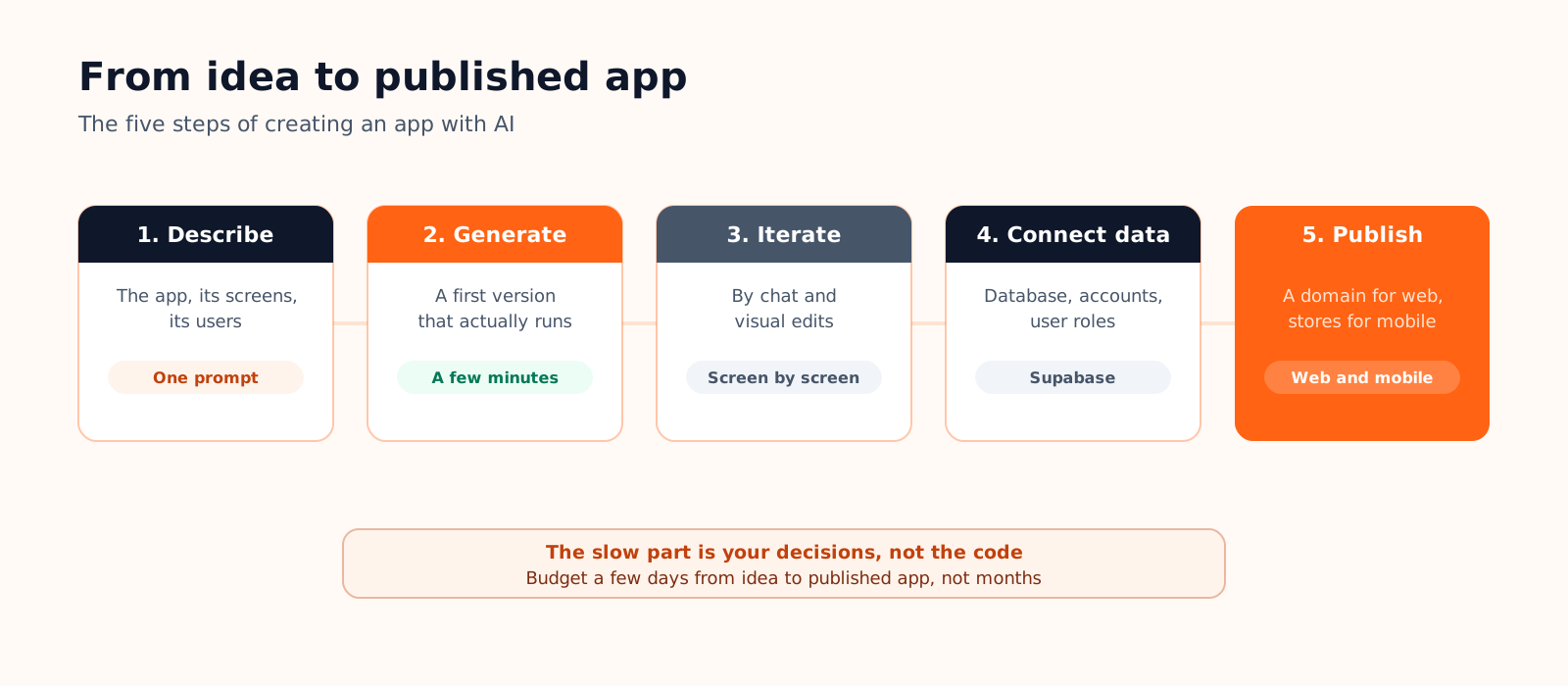
- Describe the app. Say what it does, who uses it and what the three to five key screens are. Skip the technology entirely: "a booking app for my tennis club, members reserve courts, an admin blocks time slots, everyone gets email confirmations" is a better prompt than any technical spec.
- Generate the first version. A few minutes later you have an app that runs. Judge the structure, not the details: are the screens right, is the navigation logical? Wrong colors and placeholder text are normal at this stage.
- Iterate. Ask for one change at a time, screen by screen, in the same conversation. For wording, spacing or a button label, a visual editor is faster than a prompt: click the element and type.
- Connect real data. This is the step that turns a demo into an app: a database for your records, sign-up and login for your users, roles so the admin sees more than the member. Builders that integrate Supabase handle this from the same conversation.
- Publish. A web app goes live on your domain in minutes. A mobile app goes through the App Store and Google Play, which add their own fees and review rules; that journey is longer and worth reading about before you start.
Which AI tool should you use?
Three families of tools all claim to create apps with AI, and they suit very different people:
| AI app builder | AI coding IDE | General chatbot | |
|---|---|---|---|
| Made for | Founders, teams, freelancers without a dev background | Developers who want AI speed with full control | Learning, one-off scripts, quick answers |
| You get | A hosted, running app after every prompt | Code in your own project and stack | Code snippets to assemble yourself |
| You still handle | Describing clearly what you want | Architecture, hosting, deployment, debugging | Everything except typing the code |
If you do not code, the choice narrows to the first column, and the real question becomes which builder: they differ on mobile support, database integration, code ownership and pricing. Our comparison of the best AI app builders puts the main options side by side.
Can you create an app with AI for free?
Yes, up to a meaningful point. Most builders offer a free plan that covers the part you should test anyway: describing your app, generating the first version and iterating enough to know whether the tool understands you. On Cadrant, the free plan includes 10 free credits at signup, enough to generate a first version before paying anything.
The paid line usually sits at publication: custom domains, higher usage and store publishing live in paid plans, around 20 euros per month. Beyond subscriptions, a complete budget has a few more lines, from store developer accounts to a domain name; we detail all of them in how much an AI app really costs.
Where AI still fails, and how to avoid it
- A vague prompt produces a generic app. "An app for my business" yields a template. Name your users, your screens and the one action that matters, and the output changes completely.
- Big-bang requests break things. Asking for seven features in one message is how projects get tangled. Sequence your requests and keep each one testable.
- Design cloning disappoints. AI gets you a clean, coherent interface fast; reproducing an exact existing design pixel for pixel is still a manual craft.
- Rare integrations stall. Stripe or Google Maps are well-trodden; your industry's niche ERP is not. Check the tricky integration early, not in week three.
Most of these come down to how you write requests. It is a skill that takes an hour to learn and pays for itself immediately; the prompting tips documentation is a good place to pick it up.
Creating an app with AI on Cadrant
Cadrant's AI app builder follows the five steps above with one distinctive choice: the same conversation can produce a web app or a genuine native mobile app, built on React Native and Expo, from the same kind of description.
- Describe, get a running app. Your first prompt returns a working product with a live preview, not a mockup.
- Edit visually. Click any text, button or image in the preview and change it directly; keep the conversation for structural changes.
- Plug in real data. Supabase integration adds a database, sign-up, login and roles from the chat, without leaving the editor.
- Publish where your users are. Web apps go live on your domain; mobile apps follow a guided journey to the App Store and Google Play, with builds running on your own Expo account.
The short version
- AI app builders produce working apps with screens, data and accounts, on web and on mobile; chatbots produce code you still have to turn into an app.
- The journey is five steps: describe, generate, iterate, connect data, publish. The first working version takes minutes, a publishable app takes days.
- The free plan is where you validate the tool; publishing is what you pay for, around 20 euros per month plus store fees for mobile.
- Precision in, quality out: specific prompts, one change at a time, and check your riskiest integration first.