To build an internal tool in 2026 you have four paths: configure an off-the-shelf SaaS, assemble it in a low-code platform, commission custom development, or generate it with an AI app builder. The path matters less than what you decide before opening any of them: which process the tool covers, what data it records, and who is allowed to see what. Teams that settle those three points ship a working tool in days. Teams that skip them rebuild the same spreadsheet with a nicer interface.
The question is no longer reserved for engineering departments. In Retool's 2026 Build vs Buy report, a survey of 817 builders, 35% had already replaced at least one SaaS product with a tool they built themselves, and 78% expected to build more this year. This guide answers the questions that come up on the way: what counts as an internal tool, when a spreadsheet should become one, which path fits which team, and how to go from a process to a tool your colleagues actually use.
What is an internal tool? Examples by team
An internal tool is software a company builds or configures for its own staff instead of its customers: the back-office behind the website, the screen where support issues a refund, the tracker operations opens every morning. It has few users, often five to two hundred, but those users spend hours in it, and it encodes rules that exist nowhere else: who approves a discount, when an order counts as late, which fields are mandatory before a file moves on.
Most of them start the same way: as a spreadsheet, a shared inbox or a paper form that somebody finally gets tired of.

| Internal tool | What it replaces | Who uses it | A sensible first version |
|---|---|---|---|
| Admin panel or back-office | Direct edits in the database, requests to developers | Support, operations | Search, view and correct customer records |
| Custom CRM or sales pipeline | A shared sheet plus email threads | Sales, account managers | Contacts, deals, stages, next action |
| Approval workflow | Email chains and signed PDFs | Managers, finance | Request form, approve or reject, history |
| Inventory or stock tracker | A sheet only one person understands | Warehouse, purchasing | Items, movements, low-stock alerts |
| Operations dashboard | Monday's copy-paste report | Team leads, management | Five figures that update by themselves |
| Field or intervention tracker | Paper forms, photos in a group chat | Technicians, dispatch | Jobs, status, photos, signatures |
| Client or partner portal | Status emails and shared folders | Customers, suppliers | Login, their own records, documents |
The same survey shows where companies start. Among teams that replaced a SaaS product, the categories most often rebuilt in-house were workflow automations (35%), internal admin tools (33%), BI dashboards (29%), and CRMs and form builders (25%). The CRM case is common enough that we cover it separately in our guide to building a custom CRM.
When should a spreadsheet become an internal tool?
Spreadsheets are the most successful internal tool ever shipped, and nothing here argues for retiring all of them. The trouble starts when a file quietly becomes a system of record. Ray Panko's spreadsheet error research at the University of Hawaii, which compiles field audits of operational spreadsheets, found that 88% of the 113 spreadsheets audited since 1995 contained errors. The error rate per cell is low. The problem is that a large file multiplies it, and nothing in a spreadsheet catches a wrong value before someone acts on it.
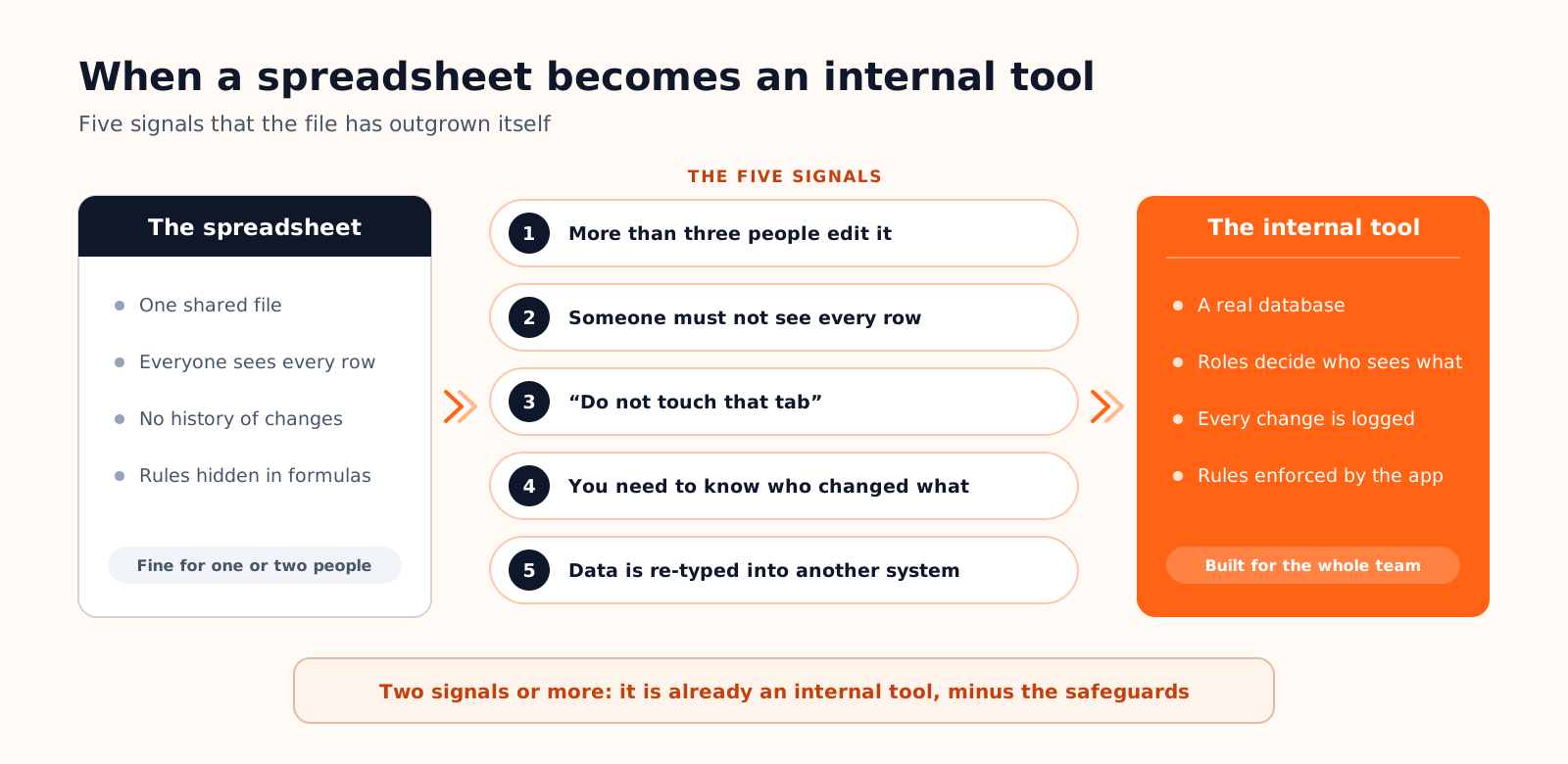
Five signals tell you the file has outgrown itself. More than three people edit it, so versions and overwritten cells appear. Someone should not see every row, a salary column or another region's customers, and the only protection is a hidden tab. One tab carries formulas nobody dares to touch. You need to know who changed a value and when, and the file cannot say. Or the data gets typed again into another system, because nothing connects the two. One signal is a nuisance. Two or more mean the spreadsheet is already acting as an internal tool, minus the safeguards. When that is the case, our guide on how to turn a spreadsheet into an app covers the migration step by step.
Build, buy or generate: four ways to get an internal tool
Build versus buy used to be a two-way decision. Low-code platforms made it three-way a decade ago, and AI app builders added a fourth path, where you describe the tool and receive a working application. Here is how the four compare for a typical tool with 20 to 50 users.
| Path | First version | Typical cost | Who builds it | What you own | Best for |
|---|---|---|---|---|---|
| Off-the-shelf SaaS, configured | Days | Per-seat subscription, often $10 to $50 per user a month | An admin in the team | A data export, not the tool | Standard processes: payroll, helpdesk, accounting |
| Low-code platform (Retool, Appsmith, Budibase, Softr) | Days to weeks | Per builder and per end user, every month | A developer or a technical operations person | Your database; the app lives on the platform | Screens on top of data you already have |
| Custom development | 4 to 12 weeks for a focused tool | Five figures upfront, then roughly 15 to 20% a year in maintenance | Developers, in-house or agency | Everything, maintenance included | Tools that are a competitive advantage |
| AI app builder | Hours to days | A flat plan from about $20 a month, metered in credits, not seats | The person who knows the process | Source code and database, if the tool exports both | Bespoke tools when no developer is available |
The per-seat maths
Internal tools have an awkward property for pricing: many occasional users. On Retool's public price list in September 2026, the Team plan costs $10 per builder and $5 per internal user a month on annual billing, and audit logging with granular permission controls starts on the Business plan, at $50 per builder and $15 per internal user. For two builders and forty colleagues, that is $220 a month on Team and $700 on Business. Airtable's Team plan is $20 per editor a month, and we compare the Airtable alternatives that avoid that model in a separate guide. None of this is unreasonable for what these products do, but it means the cost of a tool grows with its adoption, which is the opposite of what you want from something meant to reach the whole company.
What AI changed, and what it did not
AI collapsed the upfront cost of a first version. It did not touch the tail: someone still has to own the tool, fix it when a process changes, and answer for the data inside it. The Retool survey is sobering on this point. 51% of respondents have shipped production software with AI, and about half of them save six hours or more a week. Yet only 31% prompt their way to complete applications, and just 8% use AI-generated code without changes. Generation is a starting point that people review, not a vending machine.
How to build an internal tool in six steps

The method is the same whichever path you chose. The first three steps produce documents, not software, and they are where most of the time should go.
Steps 1 to 3: decide before you build
- 1. Pick one process. Not "operations", but "a purchase request, from creation to payment". Write it on one page: who starts it, what happens next, what can go wrong, when it is finished. If you cannot write the page, no tool will fix that.
- 2. Draw the data model from your current columns. List the things you track (requests, suppliers, approvals) and what you record about each. A spreadsheet row that repeats the supplier name forty times becomes two linked tables. Three to six tables cover most first versions.
- 3. Write the role matrix. One line per role, one column per table: can see, can create, can edit, can approve. Ten minutes on this grid prevents the most expensive class of bugs, the ones where somebody sees what they should not.
Steps 4 to 6: build, pilot, hand over
- 4. Build the smallest version that does the job. One list, one detail page, one form, the status change. No reporting and no notifications yet. With a low-code platform or an AI builder this is hours of work, and the brief you wrote in steps 1 to 3 is the prompt.
- 5. Pilot with three real users for a full week. Real data, real deadlines, the old spreadsheet frozen in read-only. Collect every complaint in one list. Expect the data model to change once: that is what the pilot is for.
- 6. Hand it over. Name an owner. Put the code in a repository if there is code, schedule database backups, write down how to add a user. A tool nobody owns is a spreadsheet with a login page.
Four checks before the whole team relies on it
A demo becomes a tool the day people stop keeping a backup copy of their data. Four checks decide whether it deserves that trust.
| Check | The question to ask | Why it matters |
|---|---|---|
| Permissions in the database | If I call the API with a normal account, can I read rows the screen hides? | Filters in the interface are cosmetic. Rules must live where the data lives |
| History | Can I see who changed this record, and when? | Disputes and mistakes are settled by history, not by memory |
| Integrations | Where do API keys live, and what happens when the other system is down? | Keys in browser code are public, and silent failures corrupt data |
| Ownership | If the vendor disappears or triples its price, what do we keep? | Operational data is the last thing a company can afford to rent |
There is a fifth, quieter check: tell IT. In the Retool survey, 60% of builders had created something outside IT oversight in the past year, mostly because it was faster. Speed is a fair reason. But a tool that holds customer or employee data needs to appear on somebody's list, with an owner, a backup and an access review, before it becomes critical and not after.
On Cadrant, this workflow is what the product is built around. You describe the process, and the platform generates a React application connected to a PostgreSQL database in your own Supabase project, with tables, relations and indexes derived from your description. Authentication runs on Supabase Auth with custom roles such as admin, editor and reader. Basic Row Level Security policies are created from your prompt, and the documentation recommends reviewing them in Supabase before production, which is the first check above. Integrations run server-side in Edge Functions with keys stored as environment variables, and the code syncs to a GitHub repository from the Pro plan, $40 a month however many colleagues use the tool. The details are on the internal tool builder page.
- An internal tool enforces your process; a spreadsheet only stores it. Two of the five signals are enough to switch.
- Four paths exist in 2026: configured SaaS, low-code platform, custom development, AI app builder. Compare them on cost at full adoption and on what you keep if you leave.
- Process, data model and role matrix come first, and they carry over to any path.
- Before rollout, check permissions at the database level, history, integrations and ownership.