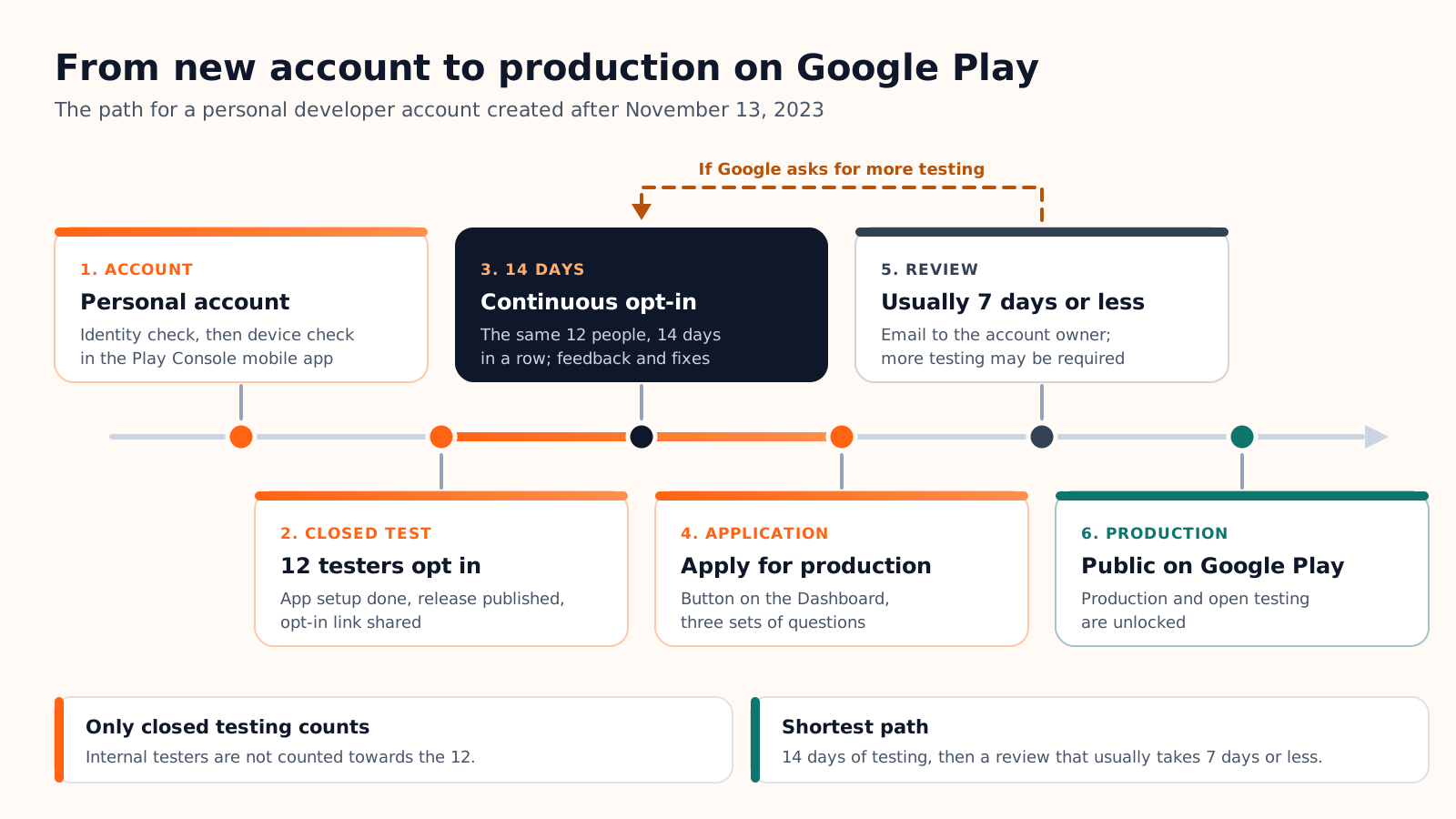
If you opened a personal Google Play developer account after November 13, 2023, you cannot publish an app to production straight away. Google first requires a closed test with at least 12 testers who have been opted in continuously for at least 14 days. Only then can you apply for production access, an application Google usually reviews in seven days or less. Organization accounts and older personal accounts are not concerned.
Until the application is approved, the Production page stays disabled in Play Console, along with pre-registration and open testing. Everything below comes from the official Play Console Help page and the pages it links to, checked on October 5, 2026.
This article goes deep on one step of a longer journey. For the whole sequence, from the $25 account to the store listing and the review, start with our guide on how to publish an app on Google Play.
The rule: who it applies to and what counts
Who is concerned
The requirement targets personal developer accounts created after November 13, 2023: Play Console's sign-up guide labels the step "Personal accounts only". An organization account is not a shortcut for a solo developer: it is meant for businesses and requires a D-U-N-S number, which Google says can take up to 30 days to obtain.
The numbers changed once. When Google announced the requirement on November 9, 2023, it asked for 20 testers. On December 11, 2024, after hearing that "getting 20 testers has been challenging" for small developers, it lowered the bar to 12. The 14 days never changed.
What "opted in continuously" means
A tester counts once they are on your tester list (or in your Google Group) and have accepted the test through the opt-in link, with a Google Account. Google's wording on the count is precise: "At least 12 testers must be opted in to your closed test when you apply for production access, and they must have been opted in continuously for the preceding 14 days."
Two consequences follow. Each tester has their own clock: someone who joins on day 5 finishes on day 19. And leaving resets it: per Google's FAQ, a tester who opts out and comes back must again reach 14 consecutive days. The same 12 people have to stay; you cannot rotate testers in and out.
Play Console has four tracks, and only one of them feeds the requirement.
| Track | Who can join | Available to a new personal account | Counts towards the 12? |
|---|---|---|---|
| Internal testing | Up to 100 testers on an email list | From the start, even before app setup is complete | No |
| Closed testing | Testers you choose, through email lists or Google Groups | Once app setup is complete | Yes, the only one |
| Open testing | Anyone; the test version is visible on Google Play | Only after production access | No, locked until then |
| Production | All Google Play users | After the application is approved | It is what you unlock |
Set up the closed test, step by step
The order matters, because closed testing only unlocks when the earlier steps are done.
- Finish the account verifications. Identity first (a government ID for a personal account), then device verification in the Play Console mobile app, on a physical, non-rooted Android phone running Android 10 or later.
- Create the app and complete app setup. The Dashboard lists the mandatory tasks: privacy policy, ads declaration, sign-in details for reviewers, target audience, content rating, Data safety and the store listing. Closed testing becomes available once they are done.
- Upload an app bundle that meets the target API level. Since August 31, 2026, new apps must target Android 16 (API level 36) or higher.
- Add your testers. In Test and release > Testing > Closed testing, click Manage track, open the Testers tab, then create an email list or enter a Google Group address. Add a feedback email or URL: it is shown on the opt-in page.
- Roll out a release and wait for "Published". The opt-in link does not appear while the app is in "Draft" or "Pending publication", and Google warns that the first test link can take several hours to become available.
- Share the link. Before production, testers cannot find the app by searching Google Play. Each one opens the opt-in link, accepts, then installs the app from its Play Store page.
- Hold 12 opt-ins for 14 days. Collect feedback, publish fixes to the same track, and do not apply early.
Find 12 real testers and keep them for 14 days
Google's own advice is plain: "The most common way to recruit testers is to use personal and professional networks." It names friends, family, colleagues and classmates, then communities of future users and social media. In practice, four sources work:
- People you know. The fastest dozen, provided they own an Android phone and a Google Account.
- Your existing customers. If the app extends a service you already sell, their use will look most like production.
- A waiting list. A sign-up form on your landing page turns interest into testers before launch.
- Communities of your target users. A club, a forum, a professional group: Google recommends testers "who represent your app's intended future audience".
Invite more than 12. If you stop at exactly 12 and one person opts out on day 9, you are below the minimum and the replacement starts a new 14 days. Fifteen to twenty opt-ins give you a margin (our advice, not a Google figure).
Then tell testers what is expected. The help page carries an explicit instruction: "Inform your testers that they need to remain opted in to your closed test continuously for at least 14 days." It also asks for clear testing instructions and suggests a messaging group for feedback.
What about activity? Google publishes no number of sessions and no daily-use quota; anyone quoting one is guessing. The page does say that an application can be sent back for "insufficient tester engagement during the testing period". That is also why services that sell testers are a weak plan: twelve accounts that opt in and never open the app satisfy the count, not the engagement question.
Apply for production access
Once 12 testers have 14 continuous days behind them, open the app's Dashboard in Play Console and click "Apply for production". The form has three parts.
| Part | What Google asks | How to answer |
|---|---|---|
| About your closed test | How easy it was to recruit testers; whether they used all the features and behaved like production users would; a summary of the feedback and how you collected it | From your log: who the testers were, what they used, what they reported. Name the differences with real use instead of hiding them. |
| About your app/game | The target audience, as specific as possible; the value the app brings to users (for a game, what makes it unique); an estimated install range for the first year | Describe a concrete user, not "everyone", and give a sober estimate. Google states these answers are not public and do not affect visibility. |
| About your production readiness | What you changed after the closed test; how you decided the app was ready | List the fixes shipped during the test and your criteria: no open crash, core flows checked on several devices. |
After you apply, Google reviews the application and emails the account owner. In its words: "Review usually takes seven days or less, but can occasionally take longer." Once approved, the Production and Open testing pages unlock.
Why applications are sent back
Google names two reasons for asking you to keep testing: "having fewer than 12 opted-in testers or insufficient tester engagement during the testing period". The closed test then continues and you apply again. The help page gives no fixed duration for the extra testing, so follow the email you receive.
The other family of refusals is policy. Google warns that "review is not a troubleshooting step" and points to four areas to check before applying:
- Content, features and monetization that comply with Google Play policies.
- A target age group and a content rating that match the real audience.
- A stable app: no crashes, broken features or missing screens.
- Working login credentials for reviewers if the app requires sign-in.
Timeline and checklist
The calendar is driven by waiting, not by work.
| Step | Duration | What Google says |
|---|---|---|
| Account and verifications | Variable | No published duration for the identity check; less than a minute for the device check |
| Closed test | 14 days minimum | Counted per tester, without interruption |
| Production access review | Usually 7 days or less | Can occasionally take longer |
| First production release | App review | Up to seven days, or longer in exceptional cases, for certain developer accounts |
From the day your twelfth tester opts in, plan on three to four weeks before the app is public, and more if Google asks for extra testing. That range is our estimate from the figures above.
With Cadrant's mobile app builder, the Android side of this path is guided, and the accounts stay yours: the build runs on your Expo account, and the app bundle lands in your own Play Console as a draft release on the internal testing track. You create the app with the package name Cadrant provides, invite its service account once, then promote the release to a closed test yourself. The rule itself is Google's and still applies: 12 testers, 14 days, then the application.
If you also ship on iPhone, the pre-release stage works differently: see how TestFlight works, from upload to external testers.