App prompt examples: 14 prompts to copy, by type of app
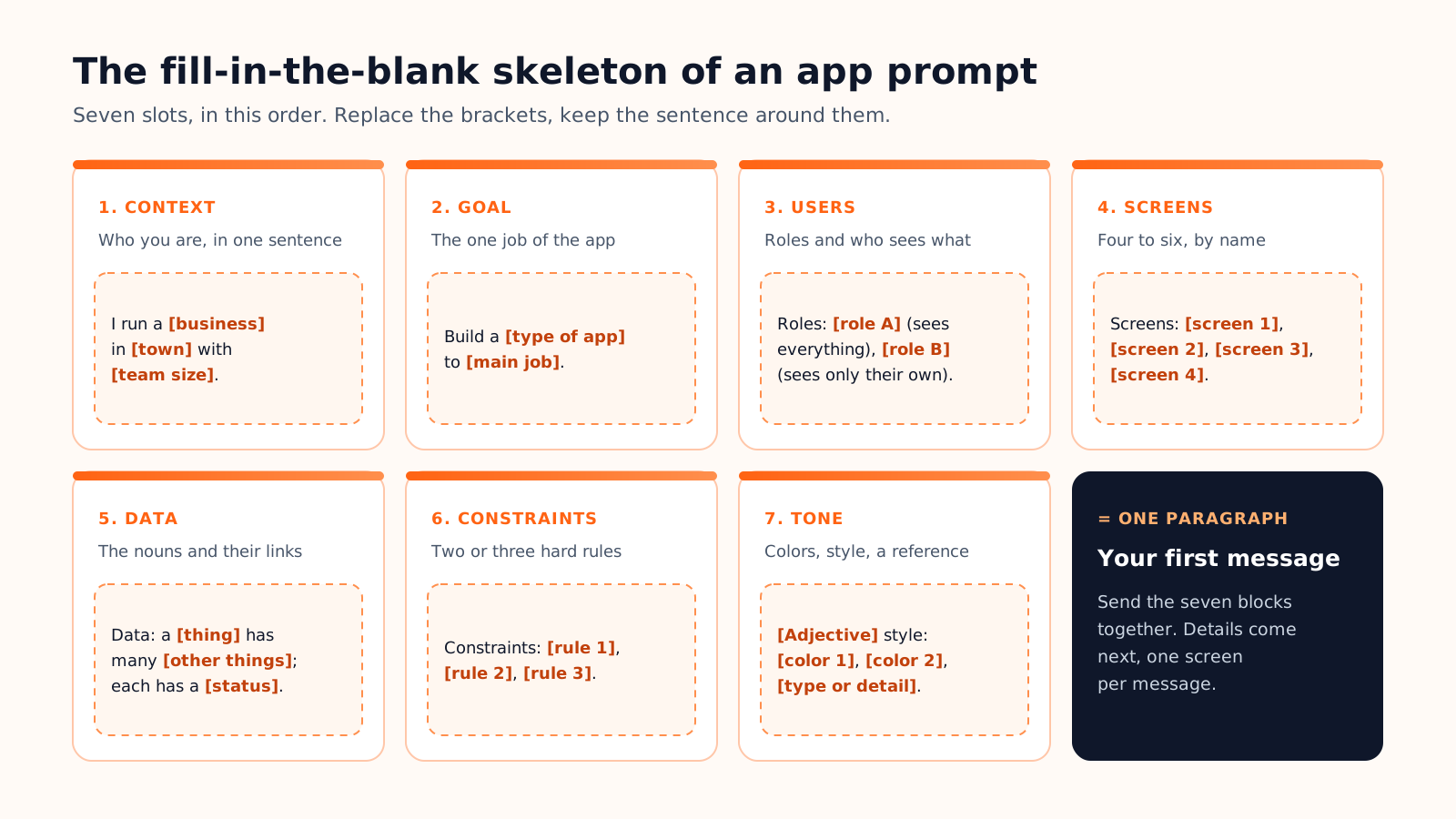
Fourteen complete prompts to paste into an AI app builder, sorted by what you want to build: websites, web apps and mobile apps. With a fill-in-the-blank skeleton, the detail that matters most for each family, and the follow-up prompts to send next.
Here are 14 app prompt examples to copy into an AI app builder: four for websites, six for web apps, four for mobile apps. Each is one paragraph, ready to send as a first message. Replace the parts in [brackets] and keep the rest.
All follow the seven blocks (context, goal, users, screens, data, constraints, tone) explained in our guide on how to write prompts to build an app. That guide is the method; this page is the worked examples.
How to adapt a prompt in two minutes
A copied prompt only works once it describes your project, not ours. Three passes:
Replace every bracket with a real detail. Your trade, town, audience, prices. Anthropic's prompting best practices compare the model to a brilliant new employee who lacks context on your norms and workflows: the brackets are where you supply it.
Keep the skeleton. The order of the blocks, the named screens and the sentence that ties the data together ("a class has many bookings"). Rename things, but never delete a block.
Cut before you add. Remove any screen the first version can live without. A fourth role or a tenth screen belongs in a follow-up message.
Seven slots, one paragraph. Only the brackets are written from scratch.
Which block deserves the most care depends on what you build:
Family
The detail that matters most in the prompt
Showcase site, portfolio
The one action expected from a visitor: call, quote request, booking
Landing page
The order of the sections and the real offer, with prices
Online store
How a product is structured: variants, stock, shipping rules
Internal tool
The roles, and what each one can see or edit
Marketplace, booking
The two sides and the statuses a request goes through
Tracker
The entry logged every day and the figure the overview must show
Community
Who gets in, who can post, who moderates
AI tool
What the AI receives, what it returns, where a human checks it
Mobile app
The tabs, what works offline, what triggers each notification
Website prompts
For a website, the prompt is mostly audience, pages and tone. Use your real service names and prices: placeholder text produces a placeholder site.
Showcase site for a trade
Showcase · Trades
I run a [cabinetry workshop] in [Portland] with four employees. Create a five-page showcase website: home, services ([custom kitchens, staircases, built-in storage]), projects with before and after photos, about, contact. Audience: homeowners within [30 miles] planning a renovation. Goal: quote requests through a form asking for the type of work, the ZIP code and photos. Constraints: mobile-first, phone number in the header, legal pages. Warm craft tone: off-white, oak brown, serif headings.
Landing page for a subscription
Landing page · Food
I sell a [coffee subscription] roasted in [Austin]. Create a one-page landing page with one goal: start a subscription. Sections in order: hero with the offer and one button, how it works in three steps, three plans ([12 oz at $16, 2 lb at $38, 5 lb at $85]), reviews, FAQ, final call to action. Audience: home brewers who buy supermarket beans. Constraints: no menu, the same button after every section, fast on mobile. Warm, direct tone: cream, dark brown, one orange accent.
Online store for a maker
Online store · Retail
I make [scented candles] by hand and sell about [40 products] as gifts. Create an online store: home with best sellers, catalog filtered by scent and price, product page, cart, checkout. Data: a product has variants (size, color), a stock level and photos; an order has several lines and a status (paid, shipped, delivered). Constraints: flat shipping at [$6], free above [$60], sold-out variants visible but not selectable. Soft, minimal style: warm white, sage green, large photos.
Photographer portfolio
Portfolio · Creative
I am a [wedding photographer] in [Denver]. Create a portfolio website: home with a full-screen slideshow, galleries by category ([weddings, engagements, families]), a photo grid per gallery, about, pricing with three packages, contact. Audience: couples getting married within [18 months]. Goal: inquiries through a form asking for the date, the venue and the budget. Constraints: photos first, very little text, fast image loading on mobile. Elegant, quiet style: white, black, one thin serif typeface.
Web app prompts
A web app stands or falls on its roles and its data, so each prompt states both before anything visual.
Maintenance request tracker
Internal tool · Productivity
We are a [property management agency] with [120 apartments] and three technicians. Build an internal web app to track maintenance requests. Roles: manager (sees and assigns everything), technician (sees only assigned requests). Screens: request board by status (new, scheduled, in progress, done), request detail with photos and comments, weekly schedule per technician. Data: a building has many apartments; an apartment has many requests; a request has one technician. Constraints: sign-in required, CSV export, requests older than [5 days] flagged late. Sober interface: gray, blue, dense tables.
Tutoring marketplace
Marketplace · Education
Build a marketplace web app connecting [private tutors] with [parents of high school students] in [Chicago]. Roles: tutor, parent, admin. Screens: search with filters (subject, hourly rate, neighborhood), tutor profile with reviews and availability, lesson request, messages, tutor dashboard. Data: a tutor teaches several subjects and has time slots; a request links a parent, a tutor and a slot, with a status (requested, accepted, done, cancelled). Constraints: the admin approves tutors before they appear, no online payment yet. Trustworthy style: white, deep blue, yellow accent.
Studio booking app
Booking · Wellness
I own a [yoga studio] with [6 teachers] and [25 classes] a week. Build a booking web app. Roles: owner, teacher, client. Screens: weekly timetable, class detail with remaining spots, my bookings, my passes, class admin. Data: a class has one teacher, a capacity and many bookings; a client has a pass with remaining credits; a booking uses one credit. Constraints: waiting list when a class is full, free cancellation up to [12 hours] before, confirmation email. Calm style: sand, terracotta, rounded cards.
Freelancer finance tracker
Tracking · Finance
Build a personal web app for a [freelancer] to track income, expenses and money to set aside for taxes. Single user, sign-in required. Screens: monthly overview (income, expenses, balance, [25%] set aside), transactions filtered by category, add a transaction, yearly summary by month. Data: a transaction has a date, an amount, a category and an optional client; a category is income or expense. Constraints: amounts in [dollars], CSV import from the bank, data visible to the owner only. Clean style: white, dark green, monospaced figures.
Members-only community
Community · Productivity
Build a private community web app for the [members of a coworking space], about [150 people]. Roles: member, moderator. Screens: feed of posts with comments, events calendar with one-click sign-up, member directory searchable by skill, profile. Data: a post has many comments; an event has a date, a capacity and many attendees; a member has several skills. Constraints: invitation only, moderators can remove any post, weekly email digest of the most commented posts. Friendly, not childish: off-white, navy, coral accent.
Lesson-to-quiz AI tool
AI tool · Education
Build a web app for [high school teachers] that turns a lesson into a quiz. Roles: teacher (account), student (opens a link, no account). Screens: my lessons, quiz editor, student quiz page, results per student. AI step: from the pasted lesson, the AI returns [10] multiple-choice questions with the right answer and a one-sentence explanation; the teacher edits or deletes them before publishing. Data: a lesson has many quizzes; a quiz has many questions and many scored attempts. Constraints: nothing published without teacher review; the AI uses only the pasted text. Clear style: white, indigo, large type.
Mobile app prompts
A mobile prompt adds four things: the tab bar, what works offline, what triggers a notification, and where the main button sits for the thumb.
Habit tracker
Habit tracking · Wellness
Create a mobile app for [people building a morning routine]. Single user, no account for now. Screens: Today (check off each habit in one tap), habit detail (monthly calendar, current streak), add a habit (name, days of the week, reminder time), weekly stats. Data: a habit has many check-ins, one per day at most. Constraints: bottom tabs (Today, Stats, Settings), a local notification at each reminder time, works fully offline, add button at the bottom right, within thumb reach. Calm style: off-white, soft orange, large numbers.
Field app for technicians
Internal tool · Field service
Create a mobile app for the [8 technicians of a heating and cooling company]; the office assigns the jobs. Screens: today's jobs in route order, job detail (address opening in Maps, tap to call, equipment history), service report (checklist, photos, parts used, customer signature). Data: a customer has many sites; a site has equipment; a job has one report. Constraints: bottom tabs (Today, Week, Profile), works offline in basements and syncs later, push notification when a job is assigned or changed, large buttons at the bottom of the screen. Functional style: white, dark blue, high contrast.
Dog sitting marketplace
Marketplace · Local services
Create a mobile app connecting [dog owners] with [dog sitters] in [Seattle]. Roles: owner, sitter. Screens: sitter search as a list and a map, sitter profile with reviews and nightly rate, booking request with dates, chat, my bookings. Data: a booking links an owner, a sitter and a dog, with dates and a status (requested, accepted, declined, completed). Constraints: bottom tabs (Search, Bookings, Messages, Profile), location asked only when the search opens, push notification for each request, reply and message. Warm style: white, teal, round photos.
Team organizer
Community · Sport
Create a mobile app for an [amateur soccer team] of [22 players]. Roles: coach, player. Screens: upcoming games, game detail with each player's availability, lineup, team chat. Data: a game has a date, a place and one availability per player (yes, no, no answer); a lineup belongs to a game. Constraints: bottom tabs (Games, Chat, Team), yes and no buttons at the bottom of the screen, push notification [48 hours] before a game to players who have not answered, schedule readable offline. Sporty style: white, grass green, bold type.
Follow-up prompts for the second and third message
The first prompt builds the skeleton. Every later message should be smaller: one screen, one rule or one bug. Lovable's documentation gives a good change prompt three parts: what to build, where it goes, and what must stay untouched. Three examples:
When
Follow-up prompt to adapt
One screen at a time
On the [request board], add a filter by [technician] and show late requests first. Do not change the other screens.
Add a role
Add an [accountant] role with read-only access to [the yearly summary and the CSV export]. Existing roles keep their rights.
Fix a bug
On [my bookings], cancelling does not return the credit. Expected: the pass gets one credit back. Fix only this.
Prefer to start from something that already runs? The Cadrant home page has a gallery of about 200 ready-made templates (websites, web apps, mobile apps) sorted by these same themes. To start from a prompt instead, paste one into the AI app builder and follow our guide on how to create an app with AI.
App Prompt Examples: 14 Prompts to Build an App | Cadrant