Expo is an open-source framework for building iOS, Android and web apps with React Native. It bundles what a React Native app needs and that React Native itself does not ship: a library of tested native modules, a file-based router, a command-line tool, and a set of cloud services (EAS) that compile your app and send it to the stores. Since 2024, the React Native documentation recommends starting every new app with a framework, and names Expo as that framework.
If you have ever set up a React Native project from scratch, you know why: Xcode, Android Studio, native dependencies, signing certificates. Expo hides that machinery until you need it, and hands it back when you do. This guide explains what Expo is made of, how it changed in 2025 and 2026, what it costs, and when it is not the right tool. If you would rather describe your app and have the Expo project generated for you, that is what a native mobile app builder like Cadrant does; the last section shows how.
Expo and React Native: a framework, not a fork
React Native is the engine. It takes React components written in JavaScript or TypeScript and renders them as real native views: a UIKit button on iOS, an Android View on Android. That engine is maintained by Meta and used in apps like Facebook, Instagram, Microsoft Office and Shopify.
Expo is the framework around that engine, the way Next.js is a framework around React. It does not replace React Native and it does not fork it: an Expo app is a React Native app, with the same components, the same libraries and the same native binaries at the end. What Expo adds is the layer everyone otherwise rebuilds by hand: navigation, a standard library of device APIs, a build pipeline, and a way to ship updates.
The distinction matters because of an old reputation. Early Expo (before 2021) locked you inside a fixed set of native modules; adding a custom native library meant leaving Expo entirely. That limitation is gone. Today you can add any native module, write Swift or Kotlin next to your TypeScript, and Expo generates the native projects for you when it is time to build.
To remember
Every Expo app is a React Native app. The reverse is not true: a React Native app without Expo has to assemble navigation, native modules, builds and updates on its own. The React Native documentation puts it plainly: if you are building a new app, use a framework, and the recommended one is Expo.
The building blocks
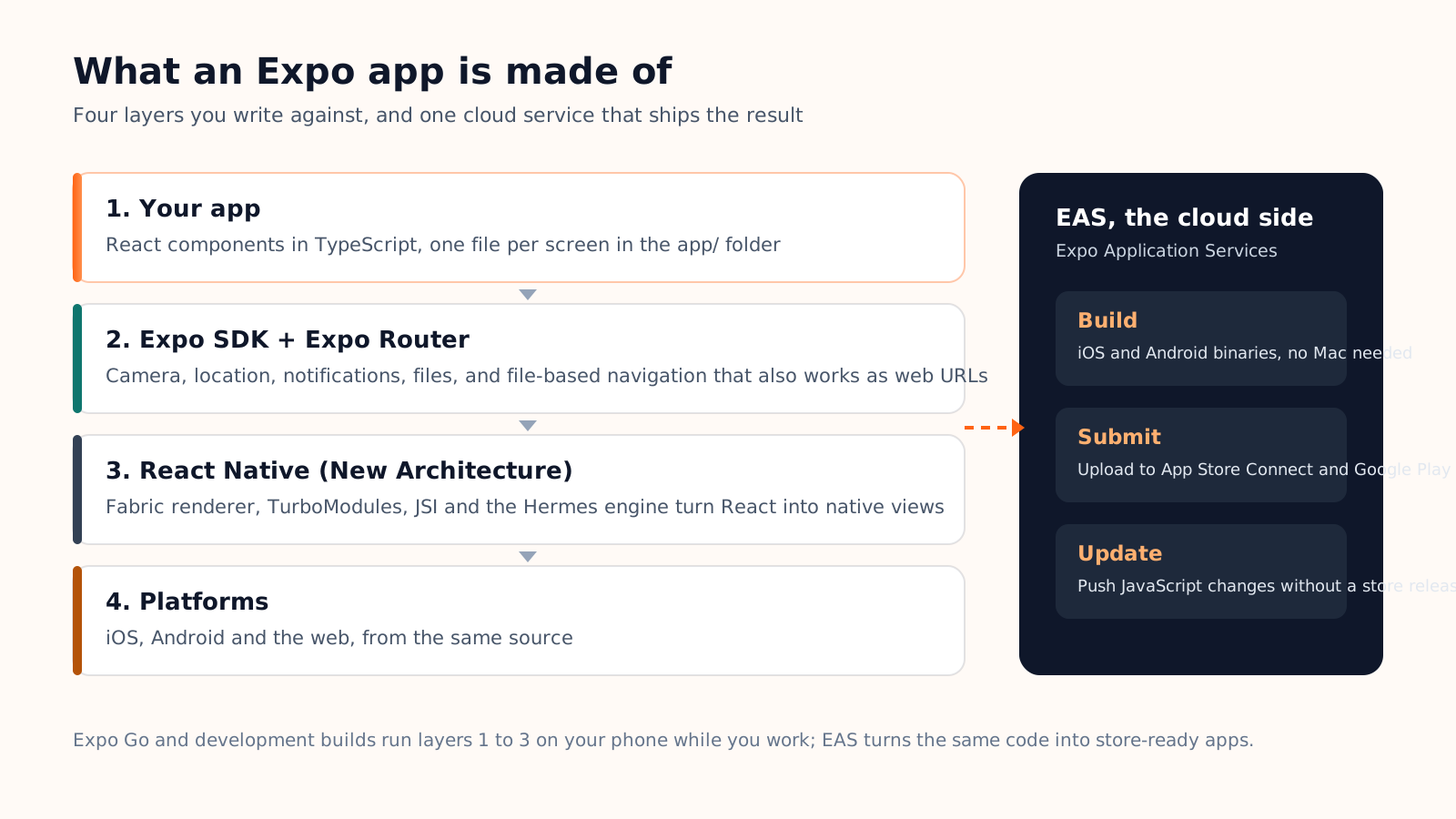
Expo is best understood as layers. You write against the top two, React Native does the rendering underneath, and a separate cloud service turns the whole thing into something you can install from a store.
The Expo SDK: a standard library for the phone
The SDK is a collection of packages, one per capability: expo-camera, expo-location, expo-notifications, expo-file-system, expo-sensors, and a few dozen more. They are tested together and released together, three times a year, and each SDK version is pinned to one React Native version. That pinning is the main reason Expo apps upgrade more smoothly than bare React Native apps: someone else has already checked that the pieces fit.
Expo CLI and Expo Router
The CLI creates a project, starts the development server (Metro) and runs the build commands. Expo Router adds file-based navigation: every file in the app/ folder is a screen, and its path is its route. The same routes work as deep links on the phone and as URLs on the web, without extra configuration. Since SDK 56, Expo Router no longer depends on React Navigation; it forked the parts it needed to evolve on its own.
Expo Go, development builds and production builds
This is where newcomers get lost, so here is the whole picture in one table. The three are different ways to run the same code, at different stages.
| Expo Go | Development build | Production build | |
|---|---|---|---|
| What it is | A ready-made app that embeds the Expo SDK | Your own app, with the developer tools inside | The signed binary you send to the stores |
| Custom native code | No, only the modules in the SDK | Yes | Yes |
| How you get it | Install it, sign in, scan a QR code | Build it once (EAS or locally), then reload live | EAS Build or a local build |
| Best for | Prototypes, learning, showing a first version on a real phone | Daily work on a real project | Release |
One change to know for 2026: Expo Go spent part of the year outside the App Store. From May, new versions waited in Apple's review queue, so Expo Go for SDK 56 and SDK 57 had to be installed with the Expo CLI (Android, simulators) or as a personal TestFlight build made with the eas go command (iPhone). In September 2026, Expo Go for SDK 57 returned to the App Store with a new rule: you must be signed in with the same Expo account in the Expo CLI and in the Expo Go app. Android gets the sign-in rule later. Expo Go remains the fastest way to see an app on a phone, but Expo keeps steering serious projects towards development builds. Our guide to testing an app with Expo Go covers the sign-in rule, the QR workflow and the usual errors.
EAS: the cloud side
Expo Application Services is the part of Expo that is not open source and not free beyond a quota. It has three jobs. EAS Build compiles your app on cloud machines, including the macOS machines you need for iOS, so you can produce an iPhone build from Windows or Linux. EAS Submit uploads the finished binary to App Store Connect or Google Play. EAS Update pushes JavaScript changes to installed apps without a new store release, within the rules the stores allow for that. The EAS Build documentation covers the exact configuration, and our guide to how EAS Build works and what it costs walks through build profiles, the queue and the price of each build.
What changed in 2025 and 2026
Two years of releases moved Expo from a convenient wrapper to the default way React Native is used. The changes worth knowing:
- New Architecture only. Since SDK 55, Expo apps run exclusively on React Native's New Architecture: the Fabric renderer, TurboModules and JSI replace the old asynchronous bridge. React Native 0.85 (April 2026) made that the assumed default for the whole ecosystem, and SDK 56 ships the Hermes v1 JavaScript engine by default.
- SDK 56 (May 2026) is about build speed. The heaviest iOS modules now arrive precompiled, which Expo measures at roughly 16 percent faster iOS builds, and the CLI bundles cold projects 20 to 50 percent faster.
- SDK 57 (June 2026) moves to React Native 0.86. React stays at 19.2 and React Native 0.86 announces no breaking changes, so the upgrade from SDK 56 is light: better edge-to-edge support on Android, light and dark mode emulation in React Native DevTools, and rendering, layout and animation fixes.
- Expo UI is stable. SwiftUI and Jetpack Compose components can be used from React, so an app can adopt the latest platform widgets without leaving TypeScript.
- Inline native modules. A Swift or Kotlin file can live next to the TypeScript that calls it, with generated types. The old wall between "JavaScript land" and "native land" is mostly gone.
Upgrade rhythm
Three SDK releases a year means an upgrade roughly every four months. Each one is small if you keep up, and painful if you skip three. Budget an afternoon per quarter for it; it is the real maintenance cost of an Expo app, and it is lower than the equivalent on a bare React Native project.
Pricing, limits, and when Expo is the wrong choice
The framework, the SDK, the CLI and Expo Router are free and open source. What costs money is the cloud, and the Apple and Google accounts you need regardless of framework.
| Item | Price | What you get |
|---|---|---|
| Expo framework, SDK, CLI, Router | Free, open source | Everything that runs on the device |
| EAS Free plan | 0 USD | 15 iOS and 15 Android builds a month, low-priority queue (waits above 90 minutes happen at peak), 45-minute build timeout |
| EAS Starter | 19 USD a month plus usage | Priority queue, 2-hour build timeout |
| EAS Production | 199 USD a month plus usage | Higher quotas for teams shipping often |
| Apple Developer Program | 99 USD a year | Required to publish on the App Store, whatever the framework |
| Google Play Console | 25 USD once | Required to publish on Google Play |
When Expo is the right call
- Your team writes JavaScript or TypeScript, or comes from web development.
- You want one codebase for iOS, Android and, often, the web.
- Nobody on the team owns a Mac, or nobody wants to maintain Xcode and Android Studio setups.
- Your app is a product, not a game: forms, lists, maps, camera, notifications, payments.
When it is not
- The app is mostly custom native code: a 3D engine, real-time audio or video pipelines, heavy AR.
- The team is already invested in Swift or Kotlin, in which case Kotlin Multiplatform may share more with less friction.
- You need only a mobile-friendly website with an installable icon: a progressive web app is cheaper and needs no store at all.
For a broader view of the alternatives, our guide to cross-platform mobile development compares React Native with Flutter, Kotlin Multiplatform and wrapped web apps.
How Cadrant uses Expo
Native mobile projects on Cadrant are Expo and React Native applications. You describe the app in plain language, the generated project uses the Expo SDK for device features, and the preview opens in a phone frame inside the editor. To test on a real device, you scan a QR code with Expo Go; most expo-* APIs run there directly.
Publishing follows the same path a developer would take by hand, driven for you: the iOS build runs on EAS under your own Expo account (the free plan covers 15 iOS builds a month), and the finished binary is submitted to your App Store Connect account after a guided Apple sign-in, app creation and certificate step. Ownership stays with you, on your Expo and Apple accounts. See the mobile app builder page for the full workflow.
Practical tip
Create your free Expo account and your Apple Developer membership on day one, not on launch day. Apple's account activation can take days for a company, and the first EAS build on a free plan can wait in the queue. Both are calendar time you cannot buy back later.
In short: Expo is React Native with the batteries included, and since 2024 it is the way the React Native team itself tells you to start. Learn the difference between Expo Go and a development build, budget for the cloud quota and the store accounts, and the rest is React.