The right Airtable alternative depends on which ceiling you hit. If the problem is the bill, an open-source base such as Baserow or NocoDB gives you the same grid for less, and viewers stay free. If the problem is the record cap, you need a real PostgreSQL database behind the interface. If the problem is that a base cannot enforce your rules, who approves what, up to which amount, in which order, then you have outgrown the category, and what you need is an application, not another base. Since 2025 there is a fourth way to get one: describe the tool and generate it on a database you own.
This guide compares six options on the three points that decide the choice: what you pay once the whole team uses it, how many records it can hold, and what you keep if you leave. We start with Cadrant, our own builder, because it is the one that turns a base into an application rather than replacing one grid with another. The five others are real alternatives with their own strengths, and for two of the three ceilings they may be the better answer. If you have not yet decided whether to build anything, our guide on how to build internal tools covers the build, buy or generate decision first.
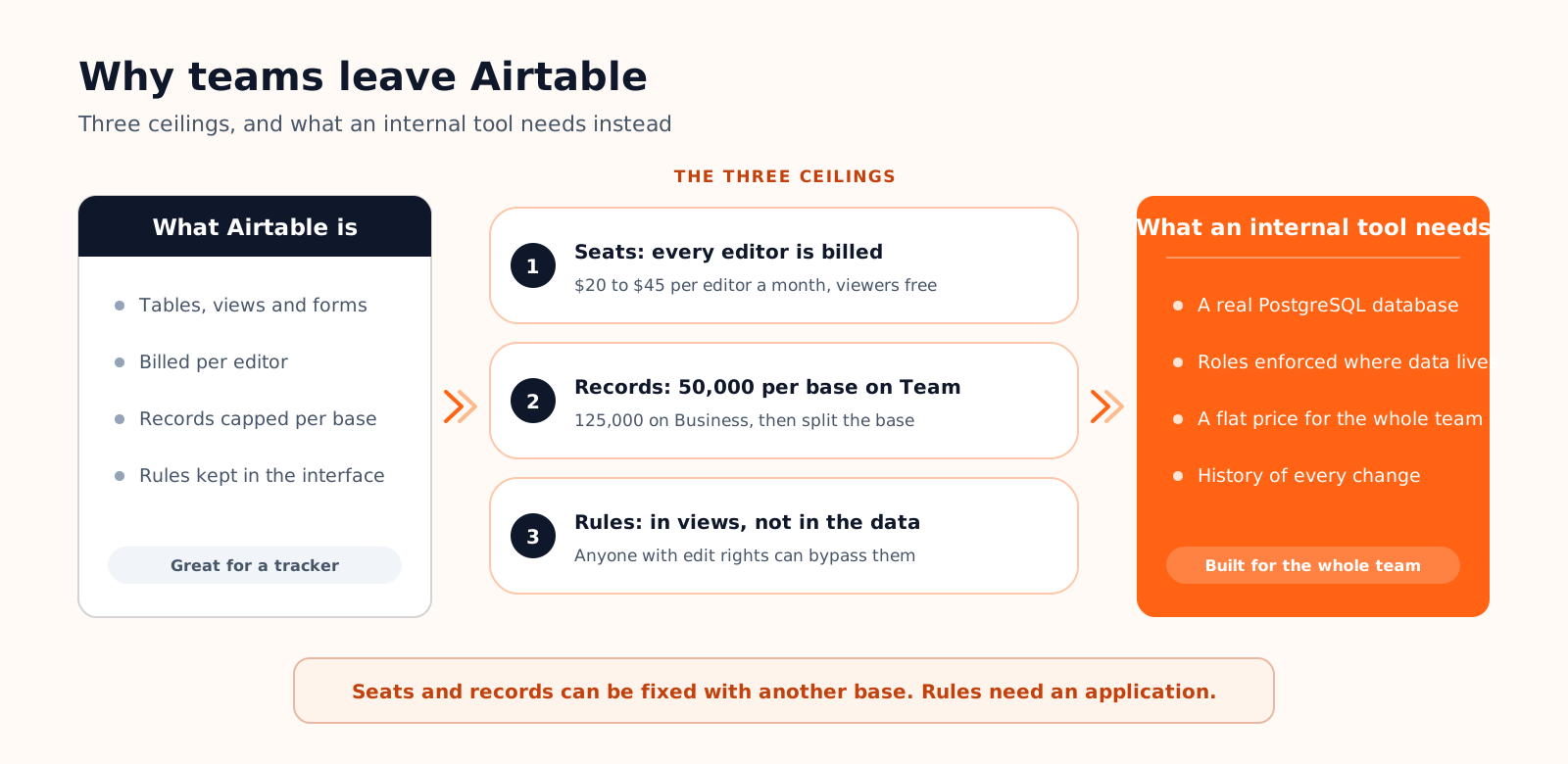
Why teams leave Airtable: three ceilings, not one
Airtable deserves its position. It made relational data approachable: linked tables, views, forms, automations and interfaces that a non-developer can assemble in an afternoon. Most teams that leave do not leave because the product got worse. They leave because a tool that started as a tracker for five people became the system of record for fifty, and Airtable's pricing and limits are designed for the first situation. The figures below come from Airtable's plan documentation in September 2026.
| Plan | Price per editor | Records per base | Attachments per base | API calls per month |
|---|---|---|---|---|
| Free | $0, up to 5 editors | 1,000 | 1 GB | 1,000 per workspace |
| Team | $20 a month, billed annually | 50,000 | 20 GB | 100,000 per workspace |
| Business | $45 a month, billed annually | 125,000 | 100 GB | Unlimited |
| Enterprise Scale | Custom | Custom | Custom | Custom |
Ceiling 1: every editor is a paid seat
Airtable's billing rule is short: you are charged for every user who has edit permission on at least one base in the workspace. Read-only collaborators, form submissions and share links are free on Team and Business. That rule is generous for a publishing team where two people edit and forty read. It is punishing for an operations tool, where everyone who touches a record needs to edit it: the technician updating a job, the salesperson moving a deal, the assistant closing a ticket.
| Monthly cost | 5 editors | 20 editors | 50 editors |
|---|---|---|---|
| Airtable Team ($20 per editor) | $100 | $400 | $1,000 |
| Airtable Business ($45 per editor) | $225 | $900 | $2,250 |
| A generated tool on a flat plan | $20 | $20 | $20 |
The cost grows with adoption, which is the opposite of what you want from a tool meant to reach the whole company. Retool's 2026 Build vs Buy report, a survey of 817 people who build software inside companies, found that 35% had already replaced at least one SaaS product with a tool they built, and per-seat pricing is one of the reasons that keeps coming up.
Ceiling 2: records per base
A base on the Team plan holds 50,000 records, Business holds 125,000. That sounds like a lot until you do the arithmetic on an operational table. A support inbox that logs 200 tickets a day fills a Team base in about eight months. An e-commerce order table at 100 orders a day gets there in under a year and a half. The usual workaround, one base per year or per region, breaks the links between tables, which was the reason to choose Airtable in the first place. A PostgreSQL database has no comparable ceiling; a table with a few million rows is ordinary.
Ceiling 3: a base is not an application
This is the ceiling that no pricing change fixes. Airtable stores data and shows it in views. What it cannot do well is enforce a process: a purchase request that a manager may approve up to $2,000 and finance above that, a job that cannot be closed without a photo and a signature, a discount that requires a second validation. You can approximate these with automations and interface permissions, but the rules live in the interface, not in the data, and anyone with edit rights on the base can bypass them. An application enforces its rules where the data lives.
What to look for in an Airtable alternative

Before comparing products, write down which ceiling sent you here. Then check each candidate on six points. The order matters: the first three are hard to change later, the last three are conveniences.
- Pricing unit. Per editor, per user, per builder, or a flat plan. Model the bill at full adoption, not at the pilot.
- Record ceiling. Rows per base or per workspace, and what happens when you reach it. Prefer a tool that sits on a real database.
- Ownership. Whether the data lives in a PostgreSQL instance you control, and whether the application itself can leave the platform as code.
- Permissions in the data. Row-level rules enforced by the database, not filters in a view.
- Who builds it. A developer, a technical operations person, or the person who knows the process.
- Migration path. CSV import per table, an API, and a way to rebuild the links between records.
Cadrant: generate the application instead of renting the base
Cadrant answers the third ceiling directly. You describe the tool in plain language, the tables, the roles, the screens, and the platform generates a React application connected to a PostgreSQL database in your own Supabase project. Tables, relations and indexes are derived from your description, authentication runs on Supabase Auth with custom roles such as admin, editor and reader, and the row-level security policies that enforce who sees what are created in the database from your prompt. The documentation recommends reviewing those policies in Supabase before production, which is exactly the check you would run on any tool holding customer data.
The pricing unit is the difference that matters against Airtable. The Starter plan is $20 a month for the workspace, metered in generation credits rather than seats, so a tool used by five people costs the same as one used by fifty. The database is hosted on your Supabase account, which offers two free projects, and the code syncs to a GitHub repository. Integrations that need secret keys run server-side in Edge Functions, with the keys stored as environment variables. The details are on the internal tool builder page.
Five other Airtable alternatives, compared
Prices are the public list prices in September 2026, billed annually where a choice exists. Record ceilings are the vendor's published limits for the plan named.
| Tool | What it is | Pricing | Record ceiling | What you own | Best for |
|---|---|---|---|---|---|
| Cadrant | AI builder that generates the app and its database | Flat, from $20 a month, no seats | PostgreSQL, no product cap | Database on your Supabase, code on GitHub | Processes with roles and rules, whole-team use |
| Baserow | Open-source base, Airtable-like grid | Free, then $10 or $18 per user | 3,000 / 50,000 / 250,000 rows per workspace; unlimited self-hosted | Everything if self-hosted | Same grid, lower bill, own the server |
| NocoDB | Open-source spreadsheet UI on PostgreSQL or MySQL | Free, then $12 or $24 per editor, capped at 9 paid seats | Your database's | The database is yours from day one | A grid on data developers already run |
| SmartSuite | Work management platform with a relational base | $12, $30 or $45 per user, 3 to 10 seat minimum | Per plan | Exports | Projects and processes across several teams |
| Softr | Portals and apps on Airtable, Sheets or SQL | $25, $119 or $395 a month with user quotas | Your source's | The data source; the app stays on Softr | Client portals on data you keep in Airtable |
| Retool | Low-code screens on any database or API | $10 per builder + $5 per user; Business $50 + $15 | Your database's | The database; apps stay on Retool | Developer teams building admin panels |
Baserow: the open-source grid
Baserow is the closest thing to Airtable you can run on your own server. The grid, the linked fields, the views and the forms will feel familiar within minutes. The hosted version is free up to 3,000 rows per workspace, then $10 per user a month on Premium for 50,000 rows and $18 on Advanced for 250,000, billed annually. Self-hosted instances remove the row limits, which is the real reason teams pick it: the same tool, on hardware you pay for once.
- Choose it if: you like Airtable's model and want to own the server or lower the bill.
- Limits: still a base, still per user in the cloud, and self-hosting is a job for someone technical.
NocoDB: a spreadsheet interface on your own database
NocoDB takes the opposite starting point. Instead of a base that exports to a database, it is a grid that sits on a PostgreSQL or MySQL database you already have. The open-source edition is free to self-host. The cloud plans are $12 per editor a month on Plus and $24 on Business, viewers are always free, and pricing stops at nine editors: every editor beyond the ninth costs nothing. For a fifty-person operations team, that changes the arithmetic entirely.
- Choose it if: the record ceiling is your problem and a developer can point it at a database.
- Limits: process rules and role logic still live in the interface, as they do in Airtable.
SmartSuite: a base with project management around it
SmartSuite combines an Airtable-style relational base with the features of a work management platform: tasks, timelines, dashboards and approval steps across teams. Plans run from $12 per user a month on Team to $30 on Professional and $45 on Enterprise, with minimums of three, five and ten seats. It is the choice when the pain is coordination between departments rather than the data model itself.
- Choose it if: several teams need shared processes, and someone will administer the platform.
- Limits: per-user pricing with seat minimums, and the data stays inside the platform.
Softr: interfaces and portals on top of your base
Softr is not a replacement for Airtable's data layer. It is a front end that turns a base, a Google Sheet or a SQL database into a client portal or an internal app with logins and per-user views. Since its August 2026 pricing, plans are $25 a month on Basic with one builder, five team users and five client users, $119 on Pro and $395 on Business, with more users available as add-ons. It solves the presentation problem without touching the seat and record ceilings underneath.
- Choose it if: you keep Airtable and need a portal for clients or partners on top of it.
- Limits: two bills, Airtable plus Softr, and the ceilings of the source remain.
Retool: low-code screens for developer teams
Retool is what engineering teams reach for when they need an admin panel on a database they already run. It connects to almost anything, and the drag-and-drop builder is fast in the hands of a developer. The Team plan is $10 per builder and $5 per internal user a month, and audit logs with granular permissions start on Business at $50 and $15. It is the wrong answer for a team without a developer, and the right one for a team with three.
- Choose it if: developers own the database and want screens on it in days.
- Limits: per builder and per user, and the apps do not leave the platform.
Which Airtable alternative for which situation
How to migrate off Airtable in four steps
- 1. Export every table as CSV, with the record ID column. Linked fields export as names, so keep the IDs to rebuild relations without ambiguity.
- 2. Draw the tables before importing. A base with twelve tables often becomes six: single-select fields become status columns, lookup tables become foreign keys.
- 3. Import, then rebuild the links by ID. Every tool above imports CSV. Test with one table and its links before moving the rest.
- 4. Run both for one week, Airtable in read-only. Real users, real data. The rules you forgot will surface in the first two days.
- Three ceilings push teams off Airtable: seats billed for every editor, 50,000 to 125,000 records per base, and rules that live in views rather than in the database.
- Baserow and NocoDB solve the bill and, on your own database, the record cap. SmartSuite adds coordination. Softr and Retool add screens on data that stays where it is.
- Only an application solves the rules ceiling. Cadrant generates it on your own PostgreSQL for a flat $20 a month, with roles enforced in the database.
- Export with IDs, redraw the tables, import one table first, run both for a week.