Why is Supabase ideal for an AI builder? Because it gives a language model exactly what it needs to ship a useful app: a readable Postgres database, predictable APIs, auth, file storage, and server functions in one project. AI app builders generate frontend fast. Without a solid backend, the result stays a demo. Supabase fills that gap with a stack developers already know, and that LLMs have seen widely in training data.
This guide does three things: recall where Supabase came from and why it got popular, explain why the platform fits an AI builder so well, then compare the two ways to integrate it, bring your own or platform-managed.

Where Supabase came from, and why everyone talks about it
Supabase launched around 2020 as an open-source Firebase alternative built on PostgreSQL rather than a proprietary document store. The founding idea is simple: BaaS comfort (auth, files, realtime, dashboard) without locking data in a hard-to-export format. Postgres is everywhere, skills exist, and an app can grow without rewriting the backend at the first serious customer.
Popularity comes from that mix. A generous free tier to start. Clear DX for modern web (JS/React). A very active open-source community. And on the business side, funding that confirmed market appetite: in October 2025, Supabase announced a $100M Series E led notably by Accel and Peak XV, at a $5B pre-money valuation. That is not a technical proof by itself, but a signal: managed Postgres plus auth and storage became standard infrastructure for products built quickly.
Open the Supabase docs today and you find the same trio founders need: Database (Postgres + RLS), Authentication, Storage, plus Edge Functions for server logic. That is exactly the surface an AI builder must wire to move from mockup to product. The rest of the ecosystem (Realtime, pgvector, SQL dashboard) strengthens the appeal: one admin panel instead of five consoles.
Why it fits an AI builder so well?
Postgres that models know how to write
An AI builder mostly generates code and schema. SQL and Postgres are heavily represented in LLM training data. Ask for “create a bookings table with user_id, status, and dates” and you usually get clean SQL, understandable relations, and RLS policies expressible in SQL. A proprietary black box forces the model (and you) to learn an opaque API. Postgres stays inspectable in a SQL editor, even after ten chat iterations.
For a non-technical founder, that means the AI can create and change the schema, and a developer can take over later without reverse-engineering the platform. For a builder, it means fewer hallucinations on home-grown abstractions.
A full backend in one project
A generated app needs more than tables. It needs accounts, sessions, uploads, sometimes Stripe webhooks or transactional email. Supabase bundles those bricks in one project: Auth, Storage, Edge Functions, Realtime. The AI builder can iterate on UI and backend without assembling five vendors on day one.
Takeaway
Supabase is not “magic” because it is trendy. It is practical for an AI builder because the model can write SQL, wire real auth, and deploy server logic in a standard frame you can still open tomorrow.
That is also why so many MVP stacks restart with React + Supabase. The detail matters less than predictability: less proprietary glue, more documented paths. See also how this trio fits a startup MVP built with AI.
Two ways to integrate Supabase in an AI builder
Almost every builder “supports Supabase.” The real question is: who owns the Supabase project, and who pays the bill? Two models dominate.
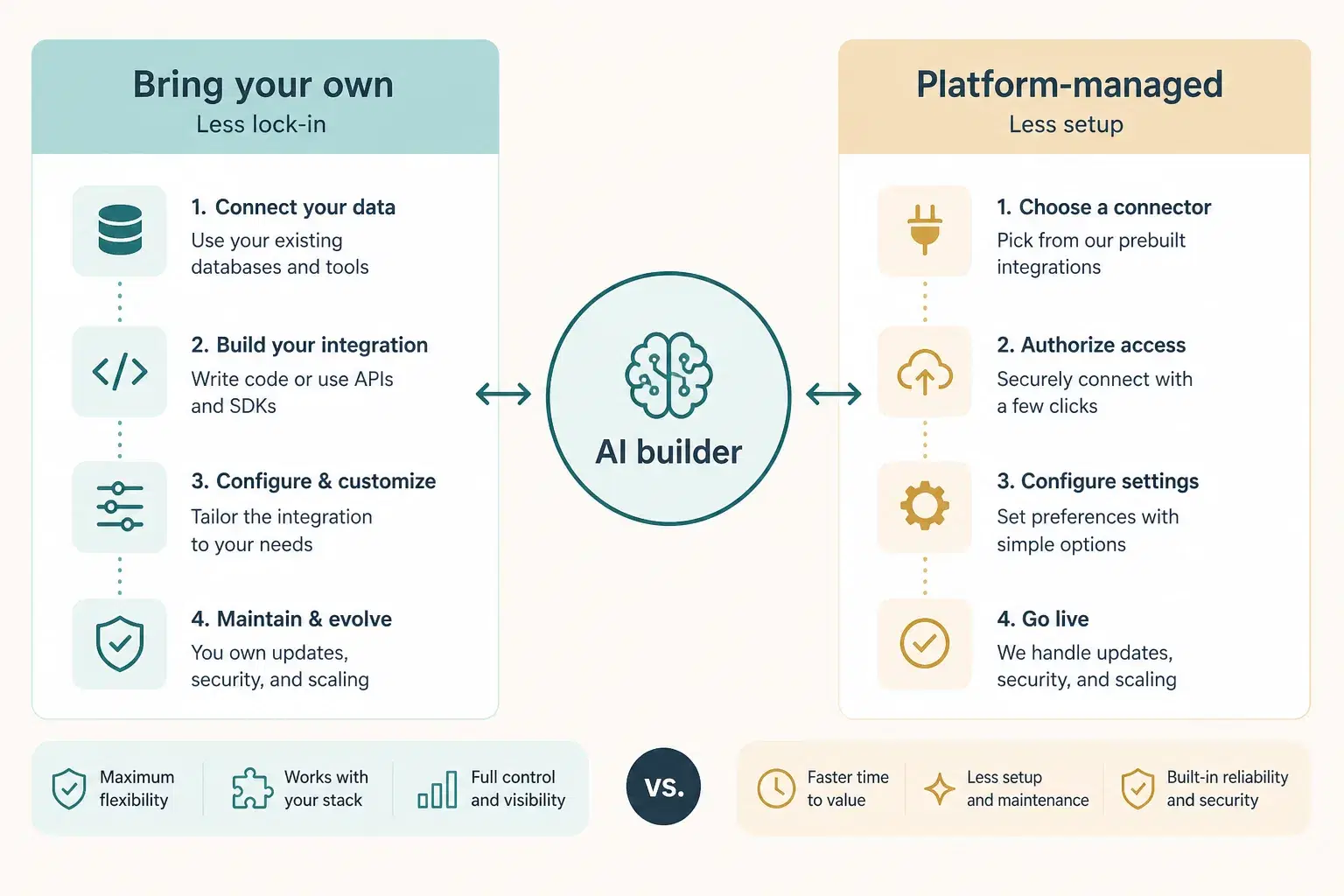
| Model | Who owns the project | Setup | Lock-in |
|---|---|---|---|
| Bring your own | Your Supabase org | Account connect / OAuth / token | Lower: you keep project and data |
| Platform-managed | Often the AI builder (or a linked account) | Near zero at the start | Higher: leaving means export / migration |
Bring your own Supabase
You create (or connect) a Supabase account, authorize the AI builder, and the project lives in your organization. You see the schema in the Supabase dashboard, you hold the keys, you pay Supabase directly. Upside: if you leave the builder, the database, auth, and storage stay. Downside: a bit more friction at start (create an account, grant access, sometimes pick an org).
On Cadrant, the documented path is this type: you connect your Supabase account (OAuth recommended, or token), then the platform creates the tables and configuration the app needs. That is the “your backend, the builder writes on top” model.
Platform-managed Supabase
Here the AI builder provisions and operates the backend for you. You click launch, auth works, tables appear, without visiting supabase.com. Ideal for validating an idea in an afternoon. The cost: more lock-in. Data and sometimes keys go through the platform. Leaving means exporting, rebuilding policies, or accepting a migration. Some platforms still use Supabase under the hood; others use a house database. Either way, the useful question remains: “if I stop paying the builder tomorrow, what keeps running?”
Trade-off
Managed = speed and less setup. Bring your own = control and a cleaner exit. Neither is “wrong”: the right pick depends on whether you optimize for the first weekend or the next six months.
How to choose in practice?
- Throwaway prototype or 24h client demo → managed can be enough.
- Real users, sensitive data, or intent to keep the backend → bring your own.
- Check that the builder writes RLS (not only open tables).
- Require opening the Supabase dashboard (or a clear SQL export) at any time.
- Keep secrets separate: no service-role keys in the generated frontend.
If you compare builders that all promise “Supabase inside,” look at the integration model before the UI marketing. Also ask about permissions: does the builder need broad org access, or only a single project? Fewer granted rights means a smaller attack surface. For the broader tool landscape, the Lovable alternative guide helps situate code and backend ownership.
In short: Supabase is ideal for an AI builder because it offers standard Postgres, ready-to-wire auth and storage, and a surface models generate well. Then the real choice is not “Supabase or not,” it is bring your own versus managed: control versus comfort.