An iOS app builder and an Android app builder used to be the same product with two export buttons. In 2026 the market has split into three families that barely overlap. Some tools write native Swift and only ever reach the App Store: MWM AI, Rork Max and Superapp. Some paths write native Kotlin and only reach Google Play, mostly through Google's own tooling. And a larger group generates a React Native or Flutter project that ships to both stores from one description: Cadrant, Replit, Emergent, Newly, Rork, Thunkable and FlutterFlow.
The family you pick matters more than the tool's interface, because it decides three things at once: which stores you can be on, how the last mile to each store works, and what you own when you cancel the subscription. This comparison goes platform by platform, then puts the two idea-to-store journeys side by side, since the slow step is not the same on Apple's side and on Google's.
Three families of mobile app builders in 2026
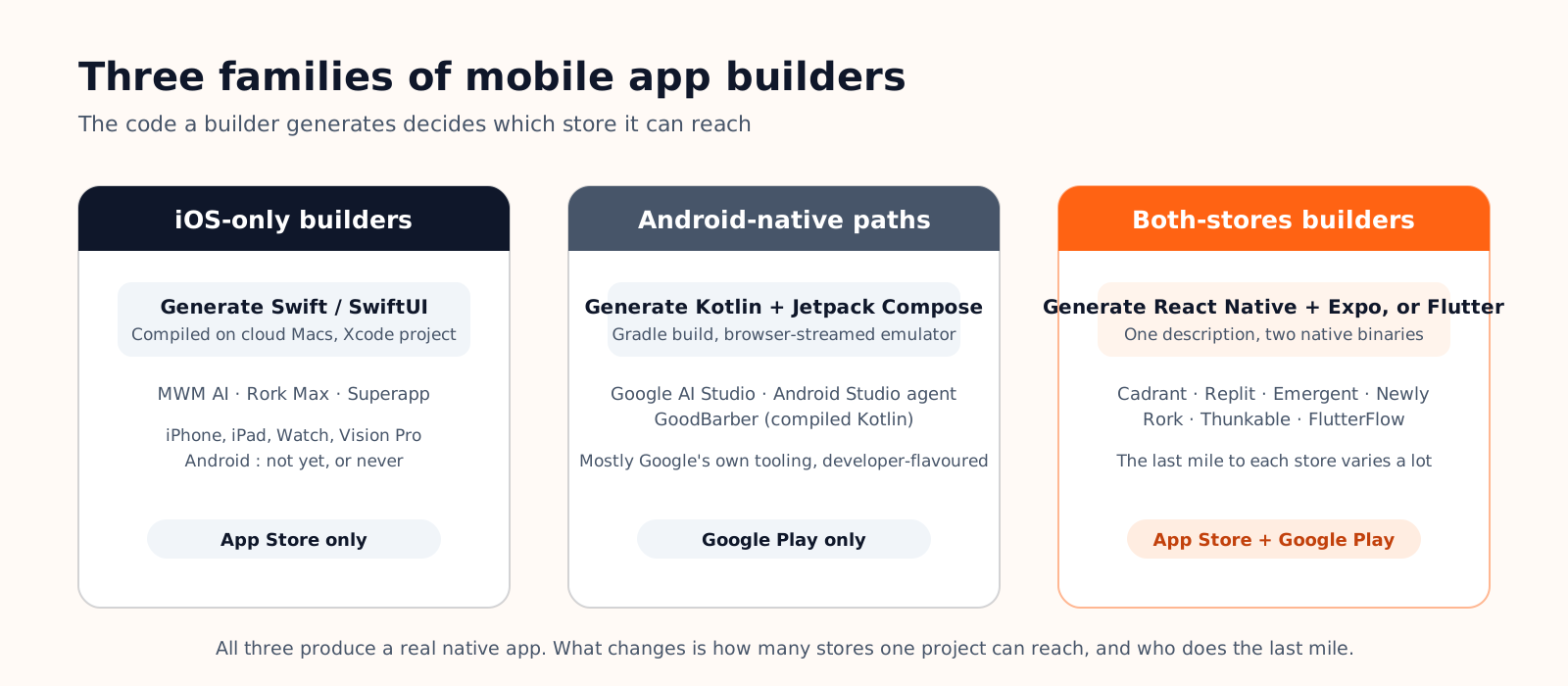
The dividing line is the code the builder generates. Swift compiles for Apple platforms only; Kotlin compiles for Android only; React Native and Flutter compile for both from one project. Everything downstream follows from that: whether you need a cloud Mac, which developer accounts you have to open, and how many binaries you maintain.
The iOS-only family is the newest and the most talked about. It exists because Apple's ecosystem rewards true Swift code with things a cross-platform app cannot easily get: Apple Watch and Vision Pro targets, widgets, Live Activities, iMessage apps. The Android-native family is smaller and more developer-flavoured, because Google chose to ship its own agent inside AI Studio and Android Studio rather than leave the space to startups. The both-stores family is where most no-code founders end up, because one project reaching two stores is usually the whole point.
iOS app builders: the Swift-native family
Three products define the category. MWM AI, launched in March 2026 by the Paris publisher behind a billion downloads, turns a prompt into native Swift for iPhone, iPad, Mac, Apple Watch and Vision Pro, with TestFlight embedded, one-click submission to App Store Connect, automatic store listings and built-in paywalls, subscriptions and ads. Its plans run from a free tier to Starter at $19, Pro at $49 with three App Store publications, and Pro+ at $149 with unlimited publications and full source export. Its Scale program is different in kind: MWM funds user acquisition for apps that show traction, in exchange for a revenue share.

Rork Max, the premium tier of Rork launched in February 2026, writes SwiftUI and compiles it on a fleet of cloud Macs, so you build in the browser, preview in a streamed simulator, install on your iPhone from a QR code and submit to the App Store in two clicks. It covers iPhone, iPad, Apple Watch, Apple TV, Vision Pro and iMessage, and starts at $200 a month. Superapp takes the same approach at a lower price point, from $25 a month, submits in two clicks as well and hands you the Xcode project. In all three cases Android is either absent (Rork Max, Superapp) or announced as native Kotlin coming later (MWM AI).
For developers, the reference iOS app builder is Xcode itself: since Xcode 26.3 in February 2026, Claude Agent and Codex can plan, edit, build and check Xcode Previews inside the IDE. It needs a Mac, which is precisely what the browser products above remove.
| Tool | Generated code | Apple platforms | Android | Path to the App Store | Entry price |
|---|---|---|---|---|---|
| MWM AI | Swift | iPhone, iPad, Mac, Watch, Vision Pro | Kotlin announced | One-click submission to App Store Connect, TestFlight built in, listings generated | Free; Starter $19; Pro $49 |
| Rork Max | SwiftUI, compiled on cloud Macs | iPhone, iPad, Watch, TV, Vision Pro, iMessage | No | Two-click submission from the browser | $200 a month |
| Superapp | Swift / SwiftUI | iPhone, iPad, Watch, Mac | No | Two-click submission with your Apple account, Xcode project exportable | Free (5 credits a day); Pro $25 |
| Xcode 26.3 + agents | Swift, any Apple framework | All | No | Archive and upload from Xcode | A Mac, plus $99 a year for the developer program |
Android app builders: the Kotlin-native paths
There is no Android mirror of MWM AI yet: no consumer product that writes native Kotlin from a prompt and hands you a Play Store business. The Kotlin-native paths that exist in 2026 come from Google. In AI Studio, the Build tab has a "Build an Android app" mode where an agent generates a full Kotlin and Jetpack Compose project with Material 3 theming, runs it in an Android emulator streamed to your browser, installs it on a plugged-in phone through WebUSB and can publish it straight to the Play Console internal testing track for up to 100 testers. The limits are explicit: single-activity projects, client-side only, no Firebase or secrets, ZIP download rather than GitHub.

Android Studio goes further for developers: its Gemini agent mode executes multi-file plans, and the new-project assistant scaffolds a Compose app from a prompt and an optional mockup. Among no-code builders, GoodBarber is the notable one that compiles to Kotlin (and Swift) rather than to a cross-platform runtime, with content and e-commerce apps from about 55 euros a month on its native tier. MWM AI's Kotlin output is the one to watch, since it would bring the paywall-and-ASO approach to Google Play.
The practical consequence: if your app is Android-first (field teams on inexpensive devices, markets where Android dominates), the honest choice in 2026 is either Google's tooling with someone who can read Kotlin, or a both-stores builder whose Android path is fully guided. The next section is about that second option.
Builders that ship to both stores
This is the family with the most choice, and the one where the marketing copy looks identical from tool to tool: "native iOS and Android from a prompt". The stack is almost always React Native with Expo, sometimes Flutter, and the stores are the same two, so the differences hide in the last mile: who runs the build, who submits, on which accounts, and whether Android gets the same treatment as iOS.
| Tool | Stack | iOS path | Android path | Code export | Entry price |
|---|---|---|---|---|---|
| Cadrant | React Native + Expo | Guided: Apple sign-in, app record, certificate, build on your Expo account, submitted to App Store Connect | Guided: package name, service-account invite, upload key kept for you, draft release on Internal testing | GitHub sync from Pro | Free plan; Starter at 20 euros a month to publish |
| Replit | React Native + Expo | Wizard powered by Expo Launch: certificates, profiles and signing handled | Build available, no guided Play flow yet, manual submission | Yes, full workspace | Plan plus usage; simulators from Core |
| Emergent | React Native + Expo (mobile agent) | Download the project, run the EAS build and submit yourself | Same: EAS to Play Console, on your side | Yes | Free (10 credits); Standard $20 |
| Newly | React Native + Expo, mobile only | Build and upload through EAS on your Apple account | App bundle generated and submitted on your Google account | Yes, ZIP or GitHub | From $25 a month |
| Rork (Pro) | React Native + Expo | Publishing from the editor with your Apple and Expo accounts | App bundle generated, Play Console upload by hand | GitHub sync on paid plans | Free; $25 to $200 |
| Thunkable | React Native, blocks plus an AI builder | Published from the platform | Published from the platform | No source export | Free; publishing from Builder, $37 a month billed yearly |
| FlutterFlow | Flutter (Dart) | One-click deploy with your App Store Connect API key, builds run on Codemagic | One-click deploy to Google Play | Download from Basic, GitHub from Growth | Free; Basic $39, Growth $80 per seat |
The last mile is where they differ
Read the two path columns together and three patterns appear. Guided on both stores: Cadrant, Newly, FlutterFlow and Thunkable take the build and the submission on both sides, on developer accounts you own. iOS guided, Android by hand: Replit and Rork made the App Store the headline feature, so on Android you download a bundle and finish in Play Console yourself, a gap both say they are closing. Do it yourself: Emergent hands you a solid Expo project and leaves the EAS build and submit commands to you, which is fine for a technical founder and a wall for a first-timer.
Two details are worth checking before subscribing, whatever the tool. First, whose accounts the builds run on: with Expo-based builders the build queue, logs and artifacts should live on your own Expo account, and the binary should land in your own App Store Connect and Play Console, not in the vendor's. Second, what happens to the signing keys if you leave: an upload key or a distribution certificate you cannot retrieve means the next version goes through a reset with Google or Apple. Expo Launch, which several of these tools build on, explains the no-Mac iOS path in detail.
From idea to the store: the two lanes side by side
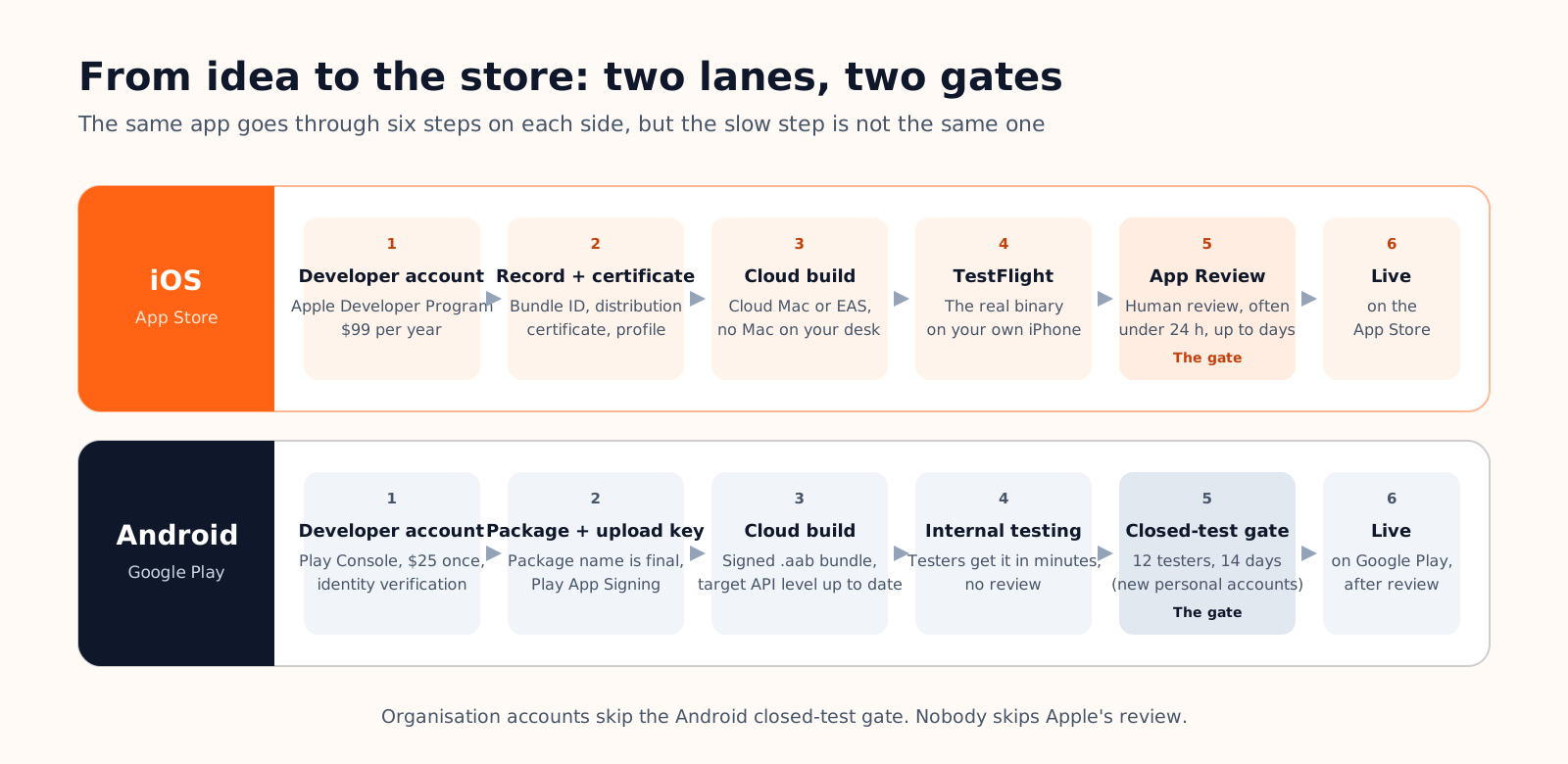
The journey has the same six steps on both sides, but the gate sits in a different place. On iOS the slow, uncertain step is the last one: a human review, with $99 a year paid up front and a certificate to provision before the first build. On Android the account costs $25 once, the build is a signed bundle, and internal testers receive it within minutes with no review at all; the slow step is the closed-test gate that new personal accounts must clear before production, 12 testers for 14 days, followed by Google's review of the production-access application.
| App Store | Google Play | |
|---|---|---|
| Developer account | $99 a year, App Store Connect | $25 once, identity verification, Play Console |
| Before the first build | Bundle ID, distribution certificate, provisioning profile | Package name (final), upload key, Play App Signing |
| Build artifact | Signed .ipa, built on a Mac (yours or the cloud's) | Signed .aab, built anywhere |
| Test track | TestFlight: internal testers, then external groups after a light review | Internal testing: instant, up to 100 testers, no review |
| Gate before production | App Review on every version | Closed test, 12 testers for 14 days on new personal accounts, then production review |
| Typical timing | Often under 24 h; two to five days for a new app in 2026 | Days for the account check, two weeks minimum for the gate, days for review |
The complete checklist, assets and declarations included, is in our guide to publishing on the App Store and Google Play.
On Cadrant's mobile app builder, the native project is an Expo and React Native app for iOS and Android from the first prompt, previewed in a phone frame and on your own device through Expo Go, and available on every plan including the free one. Publishing, on the Starter plan, follows the two lanes above. On iOS, a four-step flow signs you in with Apple, creates the app record, provisions the certificate and runs the build on your own Expo account before Expo submits it to App Store Connect. On Android, you create the app and invite a service account in Play Console, Cadrant keeps the upload key for the life of the app, and the bundle arrives as a draft release on the Internal testing track. The free Expo plan covers 15 iOS and 15 Android builds a month, and both stores stay under your own developer accounts.
- iOS app builders in the strict sense (MWM AI, Rork Max, Superapp) write Swift, reach the App Store only, and win on Apple-specific surfaces and built-in monetisation.
- Android app builders in the native sense are Google's own tooling (AI Studio, Android Studio agent) plus GoodBarber; there is no prompt-to-Kotlin consumer product yet.
- Both-stores builders (Cadrant, Replit, Emergent, Newly, Rork, Thunkable, FlutterFlow) differ in the last mile: check who builds, who submits, on whose accounts, and whether Android is guided.
- The gates differ: Apple reviews every version; Google gates new personal accounts with 12 testers for 14 days.