To validate an app idea, you test it in four steps, from the cheapest to the most convincing, and you stop as soon as one fails. First, talk to ten people who have the problem, about their life rather than your idea. Second, put up a landing page or a fake button and measure who signs up. Third, give a working prototype to five users and watch them use it. Fourth, ask for a commitment: a pre-order, a deposit, a signed letter. Each step costs a little more and proves a little more, and the whole sequence fits in two to four weeks.
The rule that makes it work is to write down, before each test, the result that would make you stop. Without that line drawn in advance, every result looks encouraging. This guide walks through the four tests, the questions to ask, the numbers to read, and how to decide between building, changing the idea or dropping it.
Why test an app idea before building it
Building has never been cheaper, which is exactly why testing matters more. When an AI builder produces a working app in a day, the expensive part is no longer the code: it is the months spent marketing a product nobody asked for. In its March 2026 analysis of 431 venture-backed startups that shut down, CB Insights found poor product-market fit behind 43% of the failures. Running out of money came up in 70% of cases, but usually as the final cause, after the product failed to find its market.
"Validating an idea" sounds like one thing. It is four separate questions, and each one needs its own test. A landing page cannot tell you whether people will understand your interface, and a great usability test cannot tell you whether they will pay.
| Question | Test | What counts as proof | What does not |
|---|---|---|---|
| Is the problem real? | Problem conversations | Stories of the last time it happened, and money or hours already spent on it | "Yes, that would be useful" |
| Do people want a solution? | Landing page or fake door | Signups from strangers who found the page on their own or through an ad | Likes, shares, signups from friends |
| Can they use your solution? | Prototype tested with 5 users | Users finish the main task without help | "The design is nice" |
| Will they pay? | Pre-order, deposit, concierge service | Money, a signature, or significant time given up | "I would pay for that" |
Step 1: test the problem with ten conversations
Before any page or prototype, check that the problem exists, that it hurts, and that the people who have it already try to solve it. Ten conversations of twenty minutes are usually enough to see a pattern, or the absence of one. Rob Fitzpatrick's book The Mom Test gives the three rules most founders now use: talk about their life instead of your idea, ask about specific past events instead of hypothetical futures, and talk less than they do.
Who to talk to
People who have had the problem recently, and ideally who are not your friends. If your app is for independent physiotherapists, talk to physiotherapists, not to people who know one. You find them where they already gather: professional groups, forums, LinkedIn, local associations. A short honest message works: you are looking into how they handle a given task and would like twenty minutes of their time, no pitch.
Questions that tell the truth
Take notes in their words, and after each conversation sort what you heard into facts (what they did, what it cost) and opinions (what they think they would do). Only the facts count. A strong signal looks like this: several people describe the same problem without being prompted, they have built a workaround, a spreadsheet, a paid freelancer, a stack of sticky notes, and they ask you to tell them when you have something.
Step 2: test demand with a landing page or a fake door
Conversations tell you the problem is real for ten people. A landing page tells you whether strangers want your solution badly enough to leave an email. The page describes the result the app delivers, shows one visual, even a mockup, and has one action: join the waitlist, request early access, or pre-order. Our guide on how to create a landing page covers the structure in detail.
A fake door is the same idea inside something that already exists: a button for a feature you have not built, on your current site or in your newsletter. Clicks show interest; the page behind the button explains honestly that the feature is coming and offers to notify the visitor. Either way, send real traffic: a small ad budget, around $100 over a week, or posts in the communities you found in step 1. Signups from your own circle do not count.
Set your threshold before you launch
There is no universal good signup rate; it depends on the traffic, the audience and the price. What matters is to decide the number in advance and keep it. The table gives example criteria for a page that receives 300 to 500 visitors from targeted ads.
| Signal | How to measure it | Example "continue" line | Example "stop or rethink" line |
|---|---|---|---|
| Signup rate | Signups divided by unique visitors | 10% or more | Under 3% |
| Ad click-through rate | Clicks divided by impressions | Well above the platform average for that audience | Nobody clicks even with several messages tested |
| Replies | A welcome email asking "what made you sign up?" | A third of signups reply with a real problem | No replies at all |
| Pre-orders | A paid early-access option next to the free waitlist | At least a few payments | Zero, after a few hundred visitors |
Step 3: test a prototype, then ask for a commitment
Once demand is there, the question changes: can people actually use what you have in mind? This is where a real prototype beats a mockup. A clickable image shows a layout; a working app shows whether a user can create an account, enter their data and get the result they came for.

Five users are enough for a first round
Jakob Nielsen's well-known study on usability testing found that five users uncover about 85% of the usability problems of an interface, and that three rounds of five, with fixes in between, teach you more than one round of fifteen. The method is simple: give each person one task ("book a session for next Tuesday"), ask them to think aloud, and do not help. Every time you want to explain something, write it down: that is a problem in the app.
Build the prototype in a day, not a quarter
With an AI app builder, the prototype is no longer the bottleneck. On Cadrant, you describe the app in plain language and get a working web or mobile application, then change it by chat between two test sessions. A web prototype is published in one click to an address like your-app.cadrant.app that you can send to testers, and each click on Publish replaces the previous version. A mobile prototype runs on a real phone through Expo Go by scanning a QR code. The Starter plan is $20 a month; the AI app builder page details what is included.
Ask for a commitment
The last step is the one most people skip, because it is uncomfortable. At the end of a good test session, ask for something real: a paid pre-order at a launch price, a deposit, a letter of intent from a company, or a few weeks of a concierge version where you deliver the service by hand behind the prototype. A concierge test is often the most instructive: if you cannot get people to pay for the result when a human delivers it, software will not change their mind.
Decide: build, change the idea or drop it
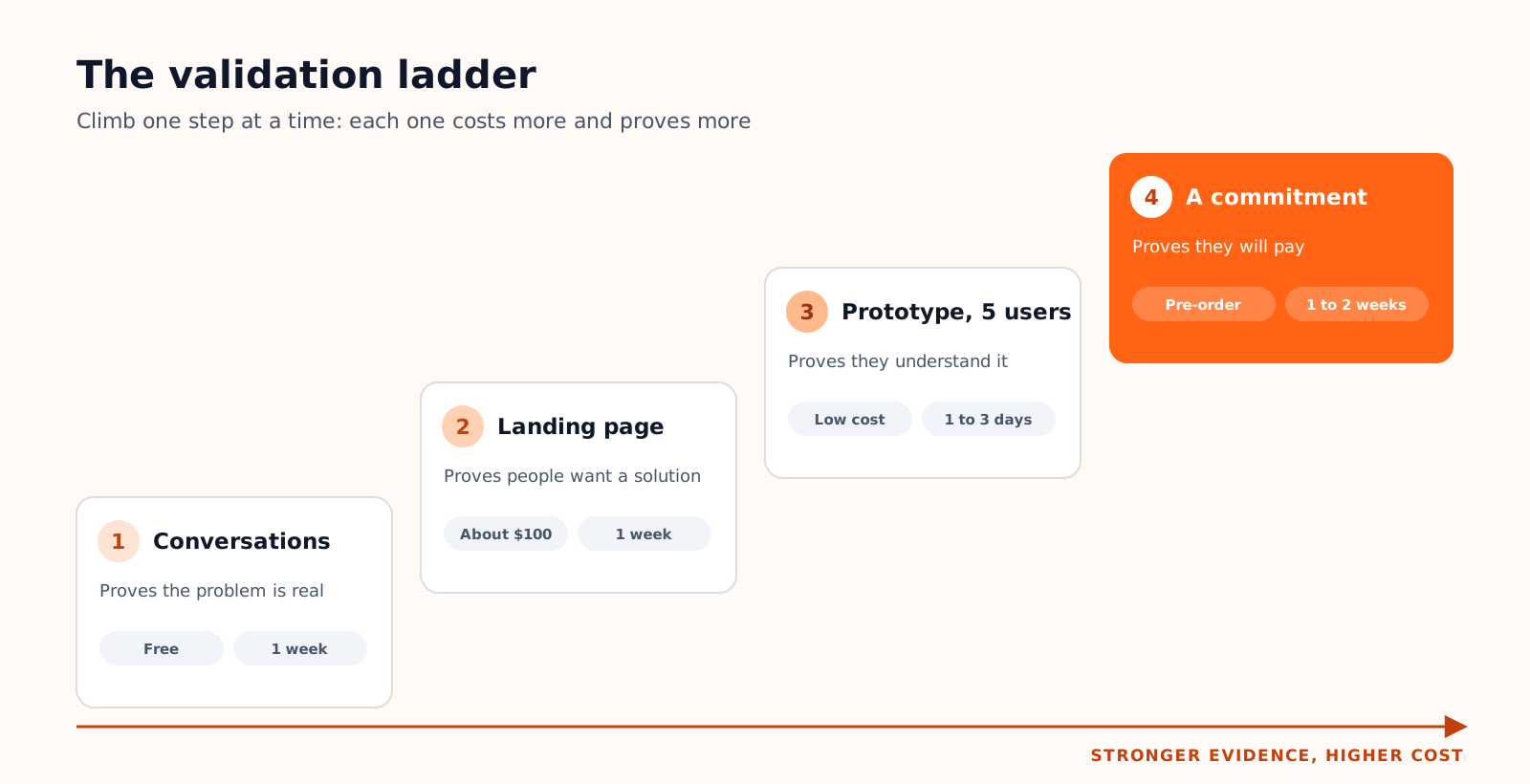
At each step, compare the result with the line you wrote before starting. Three outcomes are possible. The result clears the line: move to the next step. It falls short but the conversations revealed a different, sharper problem: change the target or the promise and run the same step again. It falls short and nothing stands out: drop the idea, and count the two weeks as cheap insurance.
A four-week plan
- 1. Week 1: conversations. Ten interviews with people who had the problem recently. Write your stop line first, for example "at least six describe the problem and a workaround without prompting".
- 2. Week 2: landing page. One page, one promise, one action, about $100 of targeted ads. Stop line decided in advance, for example under 3% signups.
- 3. Week 3: prototype. Build the main path only, test with five signups from week 2, fix, test with five more.
- 4. Week 4: commitment. Offer a paid pre-order or a concierge version to everyone who tested. A few payments is a green light; zero is an answer too.
If the four steps pass, you have more than an idea: a list of people waiting, a prototype they can use and the first revenue. The next stage is turning that prototype into a product people keep using, which our guide to building and launching a startup MVP covers from pricing to the first 90 days.
- Validation is four questions: is the problem real, is there demand, can people use it, will they pay. Each needs its own test.
- Talk about people's past, not your idea; a workaround they already pay for is the strongest early sign.
- Send strangers to a landing page and judge the signups against a number you chose beforehand.
- Five users per round find most usability problems; a pre-order or a concierge test settles the money question.