EAS Build is the hosted service from Expo Application Services that turns an Expo or React Native project into installable binaries: an .aab or .apk for Android, an .ipa for iOS. You run one command, the project is uploaded, a fresh cloud machine compiles and signs it, and you download the result or send it straight to the stores. It is the reason you can produce an iPhone build from a Windows laptop.
On price, the short answer: the Free plan covers up to 15 Android and 15 iOS builds a month in a low-priority queue. Paid plans start at $19 a month (Starter, with $45 of build credit) and $199 a month (Production, with $225 of credit), and builds beyond the credit cost $1 to $4 each depending on platform and machine size. These figures come from the Expo pricing page, checked on October 13, 2026.
This guide zooms in on the build service. For the wider picture of the framework, its SDK and its router, start with what Expo is.
What EAS Build does, and what it does not
Expo's own definition is short: "EAS Build is a hosted service for building app binaries for your Expo and React Native projects." It also builds plain native projects that use neither Expo nor React Native, but its defaults are tuned for Expo apps, so most projects need no extra configuration.
Concretely, a build takes care of four jobs that are painful to set up by hand:
- A clean build machine. Each build gets its own virtual machine with the toolchain already installed: the Android SDK on Linux, Xcode on macOS.
- Signing. EAS can generate and store your Android keystore, your iOS distribution certificate and your provisioning profiles, or use the ones you supply.
- Repeatable settings. Build profiles in an eas.json file describe each kind of build, so the same command gives the same result on any laptop or in CI.
- Distribution. A finished build can be shared with testers through a URL, or handed to EAS Submit for the stores.
What it does not do: write your store listing, take screenshots or release the app to the public. Those steps stay in App Store Connect and Play Console.
Build, Submit, Update: three different services
EAS is a family of services, and they are often confused. Only one of them compiles anything.
| Service | What it does | What you get |
|---|---|---|
| EAS Build | Compiles and signs the native app on a cloud machine | An .aab, .apk or .ipa file, plus build logs |
| EAS Submit | Uploads a finished binary to Google Play or App Store Connect | A release on a Play track, or a build waiting in TestFlight |
| EAS Update | Sends JavaScript and asset changes to apps already installed | A fix on users' phones without a new store release |
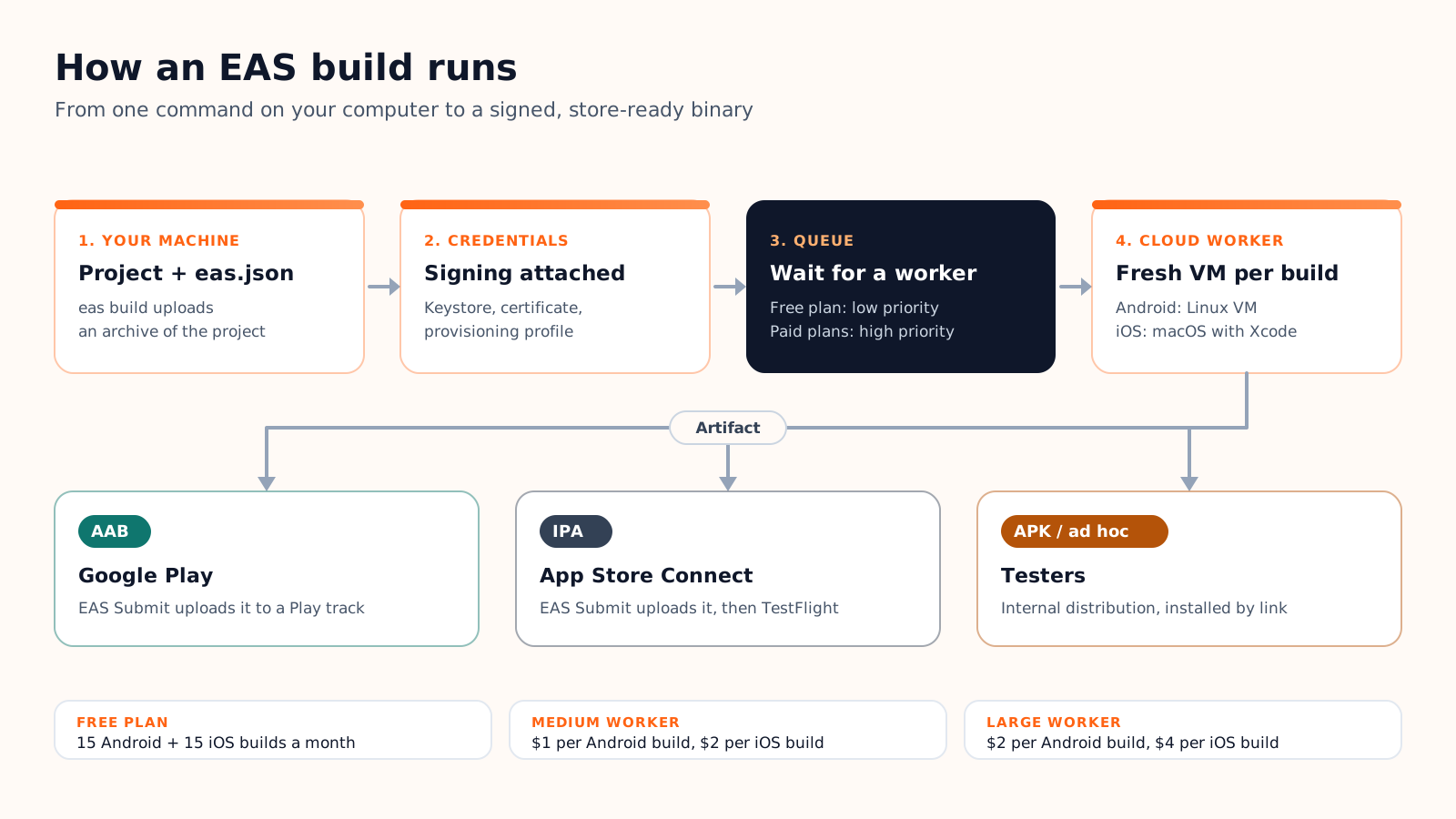
How an EAS build works, step by step
You need Node.js, the EAS CLI and a free Expo account. From there, the path from code to store looks like this:
- Configure once. Running eas build:configure creates eas.json at the root of the project, next to package.json.
- Start a build. eas build --platform android (or ios, or all) picks the production profile by default; add --profile preview for another one.
- Credentials. The CLI checks the signing credentials, and offers to generate the missing ones the first time.
- Upload and queue. The project is archived and uploaded, then the build waits for a free worker in your plan's queue.
- Compile on a fresh machine. The worker installs dependencies, generates the native projects, compiles and signs the app. Logs stream to the Expo dashboard.
- Get the artifact. Download the file, share it with an install link, or let EAS Submit upload it, either afterwards with eas submit or in the same run with --auto-submit.
Build profiles in eas.json
A profile is a named set of build settings. The file that eas build:configure generates contains three:
{
  "build": {
    "development": {
      "developmentClient": true,
      "distribution": "internal"
    },
    "preview": {
      "distribution": "internal"
    },
    "production": {}
  }
}| Profile | Who it is for | Typical output |
|---|---|---|
| development | You, while coding: a development build with developer tools (needs expo-dev-client), installed directly on your devices | APK or ad hoc iOS build; never submitted to a store |
| preview | Your team and stakeholders, testing in production-like conditions | APK or ad hoc iOS build, shared by URL |
| production | The stores, including TestFlight and Play testing tracks | AAB for Android (the default), IPA for iOS |
Two settings come up often. "buildType": "apk" under android turns a profile's output into an APK you can install directly, which is what you want for preview. "resourceClass": "large" moves a heavy build to a bigger machine; medium is the default, and large workers require a paid plan. Profiles can also inherit from each other with "extends", up to five levels deep.
Credentials and signing
Every store build must be signed. For Android, that means an upload keystore; for iOS, a distribution certificate and a provisioning profile, both tied to your Apple Developer account. EAS can generate them and keep them on Expo's servers, so any machine or teammate can build without passing files around. You can also upload your own, which matters when an app already exists: Google rejects updates signed with a different upload key, and Play App Signing keeps the final app signing key on Google's side.
EAS Build pricing in 2026
Expo sells EAS by plan, and each paid plan includes a dollar amount of build credit. The Free plan works differently: it counts builds, not dollars.
| Plan | Price per month | Builds included | Queue | Concurrent builds | Build timeout |
|---|---|---|---|---|---|
| Free | $0 | Up to 15 Android and 15 iOS builds | Low priority | 1 | 45 minutes |
| Starter | $19 plus usage | $45 of build credit | High priority | 1 | 2 hours |
| Production | $199 plus usage | $225 of build credit | High priority | 2 | 2 hours |
| Enterprise | Custom, from $1,000 | Customizable | High priority | 5 | 2 hours |
Once the credit is spent, each build is billed at a flat rate that depends on the platform and the machine. Extra concurrent builds cost $50 a month each on paid plans.
| Worker | Machine | Price per build |
|---|---|---|
| Android, medium | 4 vCPU, 16 GB RAM | $1 |
| Android, large | 8 vCPU, 32 GB RAM | $2 |
| iOS, medium | 5 performance cores, 20 GiB RAM | $2 |
| iOS, large | 10 performance cores, 40 GiB RAM | $4 |
The queue and the timeout
For a solo developer, the real cost of the Free plan is time. Expo warns that "at peak times, you may experience wait times of 90+ minutes with the low-priority queue", while it strives "for zero wait time on the high-priority queue" that every paid plan uses. The build itself must also finish within 45 minutes on Free, against 2 hours on paid plans; a large iOS project with many native modules can come close to that limit.
What a month of builds costs
Three typical cases, calculated from the rates above on medium workers (our arithmetic, not Expo's figures):
- Side project, 10 Android and 8 iOS builds: $0 on Free, if you can live with the queue.
- Small team, 30 Android and 20 iOS builds: $30 plus $40, so $70 of usage. Starter's $45 credit covers most of it, leaving $25 on top of the $19 subscription: $44 for the month.
- Active product, 100 Android and 80 iOS builds: $100 plus $160, so $260 of usage. On Production, the $225 credit leaves $35 on top of $199: $234 for the month.
Large workers double each build's price, so move to them only for builds that actually run out of memory or time. Builds started from EAS Workflows, Expo's CI service, are billed at the same flat rates.
EAS Build or a local build?
You do not have to use the cloud. There are two local options: eas build --local, which runs the same build process on your own machine, and the classic route through Xcode and Android Studio without EAS at all.
| Criterion | EAS Build (cloud) | eas build --local | Xcode / Android Studio |
|---|---|---|---|
| iOS from Windows or Linux | Yes | No, iOS needs a Mac with Xcode | No, Xcode runs only on macOS |
| Supported host | Any machine with Node.js | macOS and Linux; Windows not supported (WSL untested) | macOS for iOS; any OS for Android |
| Setup | EAS CLI and an Expo account | Android SDK and NDK, fastlane and CocoaPods for iOS, plus an Expo login | Full native toolchains, manual signing |
| Signing | Managed by EAS or your own | Can download managed credentials | Entirely yours to handle |
| Cost | Plan quota or credit, then $1 to $4 per build | Your hardware | Your hardware |
| Main limits | Queue on Free, timeout per plan | One platform at a time, no caching, eas.json tool versions ignored, secret variables to set locally | No shared setup across the team |
A simple rule of thumb: stay in the cloud while you have no Mac, while several people build the app, or while the free quota covers your month. Move to local builds when you iterate on native code many times a day on a Mac, when company policy forbids third-party build servers, or to reproduce a cloud failure on your own machine, which is exactly what Expo suggests --local for. The local builds documentation lists the current limitations.
From build to store, with or without Cadrant
Once the binary exists, EAS Submit does the upload. On Android it sends the .aab to a Play track (internal, alpha, beta or production), and it can even create the first release of a brand-new app on the internal testing track. On iOS it sends the .ipa to App Store Connect, where it shows up in TestFlight after processing; the store listing and the submission for review stay manual. The rest of the store path, from the developer account to review, is in our guide to publishing an app on Google Play.
With Cadrant's mobile app builder, you never write eas.json or type a build command, but EAS Build still does the compiling, on your own Expo account. You connect that account once in Integrations, and each publish uses your free EAS quota of 15 Android and 15 iOS builds a month. On Android, Cadrant generates and keeps the upload keystore, and Expo submits the app bundle to your Play Console as a draft release on the internal testing track. On iOS, a guided Apple sign-in creates the app in App Store Connect and provisions the distribution certificate, then Expo submits the binary to your account. The accounts, the quota and the apps stay yours.