The best Base44 alternative depends on what you are missing. For a backend in an account you own and a native mobile app from the same tool, look at Cadrant. For web apps only, with the option of your own Supabase project, Lovable. If you read code and want a full development environment, Bolt.new or Replit. If your team works in Python, Emergent. And if none of these gaps is yours, staying on Base44 is a reasonable answer.
This guide compares the five on the points that are hard to change later: who owns the backend and the data, what you can export, whether mobile is native, and what the app costs once it is live. We start with Cadrant, our own builder, and say so openly; the others follow with what each does well and who it suits. Every price and limit comes from the vendors' pricing pages and documentation, checked on October 5, 2026.
What Base44 does well, and where it stops
Base44, part of Wix since June 2025, has one clear strength: nothing to configure. You describe the app and get the interface, a database, user login, file storage and hosting in one place, with no external account to create. For an internal tool or a first prototype, that is hard to beat. The free plan (25 message credits a month, 5 a day at most, up to 5 apps) is enough to judge it.
Paid plans on the Base44 pricing page start at $20 a month for Starter ($16 a month billed yearly), then Builder at $50, Pro at $100 and Elite at $200. The reasons to look elsewhere are structural, and all four are written in Base44's own documentation:
- The backend stays on the platform. Database, authentication and hosting run on Base44's infrastructure, in the United States by default. The docs list what you can export (frontend code, backend functions, each data table as a CSV file) and what you cannot: "managed hosting, authentication system, or database infrastructure".
- Export starts at Builder. GitHub sync and the ZIP download both require the $50 plan. On Starter you can edit the code in the editor, not take it out.
- Two credit meters. Message credits pay for building with the AI chat. Integration credits are spent by the live app each time it sends an email, uploads a file or calls an AI model. Starter includes 100 of the first and 2,000 of the second; when integration credits run out, those actions fail until the monthly reset or an upgrade.
- Mobile is a web view. Base44 generates App Store and Google Play files, also from Builder, and describes the result as "a lightweight native wrapper around your web app". Full offline mode is not supported yet.
What to compare in a Base44 alternative
Four questions separate these tools more than any feature list.
- Who owns the backend and the data? Either the builder hosts your database and user accounts on its own infrastructure, or it connects to a backend account opened in your name.
- What can you export? Code, data, and everything in between: user accounts, access rules, server functions. Check on which plan export starts.
- Is mobile native? A wrapped web app and a compiled React Native app are different products, for store review and for device features alike.
- What does it cost once live? Some tools only charge for building. Others also meter the running app, through runtime credits or a monthly charge per deployed app.
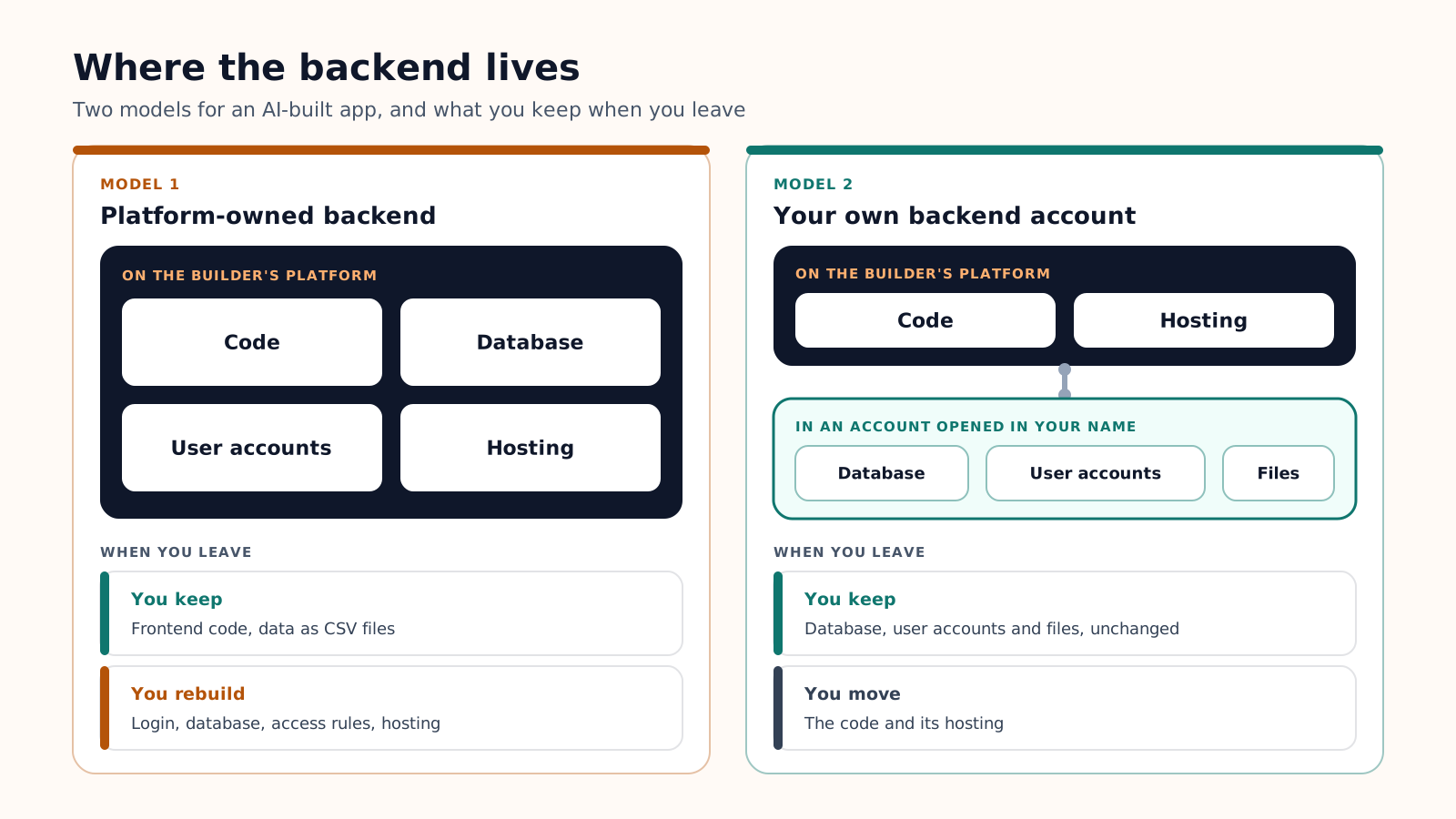
The first model is faster on day one. The second asks for one more account and gives you the database on the way out. For the full price grids, plan by plan, see our AI app cost breakdown.
Five Base44 alternatives compared
Entry paid plans, billed monthly, as of October 5, 2026. Base44 is the last row, for reference.
| Tool | Entry paid plan | Native mobile | Backend | Export |
|---|---|---|---|---|
| Cadrant | Starter, $20: 300 credits, 5 projects, hosting and custom domain included | Yes, Expo and React Native | Supabase, in your own account | Code and GitHub from Pro ($40); data already in your account |
| Lovable | Pro, $25: 100 credits plus 5 daily build credits | No, web apps | Built in (Lovable Cloud), or your own Supabase | Git sync on every plan, ZIP on paid plans |
| Bolt.new | Pro, $25: from 10 million tokens | Yes, Expo | Bolt Database, or Supabase on Pro | GitHub; the database can be claimed in Supabase |
| Emergent | Standard, $20: 100 credits, 50 a month used per deployed app | Yes, Expo | FastAPI and MongoDB, hosted by Emergent | Save to GitHub |
| Replit Agent | Core, $20: $20 of usage credits | Yes, Expo | PostgreSQL, hosted by Replit | Code can be pushed to a Git remote |
| Base44 | Starter, $20: 100 message credits, 2,000 integration credits | No, web view wrapper | Built in, on Base44's infrastructure | Code from Builder ($50), data as CSV; login and database stay |
Cadrant: your own backend account and native mobile
Cadrant is our own AI app builder, so read this section with that in mind. You describe the project in plain language and it generates a website, a React web app or a native mobile app built with Expo and React Native, then you iterate by chat or in a visual editor. The backend is Supabase (PostgreSQL database, authentication, storage, edge functions), connected to your own Supabase account, so the data sits in an account you own from the first day.
- Pricing: about 10 credits create or modify an app, so Starter's 300 credits cover roughly 30 generations or changes a month. No monthly credit charge per published app.
- Choose it if: you want an app on the App Store and Google Play, published from your own developer accounts, or you want to keep the database when you leave.
- Limits: no free plan, a Supabase account to open (a step Base44 does not ask for), and code export from Pro.
Lovable: polished web apps, backend built in or your own
Lovable is the closest to Base44 in feel: prompt in, working web app out. Its built-in backend, Lovable Cloud, is on by default and built on Supabase's open-source foundation, and you can connect your own Supabase project instead. Moving from the built-in backend to your own Supabase project is documented, but it is manual: you export the data and rebuild the schema in a new project. There is no one-click migration.
- Choose it if: you build web apps only and care about interface quality.
- Limits: no native mobile (its FAQ says it does not generate React Native projects), and credits also pay for running the app beyond the included grant. More options in our Lovable alternatives guide.
Bolt.new: a development environment in the browser
Bolt.new gives you a real project with code, a terminal and a preview, driven by an AI agent. A database is created automatically when the project needs one; on Pro and Teams you can pick Supabase instead, or claim the Bolt database in your own Supabase account. Mobile apps are built with Expo and tested in Expo Go.
- Choose it if: you can read code and want control over structure and dependencies.
- Limits: the unit is the token, and most of it goes to Bolt reading your files, so large projects cost more per message. A project started for the web does not easily switch to mobile.
Emergent: Python backend, web and mobile
Emergent builds web apps on React, FastAPI and MongoDB, and mobile apps on Expo with the same Python backend. Code is saved to GitHub from the Standard plan.
- Choose it if: Python and MongoDB are what your developers already know.
- Limits: each deployed app costs 50 credits a month, half of the Standard allowance, and a self-hosted database is listed only on the Enterprise plan.
Replit Agent: a full workspace with usage billing
Replit Agent works inside a complete cloud workspace: code, a managed PostgreSQL database, file storage and publishing in one account. It also builds native iOS and Android apps, tested with Expo Go and uploaded to App Store Connect from Replit.
- Choose it if: the project goes beyond a standard React app, or you want building and hosting in one place.
- Limits: as with Base44, the database runs on the vendor's platform. Paid Agent work is billed by effort, and the same credits pay for published apps, storage and databases, which makes the monthly total harder to predict.
Which alternative for which case
Migrating away from an all-in-one backend
Leaving Base44 is possible, and its documentation is clear about what comes with you. Sort the work into two columns before you start.
| What moves | What must be rebuilt |
|---|---|
| The React frontend and the backend functions, through GitHub or a ZIP file (Builder plan) | The database itself: tables, relations and access rules in the new backend |
| The content of each table, exported as CSV | User login, because the authentication system is not exportable |
| Your domain name | Every call to Base44's SDK and built-in integrations: email, file upload, AI calls |
- Export first: connect GitHub or download the ZIP, then export every table as CSV.
- Create the new backend before touching the interface, for example a Supabase project in your own account, and import the CSV files.
- Rebuild login and access rules, then replace the SDK calls screen by screen.
- Run both versions side by side before you move the domain.
On a small app, describing it again in the new builder and importing the CSV files is often quicker than porting the code. Either way, choose the next tool on what you cannot change later: where the backend lives, and whether mobile is native. Price is the easiest thing to correct afterwards.