The right Emergent alternative depends on what made you look. If the issue is what it costs to keep apps online, or you want native mobile apps published to the stores without a command line, Cadrant fits: hosting is part of the plan and native mobile is included from $20 a month. For a design-led web app, look at Lovable. For hands-on control of the code, Bolt.new. For an internal tool with nothing to configure, Base44. For a project outside the usual web stack, Replit.
Emergent (emergent.sh) is a capable builder: it generates full-stack web and mobile apps from a conversation, with a real Python backend, and puts them online in minutes with a custom domain and SSL. People hesitate for structural reasons that anyone can check. We go through them, then compare the alternatives, starting with Cadrant, our own builder. Prices come from each vendor's pricing page or documentation, checked on October 5, 2026.
Why people look for an Emergent alternative
Four facts explain most of these searches. They come from Emergent's pricing page and help center, mainly the Plans and Credits article.
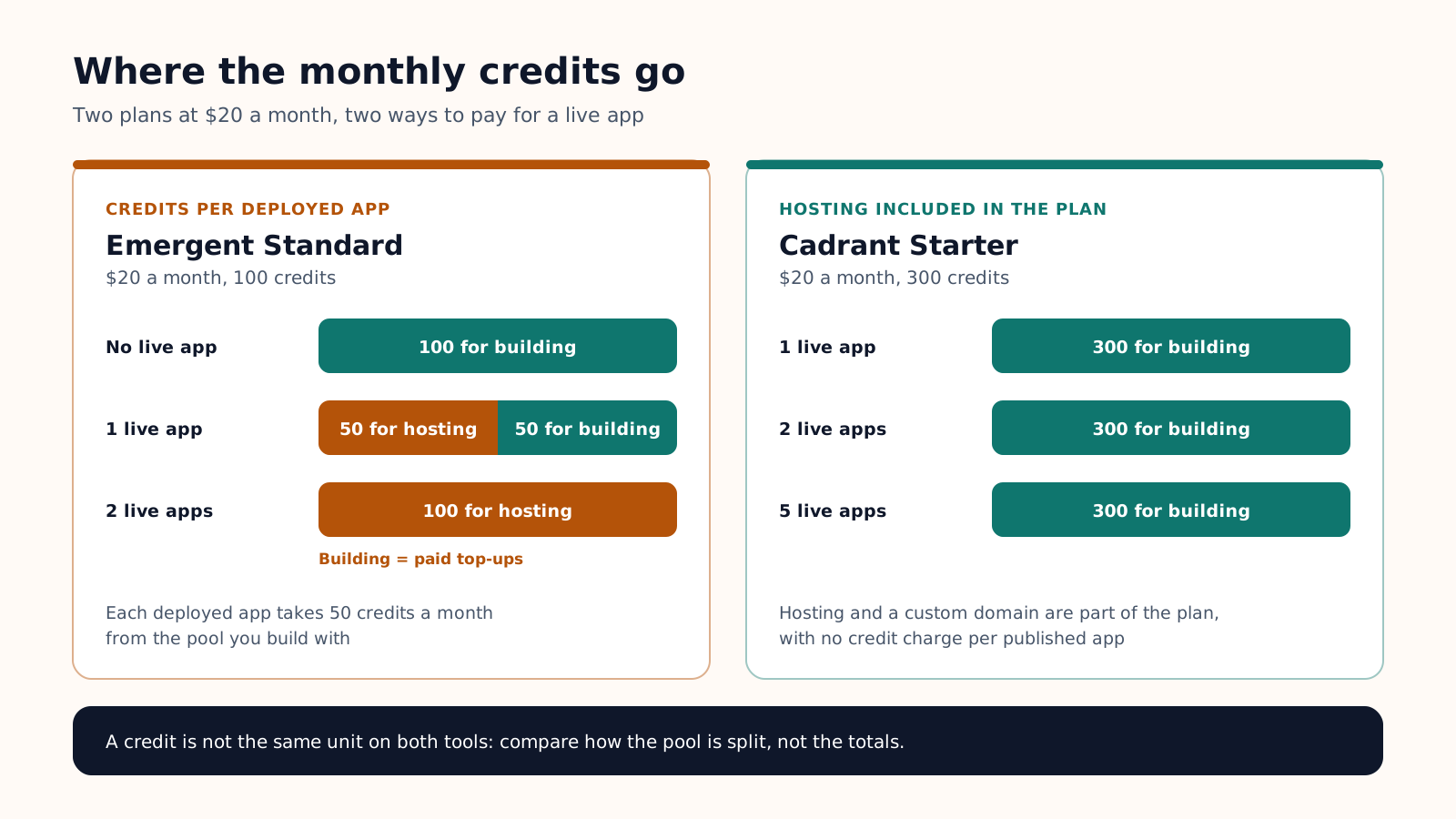
- A live app costs credits every month. Each deployed app takes 50 credits a month from your plan. On Standard ($20 a month, 100 credits), one live app uses half of the allowance and two use all of it.
- The step between plans is steep. Standard costs $20 a month ($17 billed yearly) for 100 credits. The next plan, Pro, costs $200 ($167 billed yearly) for 750. In between, you buy top-ups, from $1 for 5 credits.
- The stack is Python and MongoDB. Emergent generates React on the front (Expo for mobile), FastAPI on the back and MongoDB for the data. It is a sound stack, but not the JavaScript and Postgres pairing used by Cadrant, Lovable or Replit.
- Store publishing is a command-line job. The Mobile Agent, reserved for paid plans, builds an Expo app. To publish it, you download the code, install Expo's EAS command-line tool and run the builds and submissions yourself.
The free plan (10 credits a month) is for trying the agent: deployments, the Mobile Agent, GitHub and custom domains start with Standard. Our Emergent pricing guide covers the plans and three sample budgets.
What to compare before you switch
Compare builders on what is expensive to change later, not on the headline price:
- Cost of a live app per month. Is hosting part of the plan, taken from the credits you build with, or billed as usage?
- Native mobile. A real React Native app, a web app in a wrapper, or nothing at all. And who runs the store build.
- Backend ownership. A database in an account you own, or one that lives inside the vendor's platform.
- Code export. GitHub sync or download, and from which plan.
The table applies them, with Emergent as the reference line.
| Builder | Entry paid plan | Keeping an app live | Native mobile | Backend | Code export |
|---|---|---|---|---|---|
| Cadrant | Starter: $20 a month, 300 credits, 5 projects | Included in the plan, with a custom domain | Yes (Expo), guided store publishing | Supabase, in your own account | GitHub and export from Pro ($40) |
| Emergent | Standard: $20 a month, 100 credits | 50 credits a month per deployed app | Yes (Expo), you run EAS yourself | FastAPI and MongoDB, on Emergent's cloud | GitHub from Standard |
| Lovable | Pro: $25 a month, 100 credits plus 5 a day | Same balance as building; a monthly Cloud grant covers small apps | No, web apps only | Lovable Cloud, or your own Supabase | GitHub on every plan |
| Bolt.new | Pro: $25 a month, 10M tokens | Hosting included in paid plans | Yes (Expo), you run EAS yourself | Bolt Database, or Supabase on Pro | GitHub sync |
| Base44 | Starter: $20 a month, 100 message credits | Built-in hosting; app actions use integration credits | No, a wrapper around the web app | Built in, hosted by Base44 | GitHub from Builder |
| Replit | Core: $20 a month, $20 of credits | Billed by usage, drawn from the credits | Yes (Expo), App Store only for now | Built-in PostgreSQL, billed by usage | GitHub sync |
Emergent alternatives, one by one
Cadrant: hosting in the plan, native mobile from Starter
Cadrant is our builder, so weigh this section accordingly. You describe the project in plain language and it generates websites, React web apps and native mobile apps on Expo and React Native. You then iterate by chat or in a visual editor, or start from one of about 200 templates.
Against Emergent, the differences are structural. Hosting and a custom domain are part of the plan, so a published app does not draw credits every month. Starter costs $20 a month with 300 credits and up to 5 projects, and about 10 credits create or modify an app. Native mobile apps are included from Starter, with guided publishing to the App Store and Google Play from your own developer accounts and testing on a real phone through Expo Go. The backend is Supabase, connected to your own account, so the data stays in an account you own.
- Choose it if: you keep several apps online, want a store-ready mobile app without the EAS command line, or want the database in your own account.
- Limits: GitHub integration and code export start with Pro ($40 a month, 1,000 credits, unlimited projects). The stack is fixed: for a Python backend, Emergent or Replit fit better.
Lovable: polished web apps, no native mobile
Lovable builds React web apps with careful interfaces. Pro starts at $25 a month ($250 a year) for 100 credits plus 5 daily credits, and unused monthly credits roll over. The backend is Lovable Cloud, built on Supabase's open-source foundation, or a Supabase project you connect yourself. GitHub sync is available on every plan.
- Choose it if: the product is a web app and the interface matters most.
- Limits: its documentation states that it builds web applications and does not generate React Native projects, so mobile means a PWA or a wrapper. Building, hosting and backend usage share one credit balance.
Bolt.new: a development environment in the browser
Bolt.new hands you the project itself: files, terminal and preview in the browser, with an agent writing the code. Pro costs $25 a month for 10 million tokens, with rollover, hosting and custom domain support. It creates a database automatically, and Pro users can choose Supabase instead. Mobile apps use Expo, previewed in Expo Go.
- Choose it if: you read code and want control over every file.
- Limits: a project created for the web does not switch easily to mobile, and store publishing means running EAS commands locally, as on Emergent.
Base44: backend included, nothing to configure
Base44 ships the database, authentication and hosting inside the platform, so there is no external account to create. Starter costs $20 a month ($16 billed yearly) for 100 message credits and 2,000 integration credits. GitHub integration starts with the Builder plan.
- Choose it if: you want an internal tool or a simple web app running the same day.
- Limits: apps are web apps. For the stores, Base44 generates a native wrapper around the web app, and downloading the store files requires Builder. The database runs on Base44, not in an account you own.
Replit Agent: any language, usage billing
Replit is a cloud development workspace with an agent on top. Core costs $20 a month ($18 billed yearly) and includes $20 of monthly credits, which apply to the agent, publishing and database usage. Mobile apps are built with Expo and React Native.
- Choose it if: the project is a Python service, an automation or anything outside the standard React app.
- Limits: past the included credits, usage is billed as you go, so the monthly cost moves with activity. Its documentation says publishing to Google Play is not yet supported: the guided route covers TestFlight and the App Store.
v0: a front-end generator, not a like-for-like alternative
v0, from Vercel, generates React and Next.js interfaces and deploys them to Vercel. It is strong on UI and can be connected to a backend, but its documentation does not cover native mobile apps. The Plus plan costs $30 per user a month with $30 of included credits, metered in tokens. Use it for the front end, not in place of a builder that also ships the backend and the mobile app.
Switching builder mid-project: what migrates and what does not
Changing builder is closer to a rebuild than to a move. Know what carries over before you start.
What carries over
- The code, as a reference. Push it to GitHub from Emergent (Standard and above) before you leave. A React front end can be reused. A FastAPI backend will not be maintained by a builder that generates JavaScript and Postgres: plan to regenerate it.
- The data, with work. Export it, then remodel it: MongoDB documents do not map one to one onto Postgres tables.
- The domain and the store listings. The domain is a DNS change. Store listings sit in your own Apple and Google accounts, and a new build with the same app identifier updates the existing app.
What stays behind
- Credits. Monthly credits reset at each billing cycle and top-ups stay on the Emergent account. Use them before you go.
- The conversation. The agent's history and context do not follow you. The new tool starts from your code and your description.
- The deployment. The live URL, the environment variables and the secrets have to be recreated.
Common mistakes
- Switching on price alone, then meeting the same limit elsewhere: web only, or usage billing.
- Leaving the old deployment running: on Emergent it keeps drawing 50 credits a month until you shut it down.
- Migrating a working app for a marginal gain. If one live app on Standard covers your needs, staying is a legitimate answer.
Choose on what is costly to change later: where the data lives, whether mobile is truly native, and what each live app costs per month. For budgets across builders, see our AI app cost breakdown.