Two families of tools now promise the same thing: describe what you want, get working software. On one side, AI app builders like Cadrant, Lovable or Bolt. On the other, AI IDEs like Cursor, Windsurf or Claude Code. They look interchangeable in a demo, and they are not. Neither is a beginner version of the other: they sit at different points of the same job, and the honest comparison happens on four axes, velocity, learning curve, configuration and flexibility.

What an AI app builder really is
An AI app builder is a specialized coding agent. It understands a brief, plans changes, generates code, and also acts on the infrastructure around the code: data schema, authentication, storage, deployment. It is not a chat that pastes files into an empty folder.
It is optimized for one technical stack, often React on the front and Supabase (Postgres, auth, storage) on the back. That constraint is the whole design: the agent already knows the patterns, the migrations, the access policies and the deploy conventions, so it does not reinvent an architecture on every prompt. Depending on the platform it can generate the interface and the logic, create the database tables and wire them to the screens, configure sign-up and sessions, and publish the result on an HTTPS domain.
The consequence matters more than the feature list: what you get at the end of a session is a running application at a URL, not a folder you still have to make work.
What an AI IDE really is
An AI IDE is a code editor with a model wired into it. Cursor, Windsurf and Claude Code read your repository, answer questions about it, write patches and run commands. Their defining property is the opposite of a builder's: they are agnostic. They adapt to any codebase, whether it is Python, Java, a five-year-old React app or a legacy monorepo with three build systems.
That generality is a genuine superpower, and it has a precise price. The IDE assumes an environment already exists: a runtime installed, dependencies resolved, a database somewhere, credentials configured, a deploy pipeline someone wrote. It edits files; it does not own the machinery around them. It also assumes a reader, because what it produces is a diff, and a diff is only useful to someone who can judge it.
Neither assumption is a flaw. They are exactly what a developer working in an existing product wants. But they define who the tool serves, and at which moment of a project it is at its best.
The comparison that actually decides
Cost is the axis most comparisons pick, and it is the least useful one: both categories are cheap next to a development team. What really separates them is how fast you move, how much you have to learn first, how much you have to configure yourself, and how far you can go afterwards.
| Criterion | AI app builder | AI IDE |
|---|---|---|
| Velocity | Very high on a new project: a clickable first version in minutes, publishing included. Low on an existing codebase, which it is not built to take over. | Very high inside a codebase it can read, where context is already there. Slower at the start of a project, as long as the environment does not exist yet. |
| Learning curve | Close to none. A browser is enough, and you review the result by clicking through the app rather than by reading code. | Real. You need Git, a local environment, the habit of reading a diff, and enough judgement to accept or reject what the model proposes. |
| Configuration | Handled for you. Database, authentication, storage, domain and deployment are part of the product, not a prerequisite to it. | Yours to do. Provision the database, manage environment variables, run migrations, write the deploy pipeline and keep all of it alive. |
| Flexibility | Bounded by an opinionated stack, usually React and Supabase. In exchange, everything in that stack is already wired together. | Total and agnostic. Any language, any architecture, any host, no ceiling other than what you are able to build and maintain. |
Read the table as two profiles rather than a scoreboard. A builder trades flexibility for having nothing to configure. An IDE trades setup work for having no limits. Both trades are reasonable; they are just not reasonable for the same person on the same day.
The real gain of a builder: velocity and learning curve
It is tempting to summarise the builder advantage as speed. That is half the story. The other half, and the more decisive one, is what you never have to learn.
An AI IDE writes excellent code, then hands it to you. Running that code is a separate job, and it is the job that stops most projects. You provision a database and design its schema. You store credentials somewhere safe and inject them as environment variables. You run migrations, and you learn what to do when one fails halfway. You pick a host, connect a domain, issue a certificate, write a build command, and discover that the build passes locally and fails in CI. None of this is written by the model, because none of it is code in your repository.
A builder removes that entire chain, not by doing it faster, but by taking responsibility for it. The database exists because the platform created it. The app is online because publishing is a button. What used to be several weeks of learning infrastructure becomes something you never encounter.
Key takeaway: the builder advantage is velocity plus a learning curve you skip. The value is not that the code appears faster, it is that the twenty things around the code do not have to be learned before the product exists.
What an AI IDE does better
The reverse case is just as strong, and it is rarely made honestly on a builder's website. Here is where an IDE is simply the better tool.
- Existing code. This is the decisive one. A builder creates a project on its own stack; it cannot move into a codebase someone else shaped. An IDE reads what is there and works inside it.
- No technical ceiling. A background worker in Go, a Rust service, an unusual database, a monorepo with shared packages: the IDE does not care. A builder will eventually tell you that this is outside its stack.
- Precision. Reviewing a diff hunk by hunk is a finer instrument than describing an intention and checking the result. On a subtle change, that precision is worth a lot.
- Engineering practice. Tests, code review, branches, staged rollouts, observability. An IDE lives inside those habits; a builder mostly abstracts them away, which is convenient until the day it is not.
- Independence. An IDE is a tool you point at your own repository. There is no platform between you and your production environment, and no supplier whose roadmap becomes yours.
If your project is already running, or already unusual, the builder conversation is over before it starts. That is not a weakness of one category, it is a boundary.
The builder path: from prompt to publish
Whatever the platform, building an application with AI almost always follows the same thread. Clarifying these four steps stops you from asking for everything in the first message and getting stuck on details too early.
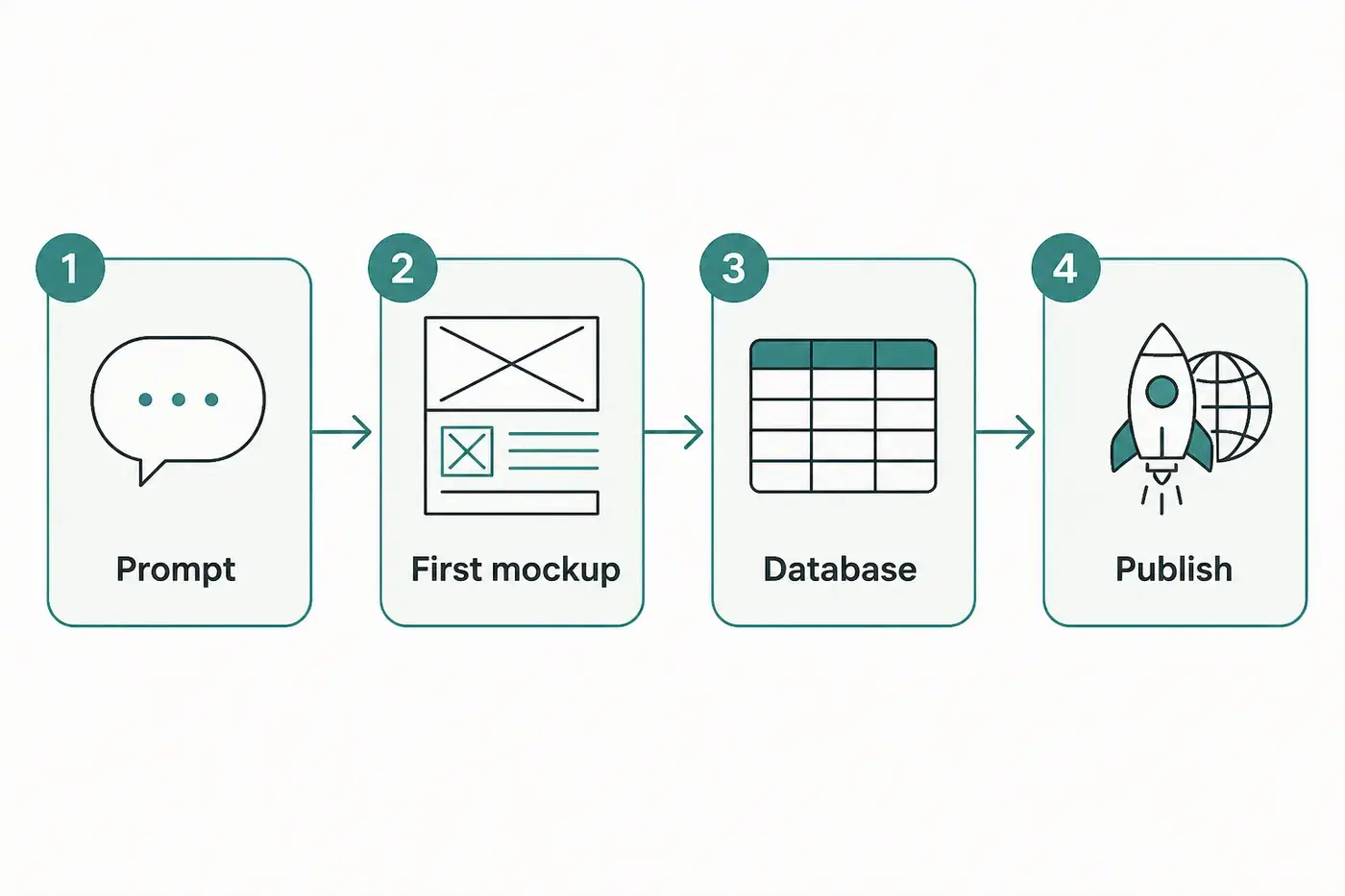
- Prompt. Describe the goal, the users, the main screens and two or three critical features. A clear brief beats a list of fifteen modules.
- First mockup. The tool generates a navigable version. You validate the information architecture before piling on complexity.
- Database integration. Tables created, auth wired, persistent data. This is the moment the mockup becomes a real application.
- Publish. Public URL, custom domain if needed, first users. Then iterate: each request refines the product without starting over.
To sharpen the initial brief, see how to write prompts to build an app.
The IDE path: from repository to diff
The IDE loop is shorter and tighter, and it starts one step later. You open a repository that already runs, point the model at the relevant files, read the diff it produces, then run the tests and commit. Nothing is deployed unless your pipeline deploys it.
Two things decide how well this goes. The first is context selection: the same prompt succeeds or fails depending on which files are in view, and that skill is most of the craft. The second is the diff review, which is where quality control actually happens. If reading a diff and judging it is comfortable, the IDE is a multiplier. If it is not, the tool quietly transfers risk to you.
Choosing, without a scoreboard
Three situations cover almost every real case, and none of them requires deciding which category is better in the abstract.
- The code already exists. Use an AI IDE. Pointing a builder at a legacy system is the wrong tool applied with great confidence.
- Nothing exists yet, and nobody on the project reads code fluently. Use a builder. The review surface is the running app, and the infrastructure you would otherwise have to learn is not on the critical path. If you are weighing this as a non-developer, our no-code and AI versus traditional development guide goes deeper.
- Nothing exists yet, but the stack is not negotiable. Use an IDE. If the project genuinely requires Django, a Rust service or an unusual database, the builder trade is a bad one, whatever its velocity.
If React plus Postgres is perfectly acceptable, and for a SaaS MVP, a client portal, an internal tool or a business CRM it usually is, the trade goes the other way: the parts you gave up choosing are the parts you no longer have to build. For the wider landscape, see our comparison of the best AI app builders.
Using both, in order
The two categories are usually presented as rivals. In practice they cover consecutive phases of the same project. A builder is at its best when nothing exists yet: no schema, no auth, no hosting, no first screen. An IDE is at its best when a lot exists and the changes have become surgical. Going from one to the other means you skip the setup nobody enjoys and arrive in the editor with a project that already runs.
This handoff has one hard prerequisite, and it is worth checking before committing to any builder: the output has to be real code that you own. With Cadrant, the project is a conventional React and Supabase repository synced to GitHub, so a developer can clone it, open it in Cursor or Claude Code and deploy it anywhere. Where a builder cannot export, the sequence above is closed to you, and the tool has to be the right one forever rather than the right one for now.
The distinction between the two families is not a hierarchy. An AI IDE assumes you have a project and gives you leverage inside it. An AI app builder assumes you have an intention and gives you a project. Pick based on which of those two you actually have today, and expect the answer to change as the product grows.