Picking an AI app builder as a freelancer is not the same problem as picking one as a solo founder. You are choosing a tool for a whole delivery chain: scoping speed, client review loops, who owns the code and data, your margin across parallel projects, and whether the client can take the app in-house six months later without rebuilding. Most builders on the market were designed for people shipping their own product, not for people who must hand a finished system to someone else.
That gap matters more every year. According to Upwork's In-Demand Skills 2026 research, skills that explicitly reference AI grew 109% year over year on the marketplace. Clients expect faster delivery; freelancers who treat AI builders as production tools, not demos, keep the work. For a wider map of the category, start with our best AI app builders comparison.

Why freelancers need a different AI app builder?
Founder-centric tools optimize for personal hosting and rapid prototyping. Freelance delivery optimizes for transferability. If the client's database lives in your account, or the runtime only works inside a proprietary platform, you have not delivered an asset, you have created a dependency that will haunt renewals, warranty work and exit conversations.
Three failure modes show up again and again in freelance projects. First, the "beautiful demo, broken week two" problem: the first prompt looks great, then every client change regenerates half the app and undoes yesterday's work. Second, the account trap: auth users, files and invoices sit under the freelancer's login, so handoff means a painful migration. Third, the pricing trap: a tool that looked cheap for one side project becomes expensive when five client apps burn credits or seats in parallel.
Research from Brookings on online labor markets shows freelancers in occupations more exposed to generative AI saw fewer contracts and lower earnings after major AI launches. The useful takeaway is not fatalism: freelancers who absorb AI into delivery, and sell outcomes rather than hours of boilerplate, stay on the complementary side of the shift. Your commercial offer should sound like "I ship a working portal in two weeks with a clean handoff," not "I write React for €450/day."
Remember
Judge every AI app builder on five freelance-specific criteria: client ownership of code and data, zero vendor lock-in, iteration speed that survives client feedback, margins across multiple projects, and real SaaS foundations (auth, roles, payments, files) from day one.
The five criteria that actually matter
Use the checklist below as a buying filter before you compare UIs. Each criterion maps to a real freelance risk: who owns the asset after invoice, whether the client can leave the platform, whether iteration still works under feedback, whether your tool bill survives parallel clients, and whether you can ship auth and data without rebuilding the foundations later.

1. The client owns the code and the data
On delivery, the app must belong to the client: source in a GitHub repo they control, database in their own Supabase project, ability to run without your personal SaaS account. Put that requirement in the contract before kickoff, ownership is much harder to retrofit after launch. Prefer builders that support bring-your-own-Supabase so auth, files and schema live on the client's side from day one.
2. Zero vendor lock-in
The nightmare case is a client who wants to continue in-house and discovers half the features die outside the original platform. Proprietary no-code runtimes make that common. An exportable React + TypeScript codebase that runs on standard hosting keeps the handoff clean, and keeps you out of hostage negotiations at invoice time. Ask one blunt question before you commit: "If the client cancels the builder subscription tomorrow, does the app still run?"
3. Real delivery speed across iterations
First-prompt demos are table stakes. What pays is the loop: prompt → preview → client feedback → adjust without breaking what already works. PwC's AI Jobs Barometer reports productivity growth about 40% higher at companies most exposed to AI versus the least, freelancers capture that only if the builder stays usable after the tenth revision, not just the first. Share a live preview early; silent multi-week builds recreate the agency problems AI was supposed to remove.
4. Margins that survive parallel clients
Per-seat or per-project licenses collapse when you run eight client apps at once. Prefer flat subscriptions with transparent credits and no surprise invoice when a second client starts. Price your services on outcomes and warranty, then treat the builder subscription as overhead you can amortize. For a full breakdown of subscriptions, credits and hidden costs, see how much an AI app costs in 2026.
5. Real SaaS foundations from day one
Freelancers rarely ship brochure pages alone. They ship client portals, internal tools, custom CRMs and SaaS MVPs. Those need auth, roles, row-level security, payments, uploads and webhooks, not a pretty shell that collapses when you add a second user type. If the builder cannot model roles and a real database early, you will rebuild the hard parts later under time pressure.
Tool comparison for freelance delivery
Use this table as a delivery filter, not a feature checklist. A tool can win a Twitter demo and still fail a client handoff. Score each option against the five criteria above before you care about UI chrome. For Lovable-specific pricing and portability, see our Lovable alternative guide.
| Lens | Cadrant | Lovable / Bolt | Bubble |
|---|---|---|---|
| Code ownership | Exportable code + GitHub sync | Export possible; quality varies after heavy iteration | No true source export |
| Client data | Client's own Supabase | Often platform-tied backends | Platform database |
| Lock-in risk | Low if client hosts elsewhere | Medium, depends on stack choices | High, runtime dependency |
| Multi-client economics | Flat plans, credit-based generation | Credit/seat models can spike | Workload + capacity pricing |
| Best freelance fit | Client apps with clean handoff | Fast founder prototypes | Complex no-code when lock-in is accepted |
Practical rule: use founder-oriented builders when you are validating your own idea over a weekend. Switch to a delivery-oriented stack when someone else will own the production system, pay for the domain, and ask their internal developer to extend it next year. Mixing those contexts is how freelancers accidentally become unpaid platform support for locked-in clients.
The optimal freelance workflow
The sequence matters as much as the tool. The flow below is the one that keeps ownership clean: you generate fast, but you put the client's database and GitHub in place before you accumulate production data on your own accounts.
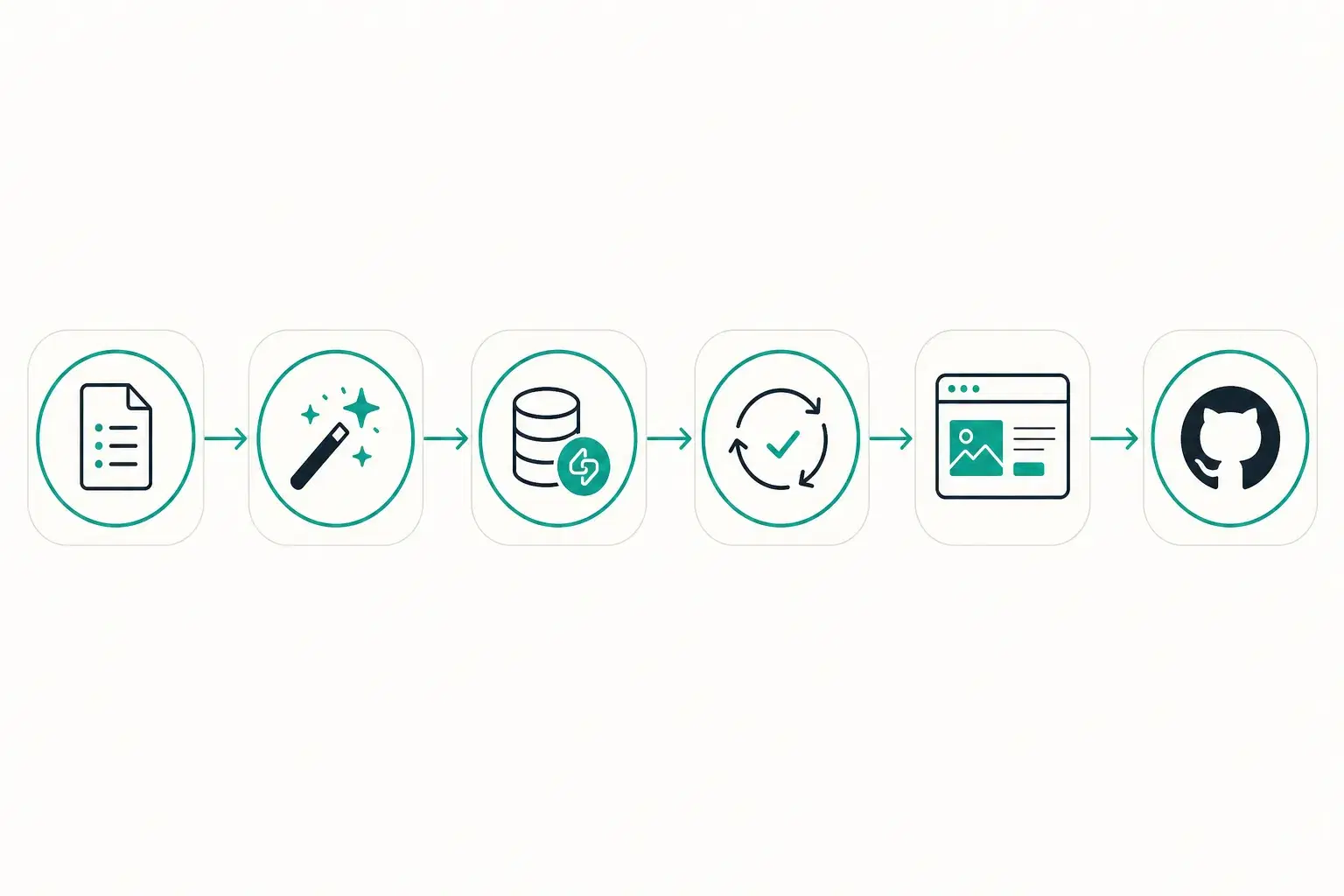
- Brief + scope (2–4 hours): turn the client ask into screens, entities and out-of-scope items before you prompt.
- Generate the skeleton (minutes): first app structure from a precise prompt, not a vague vision dump.
- Connect the client's Supabase immediately so auth, tables and files never live in your personal account.
- Iterate with preview links while the client reviews, tight loops beat weekly demos.
- Harden the foundations: roles, RLS, payments, emails, whatever the contract actually requires.
- Sync GitHub to a repo the client will own; most AI builders can push to a private repository you specify.
- Publish on the client's domain with SSL, or export for their host if they prefer Vercel, Netlify or a VPS.
- Invoice and warranty: keep temporary access only as the contract allows, then cut cleanly.
Two habits make this workflow reliable. Write acceptance criteria before the first prompt, screens, roles, and what is explicitly out of scope, so client feedback stays inside the contract. And never leave production data on a personal free tier "just for the demo": migrations at the end of the project are where freelancers lose weekends and goodwill.
What freelancers actually ship with AI builders?
AI builders pay off when the deliverable is a real system with users and data, not only a marketing page. These four project types show up constantly in freelance pipelines and map cleanly to the criteria above.
- Client portals: status, files, approvals and messaging in one place, high perceived value, clear scope, and an easy story for recurring maintenance retainers.
- Internal tools: ops dashboards, approval flows and trackers that replace spreadsheet chaos for SMBs who will never buy enterprise IT.
- SaaS MVPs: auth, billing and a thin core loop so a founder can test demand without an agency quote, then keep the code when they hire in-house.
- Showcase + app hybrids: SEO site for acquisition plus a logged-in product behind it, common for consultants and micro-SaaS who need both traffic and accounts.
If you are evaluating tools this quarter, ignore demo polish for ten minutes and score ownership, lock-in, iteration speed, multi-client economics and SaaS foundations. The freelancers who win in 2026 are not the ones with the flashiest first prompt, they are the ones who can hand over a living product and still protect their margin.