Searching for IONOS vs WordPress usually means you are about to buy a first website stack and the marketing blurbs are talking past each other. IONOS is primarily a hosting and domain company that also sells a website builder and managed WordPress plans. WordPress is open-source publishing software, WordPress.org says it powers more than 43% of the web, that you can run yourself, buy as hosted WordPress.com, or install on a host such as IONOS. This guide separates the three paths people mix up, compares them honestly, and shows when an AI showcase builder is a cleaner fourth option.
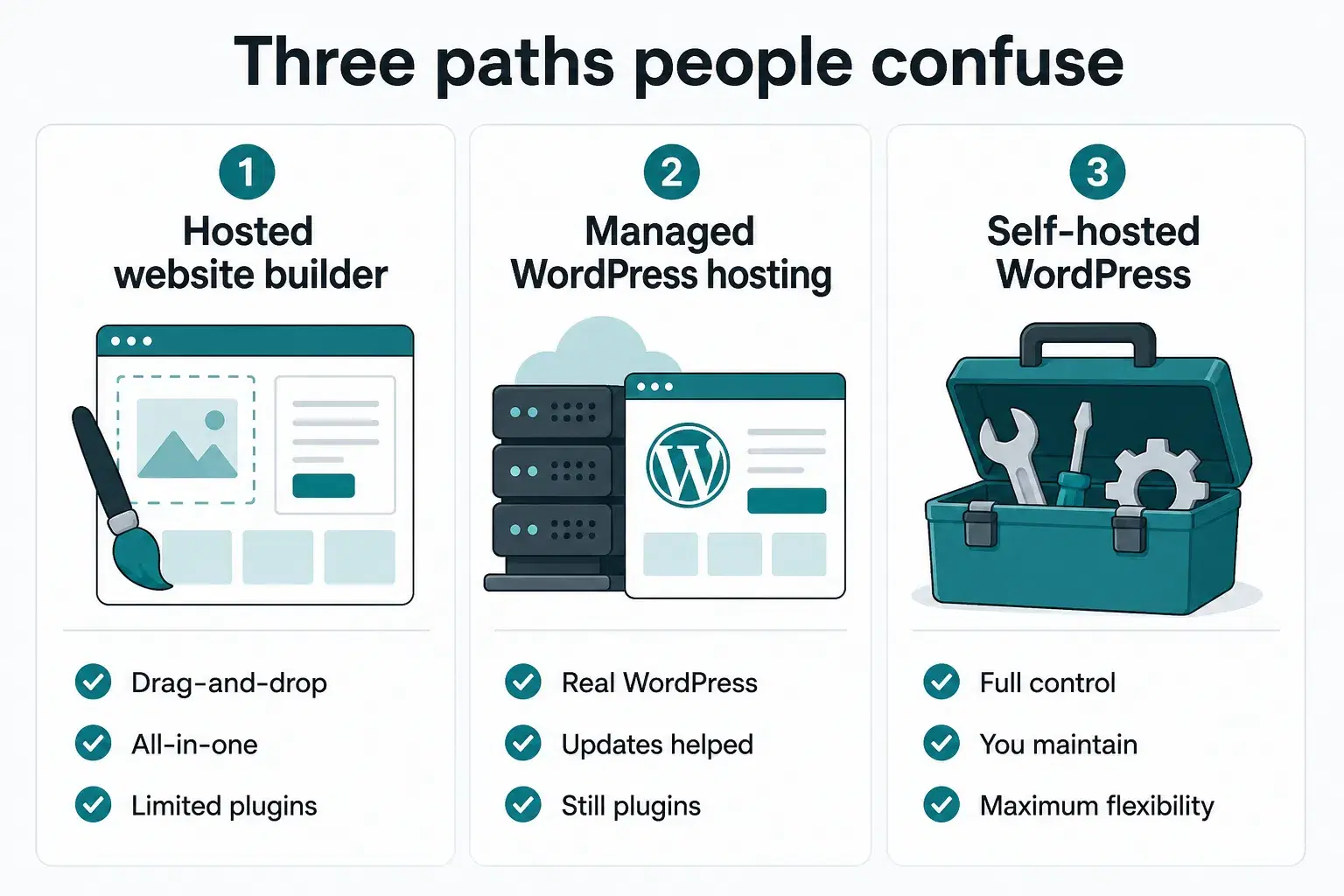
Three things people mean by “IONOS vs WordPress”
Until you name which IONOS product and which WordPress flavor you mean, any “winner” is guesswork.
- IONOS website builder (MyWebsite and similar). An all-in-one editor: templates, hosting, often domain and email in one account. You stay inside IONOS’s builder; you are not running the WordPress software.
- IONOS WordPress hosting. IONOS installs and hosts real WordPress for you. Their WordPress hosting page states the software matches the official WordPress release, the host helps with setup and ops, not with redesigning what WordPress is.
- Self-hosted WordPress (WordPress.org). You pick any host (or a VPS), install WordPress, choose themes and plugins, and own the stack. Maximum flexibility; you also own updates, backups, and security hygiene.
WordPress.com is a fourth label people confuse with the above: a hosted service from Automattic with its own plans and limits. It is WordPress-shaped, but it is not the same purchase as “install WordPress on IONOS.” Free and low tiers often restrict plugins, monetization, or custom code; higher tiers unlock more of the classic WordPress experience while you still live inside WordPress.com’s hosting rules.
Side-by-side: ease, control, maintenance, cost
Use this table as a decision frame, not a price quote. IONOS entry promos change often; always check the renewal rate before you commit.
| Dimension | IONOS builder | IONOS WP hosting | Self-hosted WordPress |
|---|---|---|---|
| Learning curve | Lowest, templates and guided editor | Medium, full WP admin, host handles install | Highest, host, DNS, themes, plugins, security |
| Design & features | What the builder ships | Themes + plugins (within host limits) | Nearly unlimited ecosystem |
| Maintenance | Mostly the vendor | Shared: host helps; you still manage WP | You (or an agency) own updates & backups |
| Portability | Weaker, rebuild if you leave | Strong, standard WP you can migrate | Strongest, files + database you control |
| Cost shape | One bill; watch renewal after promo | Hosting + optional premium plugins/themes | Hosting + time (or freelancer hours) |
| Best for | Simple brochure sites, email + domain bundle | Want real WP without picking a stack | Custom sites, heavy content, long-term control |
Promo ≠ year-two price
Budget hosts often advertise a first-term rate. Compare the renewal price, what is included (domain, SSL, email, backups), and how much of your week the setup will consume. Cheap hosting with expensive hours is not cheap.
When IONOS is the better fit
Independent reviews such as TechRadar’s IONOS hosting overview typically place IONOS as a broad, budget-friendly host with shared plans, a website builder, and managed WordPress suitable for personal and small-business sites, not as a specialist high-performance WordPress shop.
- You want domain, email, and hosting under one login and one invoice.
- You prefer templates over installing plugins and learning the block editor.
- You specifically want WordPress but do not want to choose a stack from scratch, managed WP hosting is the middle lane.
- Your site is a few pages, a contact form, and light updates, not a plugin-heavy product.
When WordPress is the better fit
WordPress wins when the project will grow through plugins, custom content types, or a long publishing cadence, and when you accept (or pay someone for) ongoing care.
- Content and SEO depth. Blogs, resource hubs, and multi-author sites benefit from WordPress’s publishing model and mature SEO plugins.
- Ecosystem fit. Booking, membership, WooCommerce, or niche plugins already solve your problem better than a closed builder.
- Ownership. Self-hosted WordPress keeps files and data portable; you are not betting the site’s life on one builder runtime.
- Team skills. If you already know WordPress, or hire someone who does, switching to a limited builder often slows you down.
If you choose WordPress but hate servers, managed hosting (IONOS or a WordPress specialist) is usually wiser than a raw VPS on day one.
Decision guide: pick the path in two minutes
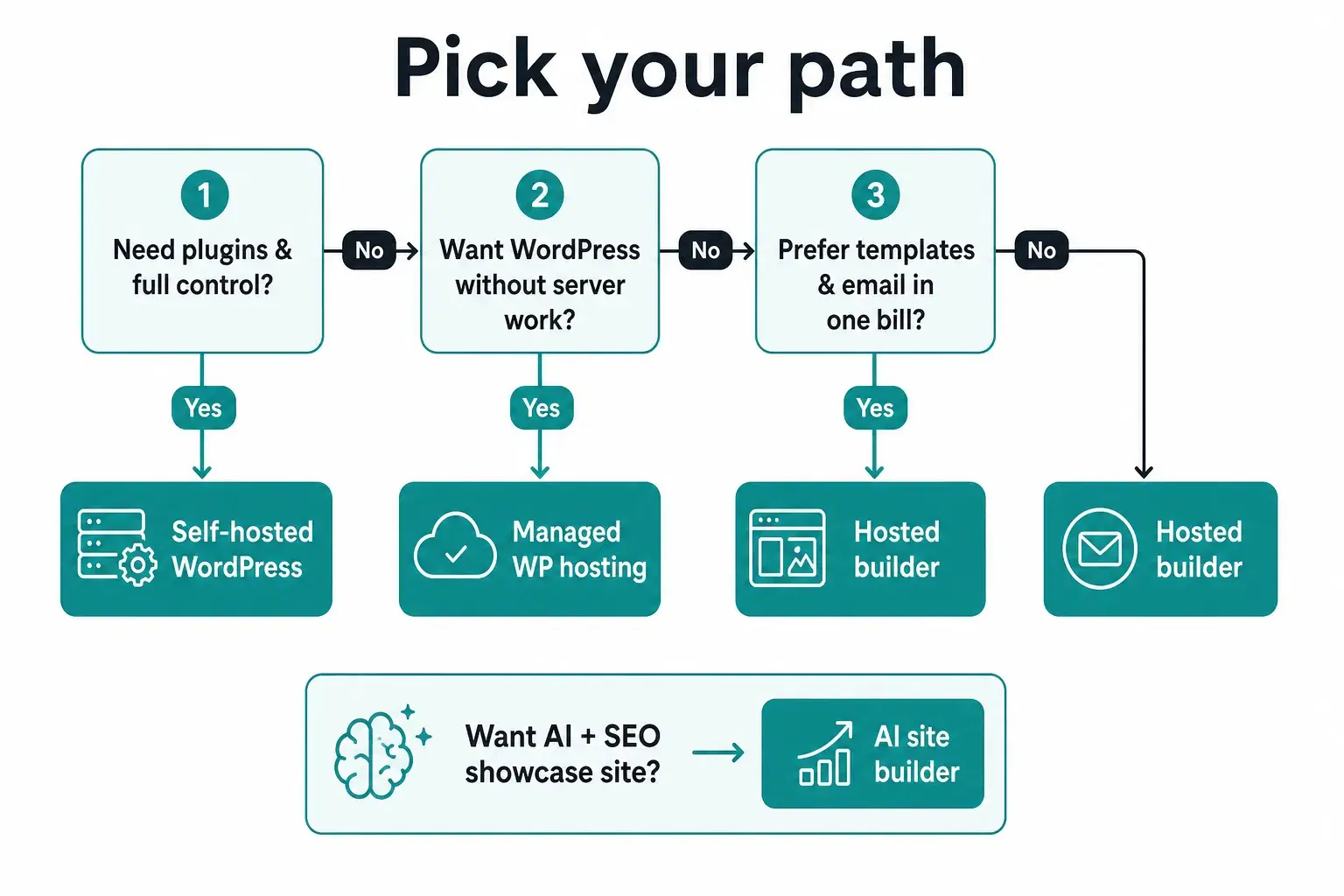
- Need plugins and full control? Self-hosted WordPress (or high-quality managed WP).
- Want WordPress without picking servers? Managed WordPress hosting (IONOS is one option among many).
- Want templates + email in one bill? IONOS-style hosted builder.
- Want a fast, SEO-oriented showcase without CMS upkeep? Consider an AI site builder, see below.
For a line-by-line budget (domain, hosting, time), see our guide on website cost.
A third path: AI showcase sites with Cadrant
Many “IONOS vs WordPress” searches are really “I need a credible multi-page site for my business, not a CMS career.” For that job, Cadrant generates a static, SEO-oriented website from natural language: hosting included on the Site plan at €10/$10 per month, built-in contact form, and fast loading, without maintaining plugins or learning a classic page builder. Docs describe Cadrant websites as multi-page sites for showcases, blogs, and landing pages; if you later need a database or accounts, you move to a web-app plan rather than bolting plugins onto a brochure stack.
That split matters for total cost of ownership. With WordPress, the sticker price of hosting is rarely the full bill: themes, premium plugins, staging, and the hours spent on updates add up. With a closed builder, the bill is simpler but leaving means a rebuild. With Cadrant’s Site plan, you pay a flat monthly fee for an AI-built showcase you can iterate in conversation, a fit when the website’s job is trust and contact, not an ever-growing plugin stack.
When Cadrant fits this comparison
Choose Cadrant when you want to describe pages in plain language, iterate in chat, and publish a professional showcase website without WordPress maintenance. Stay on IONOS/WordPress when you already depend on a specific plugin ecosystem or an agency that lives in wp-admin.
Verdict
There is no universal winner for IONOS vs WordPress. IONOS’s builder wins on simplicity and bundled email/domain. IONOS WordPress hosting wins when you want real WordPress with less hosting homework. Self-hosted WordPress wins on control and longevity. An AI showcase builder like Cadrant wins when the product you need is a fast professional site, not a CMS platform. Name the path first, then the pricing page finally makes sense.